General information
Trip computer 1
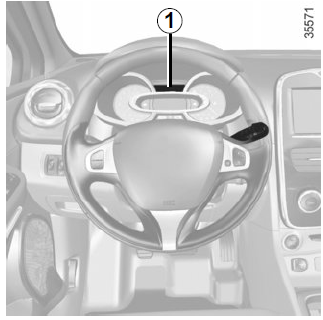
Depending on the vehicle version, it combines the following functions:
- distance travelled;
- trip data;
- information messages;
- malfunction messages (displayed with a warning lamp);
 );
- alarm messages (displayed with a warning lamp);
 );
- vehicle personal settings menu.
All functions are described on the following pages.
Information selection buttons 2 and 3
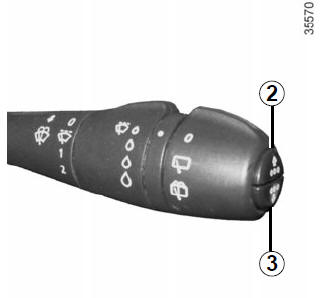
The following information can be scrolled up (button 2) or down (button 3) by briefly pressing the buttons in turn (the displayed information depends on the vehicle equipment level and the country of use).
- total and trip odometer;
- fuel consumed;
- average fuel consumption;
- instantaneous fuel consumption;
- estimated driving range on the remaining fuel in the tank;
- distance travelled;
- average speed;
- distance remaining until the next service:
- service counter;
- oil change counter;
- resetting tyre pressure default values;
- speed limiter/cruise control set speed;
- time and temperature;
- on-board log, display of information and malfunction messages.
Trip odometer reset button
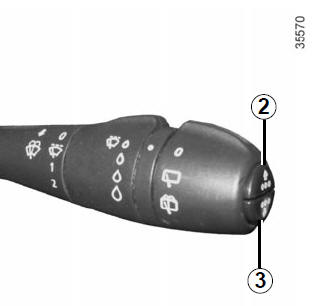
When the total and trip odometer is selected on the display, press and hold either button 2 or 3 until the trip odometer is reset.
Resetting trip data (Top Départ)
When one of the trip data items is selected on the display, press and hold either button 2 or 3 until the value is reset.
Interpreting the values shown on the display after driving a few kilometres since the Top Départ button was pressed
The values for average fuel consumption, estimated driving range on the remaining fuel and average speed become more accurate and representative as the distance driven since the Top Départ button was last pressed increases.
During the first kilometres after pressing the "Top Départ" button, the indicated driving range on the remaining fuel may increase while driving. This is because this value takes into account the average fuel consumption recorded since the Top Départ button was last pressed.
Average fuel consumption, however, decreases when:
- the vehicle has stopped accelerating;
- the engine has reached its normal operating temperature (the Top Départ button was pressed when the engine was not yet warm);
- after driving in town, the vehicle leaves the town and continues on an open road.
Automatic resetting of trip data
When the memory of one of the trip data items overflows, it is automatically reset.
Test yourself
A quick Renault Clio quiz: every answer comes with an explanation and a link to the manual page.