Parking assistance
Operating principle
Ultrasonic sensors, fitted (depending on vehicle) in the rear and/or front bumper of the vehicle, "measure" the distance between the vehicle and an obstacle.
This measurement is conveyed by audible signals whose frequency increases as the obstacle gets closer, until it becomes a continuous tone when the obstacle is about 30 centimeters from the vehicle.
Rear parking aid (depending on vehicle)
Operation
When reverse gear is engaged, most objects within approximately 1.20 metres of the rear of the vehicle are detected and an audible signal sounds.
 This
function is an additional aid that indicates, by means of audible signals, the distance between the vehicle and an obstacle during a manoeuvre.
It must therefore never replace the driver's vigilance or responsibility during manoeuvres.
The driver must always be alert to sudden events that may occur while driving: always make sure there are no moving obstacles (such as a child, an animal, a stroller, a bicycle...) or obstacles that are too small or too thin (medium-sized stone, very thin post...) when maneuvering.
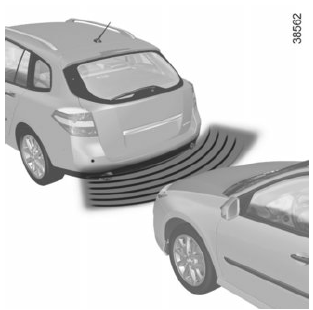
Automatic activation/deactivation of the rear parking aid
The system deactivates:
- depending on vehicle, when the vehicle has been stationary for more than approximately five seconds and an obstacle is detected (for example, in a traffic jam...);
- when you are in neutral or in positions N and P with an automatic gearbox;
- when the vehicle speed is above approximately 10 km/h.
Front parking aid (depending on vehicle)
Operation
The parking aid system is only activated when the vehicle is travelling at a speed below approximately 10 km/h.
Any object within approximately 60 centimetres of the front of the vehicle is detected.
Display A shows the detection zones, and an audible signal sounds.
Automatic activation/deactivation of the front parking aid
The system deactivates:
- when the vehicle speed is above approximately 10 km/h;
- depending on vehicle, when the vehicle has been stationary for more than approximately five seconds (for example, in a traffic jam...);
- when you are in neutral or in positions N and P with an automatic gearbox.
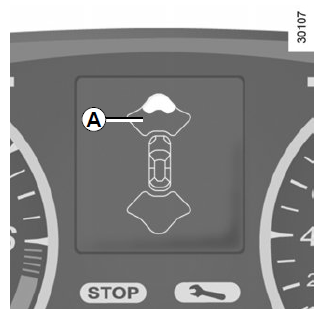
If an obstacle is present at the front and rear of the vehicle, only the closest one is taken into account and the corresponding audible signal sounds. If an obstacle is detected at both the front and rear within a detection zone of less than 30 centimetres, the front and rear audible signals sound alternately.
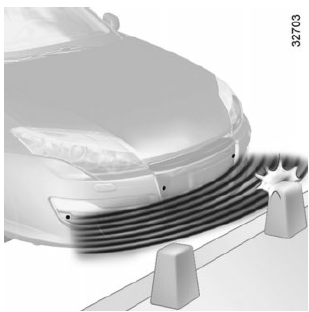 A
impact to the underbody of the vehicle during a manoeuvre (for example, contact with a bollard, a raised kerb or any other street furniture) may damage the vehicle (for example, deforming an axle).
To avoid any risk of an accident, have your vehicle checked by a Brand Representative.
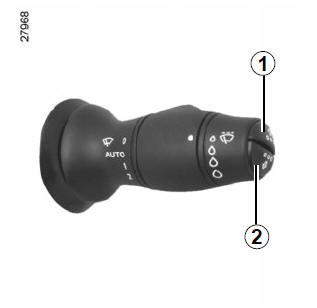
Adjusting the parking assist volume
From the personalisation menu
Select the "Parking aid volume" line to adjust the volume of the parking aid and confirm by pressing one of the buttons 1 or 2 (refer to the paragraph "Vehicle settings personalisation menu" in chapter 1).
Permanent deactivation of the system
You can deactivate the front or rear parking aid separately on a permanent basis.
From the personalisation menu
Select the "Front parking aid" or "Rear parking aid" line, then activate or deactivate the system (refer to the paragraph "Vehicle settings personalisation menu" in chapter 1):

function deactivated;
 function activated.
Special notes
Make sure the ultrasonic sensors are not obstructed (dirt, mud, snow...)
Malfunction
If the system detects a malfunction, a warning beep sounds for about 5 seconds. Consult a Brand Representative.
When the vehicle is travelling at a speed below approximately 10 km/h, certain noise sources (motorcycle, lorry, jackhammer...) may trigger audible signals.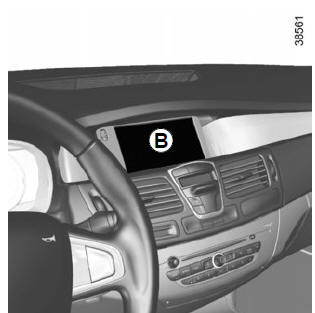
Adjusting the parking assist volume
From the multimedia display
You can adjust certain settings from multimedia display B.
Refer to the equipment user manual for more information.
Select "Menu", "Settings", "Parking aid", then adjust the parking aid volume by pressing + or -.

Deactivating the system
From the multimedia display
You can turn off the parking aid from the multimedia display.
Select "Menu", "Settings", "Parking aid", then "Rear parking aid" or "Front parking aid". Turn the parking aid on or off and confirm your choice by selecting "Confirm".
Malfunction
If the system detects a malfunction, a beep sounds each time reverse gear is engaged, for about 3 seconds, accompanied by the message "Parking aid to be checked" on instrument panel B. Consult a Brand Representative.
Special notes
Make sure the ultrasonic sensors are not obstructed (dirt, mud, snow...).
When the vehicle is travelling at a speed below approximately 10 km/h, certain noise sources (motorcycle, lorry, jackhammer...) may trigger audible signals.Test yourself
A quick Renault Laguna quiz: every answer comes with an explanation and a link to the manual page.