Assisted parking brake
Automatic operation
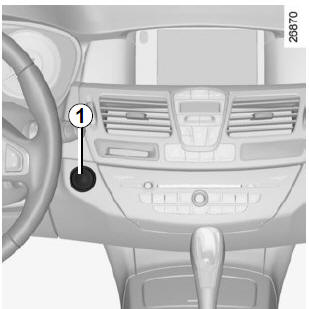
The assisted parking brake applies automatically to immobilise the vehicle when the engine is switched off by pressing engine start/stop button 1.
In all other cases, for example engine stalling, the assisted parking brake does not apply automatically.
Manual mode must then be used.
In some countries, the automatic application function is not activated.
Refer to the "Manual operation" section.

Application of the assisted parking brake is confirmed by the message "Parking brake applied" and the indicator on the
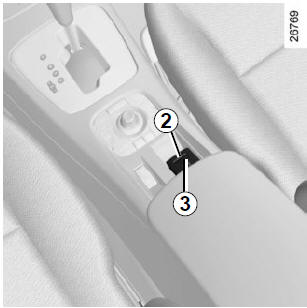
instrument panel and by indicator 2 on switch 3 coming on.
Indicator 2 goes out a few minutes after the assisted parking brake is applied, and the indicator goes out when the vehicle locks.
Note
The message "Release parking brake" appears on the instrument panel, with an audible signal, to indicate that the assisted parking brake is released. This message may appear:
- engine running: when the driver's door is opened;
- engine off (for example after engine stalling): when any door is opened.
In this case, pull then release switch 3 to apply the assisted parking brake.
The brake is released as soon as the vehicle starts moving, when you accelerate.
 Before
leaving the vehicle, check that the assisted parking brake is applied. Application is shown by indicator 2 on switch 3 coming on, and the indicator
on the instrument panel until the doors lock.
Manual operation
You can operate the assisted parking brake manually.
Applying the assisted parking brake
Pull switch 3. Indicator 2 and the indicatoron the instrument panel
come on.
Releasing the assisted parking brake
With the ignition on, press the brake pedal then press button 3: indicator 2 and the indicatorgo out.
Temporary stop
To apply the assisted parking brake manually (stopping at a red light, stopping with engine running, etc.): pull and release switch 3. Release is automatic when the vehicle restarts.
Special cases
To park on a slope or with a trailer, for example, pull switch 3 for a few seconds to obtain maximum braking.
To park with the assisted parking brake released (risk of freezing, for example):
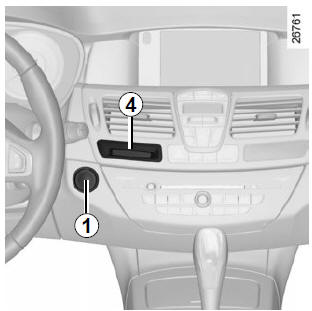
- engine running, RENAULT card in reader 4, stop the engine by pressing engine start/stop button 1;
- engage a gear (manual gearbox) or position P (automatic gearbox);
- press the brake pedal and switch 3 simultaneously;
- remove the RENAULT card from the reader.
Versions with automatic gearbox
Driver's door open or not properly closed with engine running: for safety reasons, automatic release is disabled (to prevent the vehicle from moving without a driver). An audible signal warns you and the message "Release manually" appears on the instrument panel.
Never leave the vehicle without setting the selector lever to P or N. With the vehicle stationary and the engine running with a gear engaged, pressing the accelerator may cause the vehicle to move off.
Risk of accident.
Operating faults
- In case of a fault, the indicators
 and
 come on on the instrument panel
with the message "Check parking brake".Consult a Brand Representative as soon as possible.
Absence of a visual or audible signal indicates a fault in the instrument panel. You must stop immediately, as soon as traffic conditions allow.
Make sure the vehicle is properly immobilised and contact a brand representative.
- In case of assisted parking brake failure, the indicators
 ,
 and come on
with the message "Parking brake fault" and an audible signal.You must stop immediately, as soon as traffic conditions allow.
It is then essential to immobilise the vehicle by engaging first gear (manual gearboxes) or position P (automatic gearboxes). If the slope requires it, chock the wheels.
Test yourself
A quick Renault Laguna quiz: every answer comes with an explanation and a link to the manual page.