Automatic transmission
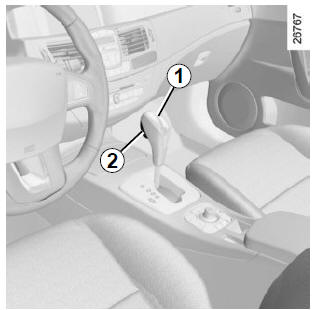
Selector lever 1
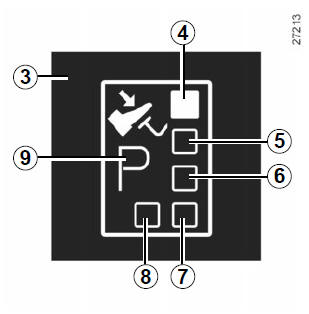
Display 3 on the instrument panel shows the selected mode and gear.
4: P: Park
5: R: Reverse
6: N: Neutral 7: D: Automatic mode 8: Manual mode
9: Display area for the mode or gear selected in manual mode
Starting
With selector lever 1 in position P, switch on the ignition.
To leave position P, it is essential to press the brake pedal before pressing the release button 2.
Foot on the brake pedal (the indicator on display 3 goes out),
move the lever out of position P.
Engage the lever in position D or R only when the vehicle is stationary, with your foot on the brake and the accelerator pedal released.
Driving in automatic mode
Select position D. In most driving conditions, you will not need to touch the lever again: gears change automatically, at the right time and at the appropriate engine speed, as the "automatic" function takes into account vehicle load, road profile and selected driving style.
Economical driving
On the road, always leave the lever in position D with the accelerator pedal lightly pressed; the gears will automatically shift to a lower engine speed.
Acceleration and overtaking
Press the accelerator pedal firmly and fully down (past the kickdown point of the pedal).
This will, as far as the engine allows, downshift to the optimal gear.
Driving in manual mode
With the selector lever in D, move the lever to the left. Successive pulses on the lever allow manual gear changes:
- to downshift, pull the lever toward the rear;
- to upshift, push the lever toward the front.
The selected gear is shown on the instrument panel.
Special cases
In certain driving situations (e.g. engine protection, activation of Electronic Stability Control: ESC...), the "automatic" function may select the gear itself.
Likewise, to prevent "incorrect operation", the "automatic system" may refuse a gear change: in this case the gear display flashes for a few seconds to warn you.
Exceptional situations
- If the road profile and bends do not allow driving in automatic mode (e.g. in mountains), it is recommended to switch to manual mode.
This prevents successive gear changes by the "automatic" function when climbing, and provides engine braking on long descents.
- In very cold weather, to avoid stalling the engine, wait a few moments before leaving position P or N and selecting D or R.
- Vehicle without traction control system: on slippery or low-grip roads, to prevent wheelspin when starting, switch to manual mode and select second gear before starting off.
Parking the vehicle
When the vehicle is stopped, keep your foot on the brake and move the selector lever to position P: the gearbox is in neutral and the drive wheels are mechanically locked by the transmission.
Apply the handbrake or, depending on the vehicle, make sure the electric parking brake is applied.
 In case of
impact on the underbody of the vehicle (for example: contact with a bollard, a raised pavement or any other street furniture), you may damage the vehicle (for example: deformation of an axle...).
To avoid any risk of an accident, have your vehicle checked by a Brand Representative.
Malfunction
- While driving, if the message "Gearbox to be checked" with the indicator
 appears on the
instrument panel, it indicates a fault.Consult a brand representative as soon as possible.
- While driving, if the message "Gearbox overheating" with the indicator
 appears
on the instrument panel, stop and let the gearbox cool down.Consult a brand representative as soon as possible.
- To tow a vehicle with an automatic gearbox, refer to the "Towing" section in chapter 5.
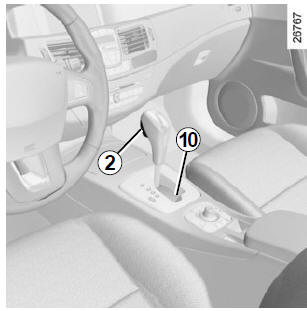
When starting, if the lever is locked in P while you press the brake pedal and the unlock button 2, the lever can be released manually.
To do this, press the button by inserting an object into hole 10 and simultaneously press unlock button 2 on the lever.
Test yourself
A quick Renault Laguna quiz: every answer comes with an explanation and a link to the manual page.