Configuration
MULTIPLEXED NETWORK CONFIGURATION
On this vehicle, the two control modules that hold the multiplexed network configuration are the Airbag control module and the Passenger Compartment Unit control module.
The "Configuration" screen consists of two tabs that allow you to display and modify:
- the "Multiplexed network configuration" on the first tab,
- the "Configuration of diagnosable control modules" on the second tab (via CAN or K/L line).
Repair the control units containing the multiplexed network configuration first (Airbag - Cabin Central Unit), so that a screen showing the configuration diagram of the multiplexed network of the diagnosed vehicle can be displayed.
LIST OF VEHICLE CONTROL UNITS
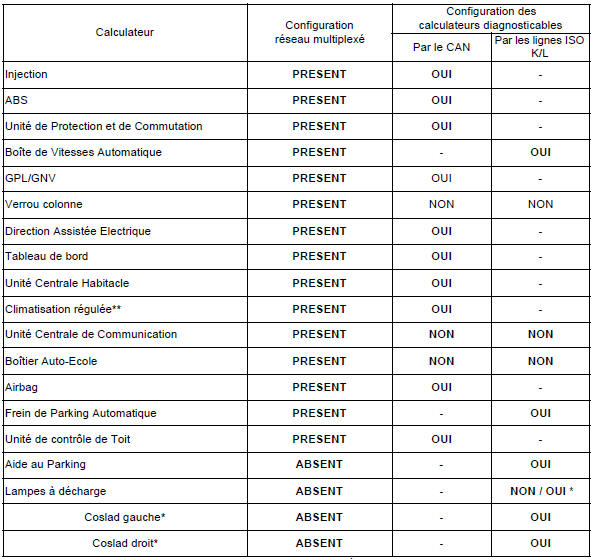
* When replacing a COSLAD control unit, follow the procedure on the next page.
** Manual air conditioning is not on the multiplexed network and cannot be diagnosed with the CLIP tool.
Multiplexed network configuration procedure when replacing a COSLAD control unit.
Replace the relevant COSLAD control unit (only one control unit at a time if both need to be replaced).
Carry out a multiplexed network test (switch on the dipped headlights). The replaced control unit responds to the tool but is not in the configuration.
In the list of diagnosable control units, set the "discharge lamps" control unit to "YES" in both control units (CCH - airbag).
Switch the dipped headlights off, then on again.
Carry out a multiplexed network test. A control unit does not respond to diagnosis; continue, then select "discharge lamps". Configure the address of the replaced control unit using command CF004 "Control unit address".
Carry out a multiplexed network test again. A control unit does not respond to diagnosis.
In the list of diagnosable control units, set the "discharge lamps" control unit to "NO" in both control units (CCH - airbag).
Check with a multiplexed network test that the replaced control unit is correctly configured in the CCH and in the airbag.
Complete the repair by carrying out the additional configurations described in MR 366 chapter 8 "Discharge lamps".
GENERIC MULTIPLEXED NETWORK TOPOLOGY
Multiplexed network segment numbers between each control unit:
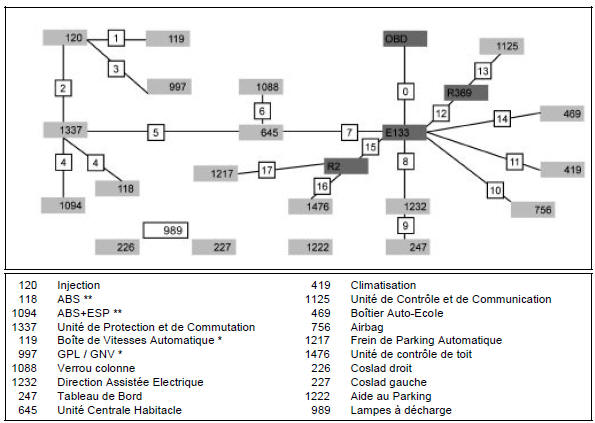
* The vehicle may have either LPG or an Automatic Gearbox, never both on the same vehicle.
** The vehicle has either ABS alone, or ABS + ESP.
NETWORK CONFIGURATION
INSTRUCTIONS
The configuration is entered with the ignition on.
It can be started from the multiplexed network test result screens.
The tool displays the configuration of the Passenger Compartment Unit and/or the Airbag. The configuration steps are then as follows:- Select the control unit to modify.
- Select the multiplexed network diagram version.
This version changes each time the multiplexed network wiring of this vehicle is modified.
This information is available in the worldwide vehicle database.
Selection of the vehicle control units present on the network. The following control units are always present on the vehicle:
- Injection
- Protection and Switching Unit (UPC)
- ABS
- Steering column lock (cannot be diagnosed with the tool)
- Instrument Panel
- Cabin Central Unit (CCH)
- Electric Power Steering
- Airbag
+ the vehicle options:
- Automatic Gearbox (BVA)
- LPG
- Automatic air conditioning
- Control and Communication Unit (cannot be diagnosed with the tool)
- Automatic Parking Brake
- Roof Control Unit
- Driving School Box (cannot be diagnosed with the tool)
- Discharge lamps (COSLAD)
- Parking Assist
If a control unit is connected to the multiplexed network but is not declared in the control units containing the multiplexed network configuration, it will not be checked during the multiplexed network test.
Correct the configuration by declaring the missing control unit as present in the Cabin Central Unit, the Airbag, or both.
Rerun the multiplexed network test after modifying the configuration.
Test yourself
A quick Renault Megane quiz: every answer comes with an explanation and a link to the manual page.