Driving Your Vehicle
Driving Mode Indicator Display
In this manual: Driving Your Vehicle
~2min read
The Driving Mode Indicator display can be shown using the trip computer button on the steering wheel. The Drive Mode indicator display shows the status of the current drive mode.
- The DRIVE MODE button is located at the lower part of the shift lever to select the driving mode. If the driving mode is selected manually by the user, the Driving Mode Indicator display will show the driving mode selected by the user. (COMFORT, ECO, or SPORT) If SMART mode is selected with the DRIVE MODE button, the Driving Mode Indicator display will show the current driving mode automatically selected by the SMART mode system. (SMART COMFORT, SMART ECO, or SMART SPORT)
- When the trip computer mode is selected to display the driving mode and SMART operating mode, the automatically selected SMART ECO, SMART COMFORT, or SMART SPORT driving mode will be shown on the LCD display. Directly below is the driving style gauge, which shows your driving style in real time.
- If you drive carefully and slowly in SMART mode, the left side of the driving style gauge will illuminate and the system will automatically switch to SMART ECO mode. When the driver accelerates more frequently, the right side of the driving style gauge will fill and the system will switch to SMART COMFORT mode. Also, if the rate of acceleration and speed are high, the driving mode will change to SMART SPORT mode.
- If Cruise Control is operating or the transmission is in manual shift mode while SMART mode is on, SMART mode will temporarily stop, the driving mode will be displayed as OFF, and the driving style gauge will be turned off accordingly.
- If the trip computer is not set to display the driving mode indicator screen and you want to check whether SMART mode is on or off, simply check whether the letters 'SMART' are illuminated on the display (green - ECO MODE, white - COMFORT MODE, red - SPORT MODE).
Driving Style Gauge
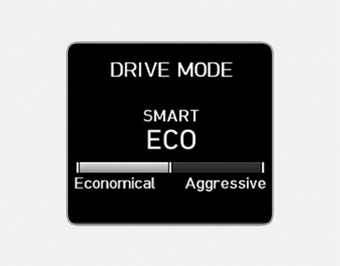
After selecting SMART mode by pressing the DRIVE MODE button, select the driving mode indicator screen by pressing the trip computer button on the steering wheel. The driving style gauge will appear at the bottom of the screen and display your current driving style.
- The left side of the driving style gauge indicates the degree of economical and gentle driving in green. The more economical and gentle your driving, the further left the green indicator illuminates. Similarly, the right side of the driving style gauge indicates the degree of aggressive and sporty driving in red. The faster and more aggressively you drive, the further right the red bar illuminates.
- When the driving style gauge fills to the left (economical side) and stays there for a certain time, your vehicle will automatically switch to SMART ECO mode. Likewise, when the driving style gauge fills to the right (aggressive side) and stays there for a certain time, your vehicle will automatically switch to SMART SPORT mode.
- If you want to maintain SMART ECO mode for better fuel economy, try to keep a economical driving style and keep the driving style indicator green.
Test yourself
A quick Hyundai Sonata LF quiz: every answer comes with an explanation and a link to the manual page.
Was this page helpful?