Display does not Dim when Light Control Switch is Turned ON
NOTICE:
After replacing the navigation receiver assembly of vehicles subscribed to pay-type satellite radio broadcasts, registration of the XM radio ID is necessary.
PROCEDURECHECK IMAGE QUALITY SETTING
(a) Turn the light control switch to the tail or head position.
(b) Check that the daytime screen setting on the display adjustment screen is set to on.
Result | Proceed to |
|---|---|
Daytime screen setting is set to on. |
A |
Daytime screen setting is set to off. |
B |
| A |  | CHANGE DAYTIME SCREEN SETTING TO OFF |
|

CHECK VEHICLE SIGNAL (OPERATION CHECK)
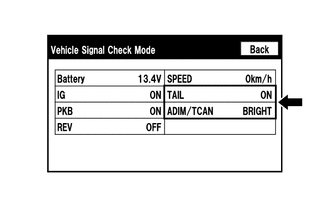
(a) Enter the "Vehicle Signal Check Mode" screen. Refer to Check Vehicle Signal in Operation Check (See page |
 |
 ).
(b) Check that the display for "TAIL" changes between ON and OFF according to the light control switch operation.
OK:
Light Control Switch | Display |
|---|---|
Tail or head |
ON |
Off |
OFF |
HINT:
This display is updated once per second. As a result, it is normal for the display to lag behind the actual switch operation.
(c) Check that the display for "ADIM/TCAN" changes between DIM and BRIGHT according to the light control switch operation.
OK:
Light Control Switch | Display |
|---|---|
Tail or head |
DIM |
Off |
BRIGHT |
| OK | | REPLACE NAVIGATION RECEIVER ASSEMBLY |
| NG | | PROCEED TO NEXT SUSPECTED AREA SHOWN IN PROBLEM SYMPTOMS TABLE |
Test yourself
A quick Toyota 4Runner quiz: every answer comes with an explanation and a link to the manual page.