History
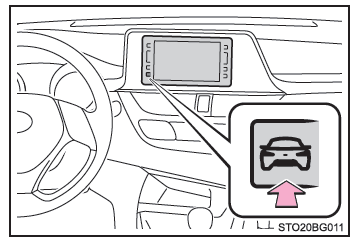
1. Press the button on the multimedia/navigation system.
2. Select "Previous Record".
■ Previous record screen
- Best fuel consumption recorded
- Fuel consumption history
- Average fuel consumption
- Updating the average fuel consumption data
- Clearing the history data
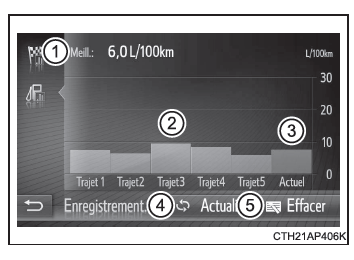
The fuel consumption history is color-coded to distinguish past averages from the average fuel consumption since the last update. Use the displayed average fuel consumption as a reference value.
These illustrations are examples only and may differ slightly from the actual display.
■ Updating the history data Select "Update" to update the average fuel consumption and start measuring fuel consumption again.
■ Resetting the data You can select "Clear" to erase the fuel consumption data.
■ Remaining range Shows the estimated maximum distance that can be driven with the remaining fuel.
This distance is calculated based on the average fuel consumption.
Therefore, the actual distance you can drive may differ from the displayed distance.