Unlocking and locking the doors from the outside
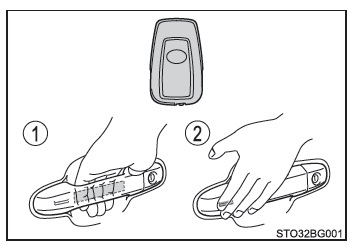
"Smart entry" access (vehicles with a "smart entry & start" system)
Carry the electronic key on your person for this function to be active.
- Grasp the front door handle to unlock all doors.* Be sure to touch the sensor on the back of the handle.
The doors cannot be unlocked within 3 seconds after they are locked.
- Touch the lock sensor (the recess on the side of the front door handle) with your fingers to lock all doors.
Check that the door is securely closed.
*: The door unlocking function can be customized
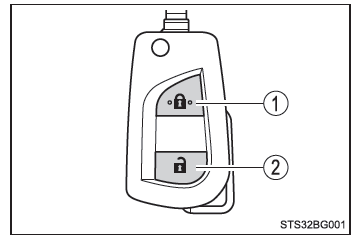
Remote-controlled door lock
Vehicles without a smart entry & start system
- Locking all doors
Check that the door is securely closed.Press and hold to close the windows.*
- Unlocking all doors
Press and hold to open the windows.*
*: These settings must be customized by a Toyota dealer, a Toyota-authorized repairer, or any reliable repairer.
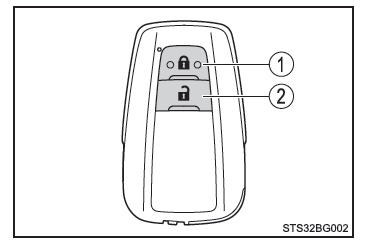
Vehicles with a smart entry & start system
- Locking all doors
Check that the door is securely closed.Press and hold to close the windows.*
- Unlocking all doors
Press and hold to open the windows.*
*: These settings must be customized by a Toyota dealer, a Toyota-authorized repairer, or any reliable repairer.
Turn the key to operate the doors as follows:
Vehicles without a smart entry & start system
- Locking all doors
Turn and hold to close the windows.* - Unlocking all doors
Turn and hold to open the windows.*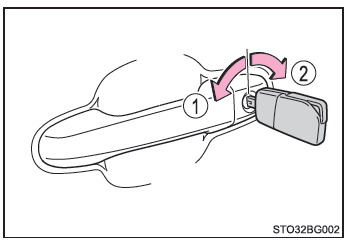
*: These settings must be customized by a Toyota dealer, a Toyota-authorized repairer, or any reliable repairer.
Vehicles with a smart entry & start system
The doors can also be locked and unlocked using the conventional key.
■ Operation signals
Doors: The hazard warning lights flash to indicate that the doors have been locked/unlocked using "smart entry" access or the remote-controlled door lock. (Locking: 1 flash; unlocking: 2 flashes)
Windows (vehicles with a "smart entry & start" system): Window operation is confirmed by a buzzer sound.
■ Security function
Vehicles without a smart entry & start system
If no door is opened within 30 seconds after the vehicle is unlocked using the remote-controlled door lock, the security system automatically locks the vehicle again.
Vehicles with a smart entry & start system
If no door is opened within 30 seconds after the vehicle is unlocked using "smart entry" access or the remote-controlled door lock, the security system automatically locks the vehicle again.
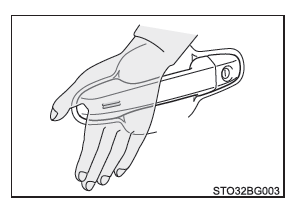
■ If the door cannot be locked using the lock sensor on the front door handle surface (vehicles with a "smart entry & start" system) Use your palm to touch the lock sensor.
■ Door lock warning buzzer
Vehicles without a smart entry & start system
If you try to lock the doors using the remote-controlled door lock while one of them is not fully closed, the buzzer sounds continuously for 10 seconds. Close the door properly to stop the buzzer, then lock the doors again.
Vehicles with a smart entry & start system
If you try to lock the doors using the smart entry & start system or the wireless remote while any door is not fully closed, a buzzer sounds continuously for 5 seconds.
Close the door completely to stop the buzzer, then lock the doors again.
■ Alarm arming (on equipped models) Locking the doors also arms the alarm system.
■ If the smart entry & start system or the wireless remote does not operate normally Vehicles with a smart entry & start system: Use the conventional key to lock and unlock the doors. If the key battery is worn, replace it with a new one.