Unlocking and locking the doors from inside
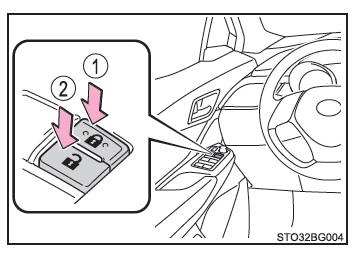
Power door lock switches
- Locking all doors
- Unlocking all doors
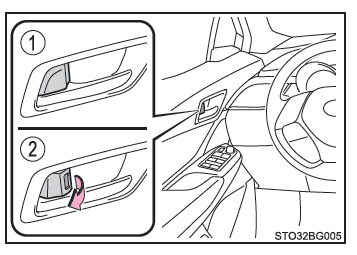
Interior lock knobs
- Locking the door
- Unlocking the door
You can open the front doors by pulling the inside handle, even when the lock knobs are in the locked position.
Locking the front doors from outside, without a key
1. Set the interior lock knob to the locked position.
2. Close the door while pulling the door handle.
Vehicles without a smart entry & start system
The door cannot be locked if the key is left in the anti-theft ignition switch.
Vehicles with a smart entry & start system
The door cannot be locked if the ignition switch is in ACCESSORY or ON mode, or if the electronic key has been left inside the vehicle.
There is a risk that the key may not be detected correctly and the door may lock.
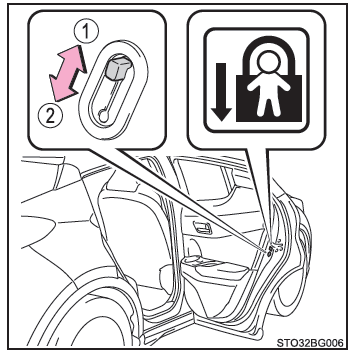
Rear door child safety lock
The door cannot be opened from inside the vehicle when the child safety lock is engaged.
- Unlock
- Lock
You can engage this lock to prevent children from opening the rear doors by themselves.
Lower the child safety lock on each rear door.
■ Programming the door unlock function (vehicles with a smart entry & start system) You can program which doors the smart entry system unlocks when you use the wireless remote unlock function.
1. Set the ignition switch to off.
2. Deactivate the alarm system intrusion sensor to prevent the alarm from sounding accidentally during programming (on equipped models).
3. With the key indicator light off, press and hold for about 5 seconds while pressing and holding
 .
The setting changes each time an action is performed, as shown below.
(When changing the setting several times, release the buttons, wait at least 5 seconds, then repeat step (3).)
| Multi-information display | Unlock function | Beep |
 (Left-hand drive vehicles)  (Right-hand drive vehicles) |
Unlocks only the driver's door when the driver's door handle is grasped. | Outside: 3 beeps Inside: 1 beep |
| Unlocks all doors when the front passenger's door handle is grasped. | ||
 |
Unlocks all doors when any door handle is grasped. | Outside: 3 beeps Inside: 1 beep |
For vehicles equipped with an alarm: To prevent the alarm from sounding accidentally, unlock the doors with the wireless remote, then open and close a door after programming the functions. (If no door is opened within 30 seconds after pressing , the doors lock again and the alarm arms automatically.) If the alarm sounds, stop it immediately.
■ Door open warning buzzer If the vehicle reaches a speed of 5 km/h, the master warning light flashes and a buzzer sounds to indicate that one or more doors are still not properly closed.
The open door(s) is displayed on the multi-information display.
■ Conditions affecting the operation of the smart entry & start system or the wireless remote control
Vehicles without a smart entry & start system
Vehicles with a smart entry & start system
■ Customization Some functions can be customized.
WARNING■ To avoid accidents Observe the following precautions while the vehicle is moving.
Otherwise, a door could open and a passenger could fall from the vehicle, resulting in serious injury or death.
- Make sure all doors are properly closed and locked.
- Do not pull the interior door handles while the vehicle is moving.
Be especially careful with the driver's door and front passenger's door, as they may open even when the interior lock knob is in the locked position.
- Engage the rear door child safety locks when transporting children in the rear seats.
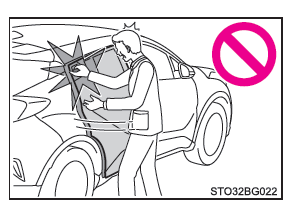
■ When opening or closing a door Check the surroundings, for example whether the vehicle is on a slope, whether there is enough clearance to open the doors, and whether it is windy. When opening or closing a door, hold the door handle firmly so you can control any unexpected movement.
■ When using the wireless remote or key to open/close the power windows Before opening or closing a power window, make sure that no passenger can get a body part caught in the side window. Also, do not let children play with the wireless remote or the key. Children and other passengers may be caught by a power window.
■ When closing the back door Take extra care to avoid pinching your fingers, etc. Failure to do so may result in serious injury or death.