Ground jump-start point

In this manual: Ground jump-start point
View from the front — 1Rear view — 1Driver door — 1Driver side — 1Center console — 1Passenger's side — 1Symbols in the instrument cluster — 1Warning and information texts — 1Introduction to the instrument cluster — 1Operating the Volkswagen Digital Cockpit — 1Volkswagen Digital Cockpit information displays — 1Charge status and range in the digital instrument cluster — 1Power display — 1Head-up display (HUD) — 1ID. Light — 1Service menu — 1Service display — 1Vehicle settings menu — 1Limits of the Driver Alert System — 1Operating the Driver Alert System — 1Limits of the Dynamic Road Sign Display — 1Operating the Dynamic Road Sign Display — 1Correct seating position — 1Fasten seat belts reminder — 1Fastening and unfastening the safety belts — 1Safety belt positioning — 1Safety belt height adjuster — 1Automatic safety belt retractor, safety belt pretensioner, safety belt load limiter — 1Safety belt pretensioner servicing and disposal — 1Functions of the proactive passenger protection system — 1Limitations of the proactive passenger protection system — 1Indicator light — 1Installation Locations and Deployment Zones — 1Front airbags — 1How to Recognize that the Front Passenger's Front Airbag is Switched Off — 1Side airbags — 1Types of child restraints — 1Installing and using child restraints — 1Securing systems — 1Attaching a child restraint with ISOFIX or i-Size — 1Securing the child restraint with the upper strap (top tether) — 1Securing a child restraint with a safety belt — 1Securing yourself and the vehicle — 1What to do in the event of an accident or fire — 1Emergency equipment — 1Information Call, Roadside Assistance Call and Emergency Call Service — 1Legally required eCall Emergency System — 1Vehicle key functions — 1Replacing the button cell battery — 1Synchronizing a vehicle key — 1Setting up primary users for the vehicle — 1Using a mobile key — 1Unlocking or locking using Keyless Access — 1Opening the doors — 1Control for central locking — 1Opening and closing the driver's door in an emergency — 1Locking the front passenger door and rear doors in an emergency — 1Electrical childproof lock — 1SAFELOCK — 1Anti-theft alarm system — 1Interior monitoring and towing protection — 1Opening and closing the trunk lid — 1Power opening and closing the trunk lid — 1Trunk lid with Easy Open motion sensor — 1Automatic trunk lid closing Easy Close — 1Opening and closing the windows — 1Power window pinch protection — 1Adjusting the steering wheel position — 1Manually adjusting front seats — 1Adjusting power front seats — 1Folding the rear bench seat backrest forward or backward — 1Adjusting the head restraints — 1Removing and installing the head restraints — 1Center armrest — 1Memory function — 1Massage feature — 1Switching the turn signals on and off — 1Switching the lights on and off — 1Switching the high beam headlights on and off — 1High Beam Control (Light Assist) — 1Advanced high beam control (Dynamic Light Assist) — 1Switching the poor weather lights on and off — 1Parking lights — 1Entry and exit lighting (orientation lighting) — 1Headlight range control — 1Adjusting headlights (travel mode) — 1Interior/reading lights, ambient lighting — 1Operating the windshield wiper lever — 1Rain/light sensor — 1General safety precautions — 1Interior rearview mirror — 1Outside mirrors — 1Sun visors — 1Sunshade in the sunroof — 1Overview of the Climatronic — 1Air conditioner menu in the Infotainment system — 1Temperature regulation — 1Air distribution and blower speed — 1Air recirculation — 1Seat heating — 1Steering wheel heating — 1Windshield defroster — 1Operating the stationary air conditioning — 1Programming the stationary air conditioning — 1Functions of the electric drivetrain — 1Steering information — 1Information on the pedals — 1Information on the brakes — 1Switching the ignition on and off — 1Activating the vehicle's drive system — 1Exiting a vehicle while the vehicle's drive system is active — 1Deactivating the vehicle's drive system — 1Driving mode selector — 1Brake energy recuperation — 1General driver information — 1Eco tips — 1Driving a loaded vehicle — 1Driving with an open trunk lid — 1Driving through water on roads — 1Operating the vehicle in different countries and continents — 1Selecting the driving mode — 1Standard behavior of the driving mode and the vehicle systems — 1Limits of the sensor system — 1Operating the cruise control system — 1Operating the speed limiter — 1System Limitations of the Predictive Control — 1Driving with predictive control — 1Eco assist — 1Special driving situations — 1System Limitations of ACC — 1Switching ACC on and off — 1Adjusting the ACC settings — 1System Limitations of Predictive Cruise Control — 1Driving with predictive cruise control — 1Warning levels and braking support — 1System Limitations of Front Assist — 1Using Front Assist — 1Lane Assist system limitations — 1Driving with Lane Assist — 1Operating Travel Assist — 1Using assisted lane changing — 1Driving with Emergency Assist — 1Side Assist system limitations — 1Driving with Side Assist — 1Parking — 1Electronic parking brake — 1Auto Hold — 1Automatic braking intervention — 1Switching Park Distance Control (PDC) on and off — 1Parking (Rear View Camera system with parking mode selection) — 1Changing the camera perspective — 1Searching for parking spaces — 1Driving into parking spaces — 1Exiting a parking space — 1Calibrating the parking process — 1Displaying and editing parking spaces — 1Driving into or out of a parking space — 1Rear Traffic Alert — 1Information about braking assistance systems — 1Switching ASR Sport and ESC Sport on and off — 1Sockets in the vehicle — 1Charging Options for Mobile Devices — 1Cyber security — 1Download and software installation — 1V2X limitations — 1Traffic hazard alert — 1USB port — 1Bluetooth interface — 1Establishing a data connection — 1Setting up and deactivating a Wi-Fi hotspot — 1Setting up a Wi-Fi client — 1Quick connection — 1Apps — 1Apple CarPlay — 1Android Auto — 1MirrorLink — 1Introduction to online services — 1Data processing — 1Prerequisites for Using Services — 1Situations that can affect system functions — 1Services That Do Not Require Activation — 1Ordering Services and Activation in the Vehicle — 1Setting, Changing and Resetting the S-PIN — 1Carrying Out Volkswagen Ident — 1Manage services — 1Managing Users — 1Changing and Deleting User Data — 1Status display — 1Impact on online vehicle functions — 1Customizable vehicle settings — 1Viewing and enabling functions — 1Safety instructions — 1User information — 1Overview and controls of the 12" version — 1Overview and controls of the 10" version — 1Operating the Infotainment system — 1Personalizing the Infotainment system — 1System and sound settings — 1Cleaning the screen — 1Brands, licenses, copyright — 1Functions and radio symbols — 1Special functions in radio mode — 1Online functions in radio mode — 1Functions and media symbols — 1Selecting and playing a media source — 1Entertainment playback via the Infotainment system — 1Function descriptions — 1Functions and symbols of the navigation system — 1Inputting destinations and starting route guidance — 1Setting a 360º range display and Electric Vehicle Route Planner — 1Navigation data — 1Traffic information — 1Functions and symbols of the phone interface — 1Coupling, connecting and managing — 1Calling and sending text messages — 1Phone directory, favorites and speed dial keys — 1Introduction to using voice control — 1Starting and ending voice control — 1Activation word — 1Stowing luggage and cargo — 1Luggage compartment cover — 1Second luggage compartment floor - functions — 1Fitting and removing the screen separator behind the rear bench seat — 1Fitting and removing the screen separator behind the front seats — 1Tie-downs — 1Luggage net — 1Shopping bag hooks — 1Load-through hatch — 1Hitching a trailer — 1Loading a trailer — 1Driving with a trailer — 1Trailer stabilization — 1Swiveling out the ball mount — 1Dimensions and mounting points for retrofitting a trailer hitch — 1Attaching a rear carrier system or bicycle rack to the ball mount — 1Mounting a roof rack — 1Loading the roof rack — 1Warning signs for the high-voltage system — 1Handling the high-voltage battery — 1Charging — 1Charging process indicator — 1Emergency release for the charging connector — 1Overview of the charging settings — 1Battery charge limits — 1Charging locations — 1Departure Times (time-delayed charging) — 1Charging with solar power — 1Bidirectional charging — 1Instructions for the charging cable — 1Charging cable for charging stations with alternating current (AC) — 1Charging cable for mains sockets — 1Vehicle tool kit components — 1Putting the windshield wipers in the service position — 1Cleaning and changing wiper blades — 1Information on bulb replacement — 1Replacing bulbs in LED headlights — 1Fuses in the hood space — 1Fuse table for fuses in the hood space — 1Fuses in the instrument panel — 1Fuse table for fuses in the instrument panel — 1Replacing blown fuses — 1Ground jump-start point — 1Preparing and Performing a Jump-start — 1Instructions for towing — 1Towing — 1Installing the front towing eye — 1Installing the rear towing eye — 1Safety precautions for working in the hood space — 1Preparing the vehicle for work in the hood space — 1Display — 1Operating fluids and operating equipment — 1Washer fluid — 1Engine coolant specifications — 1Checking and filling engine coolant — 1Brake fluid specifications — 1Checking the Brake Fluid — 1Checking the 12 V vehicle battery acid level — 1Handling tires — 1Handling rims — 1Checking the tire pressure — 1Monitoring the tightening torque — 1Replacing tires — 1Monitoring the tread depth — 1Winter tires — 1Snow chains — 1How the Tire Pressure Monitoring System Works — 1Limitations of the Tire Pressure Monitoring System — 1Calibrating the Tire Pressure Monitoring System — 1Troubleshooting the Tire Pressure Monitoring System — 1Preparing Your Vehicle — 1Removing and Fitting Hubcaps — 1Removing and Fitting Wheel Hub Covers — 1Removing and Fitting the Wheel Bolt Caps — 1Loosening wheel bolts — 1Raising the vehicle with the vehicle jack — 1Changing a wheel — 1Preparing Your Vehicle — 1Sealing and pumping up tires — 1Tire labeling and tire classifications — 1Maintenance procedures and digital maintenance schedule — 1Information about operating conditions — 1Scope of service — 1Vehicle care information — 1Washing the vehicle — 1Exterior care and cleaning — 1Care and cleaning of the vehicle interior — 1Accessories and replacement parts — 1Sensors and Cameras — 1Repairs and technical modifications — 1Airbag system repairs and situations that can affect the system function — 1Mobile phone usage in the vehicle — 1Volkswagen dealer warranty — 1Data Storage and Data Protection Information — 1Event data recorder (crash data recorder) — 1Labels and signs — 1Fluids in the air conditioning system — 1Component protection — 1Disposal of old batteries and electronic devices — 1Declaration of conformity — 1Third Party Copyright Information — 1Useful information on vehicles with N1 type approval (light commercial vehicle) — 1Radar Sensors — 1Mapping tables — 1Dimensions — 1
~1min read

Volkswagen ID.4 negative jump start terminal location in hood space
Fig. 1 In the hood space: Negative terminal jump-start point.

Volkswagen ID.4 connection point for black jumper cable negative terminalThe negative jump-start terminal in the Volkswagen ID.4 is used to connect the black jumper cable → fig. 1.

To prevent electrical damage, the Volkswagen ID.4 must not be used to jump-start other vehicles.

However, the vehicle itself can receive a jump-start using this designated ground connection point.

Positive jump-start point
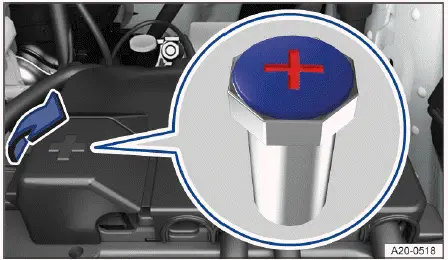
Volkswagen ID.4 positive jump start terminal under protective cover in hood space
Fig. 1 Under a cover in the hood space: Positive jump-start point.

Volkswagen ID.4 red jumper cable connection to positive battery terminalThe positive jump-start terminal for connecting the red cable is located beneath a protective cover in the hood space of the Volkswagen ID.4.

As with the negative terminal, this connection point is designed solely for receiving a jump-start and must not be used to supply power to other vehicles.

Using the correct procedure and connection points ensures safe jump-starting of the Volkswagen ID.4 without risking damage to its advanced electrical system.