USB port
Using the USB port in the Volkswagen ID.4, you can conveniently transfer data, connect multimedia devices, and charge compatible devices, depending on the port type and configuration.
USB-C port
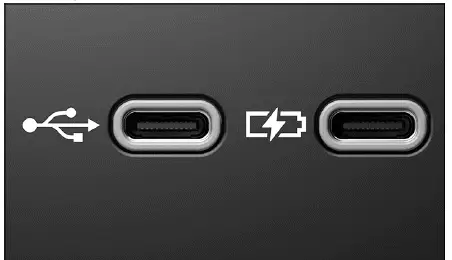
Fig. 1 USB-C connection in the vehicle (general example).
The Volkswagen ID.4 may be equipped with different types of USB-C ports designed to support both data transmission and charging functionality.
 Symbol for a USB port for data transmission and charging.
 Symbol for a USB port for charging only.
Detailed information regarding charging capabilities and power output in the Volkswagen ID.4 can be found in the relevant section (→ Sockets).
Possible USB port installation locations
The number and positioning of USB ports in the Volkswagen ID.4 vary depending on vehicle configuration and optional equipment.
- In the center console of the Volkswagen ID.4.
- At the base of the interior rearview mirror.
- Inside the storage compartment in the center console.
- In the compartment beneath the center armrest.
 USB ports available for rear passengers in the Volkswagen ID.4 are typically limited to charging functionality only.
Available Data Transfer Functions
The Volkswagen ID.4 supports multiple USB-based data transfer features depending on installed equipment.
- App-Connect integration for smartphone connectivity.
- Media playback through the Infotainment system.
- System and navigation updates via USB (→ Navigation).
Instructions and restrictions
- Always use compatible USB cables designed for the Volkswagen ID.4 ports.
- Avoid using damaged, overheated, or contaminated storage devices. Follow manufacturer guidelines.
- Differences in data carrier quality may affect playback performance.
- Avoid using USB hubs, extension cables, or adapters, as they may cause malfunctions.