Load-through hatch

In this manual: Load-through hatch
View from the front — 1Rear view — 1Driver door — 1Driver side — 1Center console — 1Passenger's side — 1Symbols in the instrument cluster — 1Warning and information texts — 1Introduction to the instrument cluster — 1Operating the Volkswagen Digital Cockpit — 1Volkswagen Digital Cockpit information displays — 1Charge status and range in the digital instrument cluster — 1Power display — 1Head-up display (HUD) — 1ID. Light — 1Service menu — 1Service display — 1Vehicle settings menu — 1Limits of the Driver Alert System — 1Operating the Driver Alert System — 1Limits of the Dynamic Road Sign Display — 1Operating the Dynamic Road Sign Display — 1Correct seating position — 1Fasten seat belts reminder — 1Fastening and unfastening the safety belts — 1Safety belt positioning — 1Safety belt height adjuster — 1Automatic safety belt retractor, safety belt pretensioner, safety belt load limiter — 1Safety belt pretensioner servicing and disposal — 1Functions of the proactive passenger protection system — 1Limitations of the proactive passenger protection system — 1Indicator light — 1Installation Locations and Deployment Zones — 1Front airbags — 1How to Recognize that the Front Passenger's Front Airbag is Switched Off — 1Side airbags — 1Types of child restraints — 1Installing and using child restraints — 1Securing systems — 1Attaching a child restraint with ISOFIX or i-Size — 1Securing the child restraint with the upper strap (top tether) — 1Securing a child restraint with a safety belt — 1Securing yourself and the vehicle — 1What to do in the event of an accident or fire — 1Emergency equipment — 1Information Call, Roadside Assistance Call and Emergency Call Service — 1Legally required eCall Emergency System — 1Vehicle key functions — 1Replacing the button cell battery — 1Synchronizing a vehicle key — 1Setting up primary users for the vehicle — 1Using a mobile key — 1Unlocking or locking using Keyless Access — 1Opening the doors — 1Control for central locking — 1Opening and closing the driver's door in an emergency — 1Locking the front passenger door and rear doors in an emergency — 1Electrical childproof lock — 1SAFELOCK — 1Anti-theft alarm system — 1Interior monitoring and towing protection — 1Opening and closing the trunk lid — 1Power opening and closing the trunk lid — 1Trunk lid with Easy Open motion sensor — 1Automatic trunk lid closing Easy Close — 1Opening and closing the windows — 1Power window pinch protection — 1Adjusting the steering wheel position — 1Manually adjusting front seats — 1Adjusting power front seats — 1Folding the rear bench seat backrest forward or backward — 1Adjusting the head restraints — 1Removing and installing the head restraints — 1Center armrest — 1Memory function — 1Massage feature — 1Switching the turn signals on and off — 1Switching the lights on and off — 1Switching the high beam headlights on and off — 1High Beam Control (Light Assist) — 1Advanced high beam control (Dynamic Light Assist) — 1Switching the poor weather lights on and off — 1Parking lights — 1Entry and exit lighting (orientation lighting) — 1Headlight range control — 1Adjusting headlights (travel mode) — 1Interior/reading lights, ambient lighting — 1Operating the windshield wiper lever — 1Rain/light sensor — 1General safety precautions — 1Interior rearview mirror — 1Outside mirrors — 1Sun visors — 1Sunshade in the sunroof — 1Overview of the Climatronic — 1Air conditioner menu in the Infotainment system — 1Temperature regulation — 1Air distribution and blower speed — 1Air recirculation — 1Seat heating — 1Steering wheel heating — 1Windshield defroster — 1Operating the stationary air conditioning — 1Programming the stationary air conditioning — 1Functions of the electric drivetrain — 1Steering information — 1Information on the pedals — 1Information on the brakes — 1Switching the ignition on and off — 1Activating the vehicle's drive system — 1Exiting a vehicle while the vehicle's drive system is active — 1Deactivating the vehicle's drive system — 1Driving mode selector — 1Brake energy recuperation — 1General driver information — 1Eco tips — 1Driving a loaded vehicle — 1Driving with an open trunk lid — 1Driving through water on roads — 1Operating the vehicle in different countries and continents — 1Selecting the driving mode — 1Standard behavior of the driving mode and the vehicle systems — 1Limits of the sensor system — 1Operating the cruise control system — 1Operating the speed limiter — 1System Limitations of the Predictive Control — 1Driving with predictive control — 1Eco assist — 1Special driving situations — 1System Limitations of ACC — 1Switching ACC on and off — 1Adjusting the ACC settings — 1System Limitations of Predictive Cruise Control — 1Driving with predictive cruise control — 1Warning levels and braking support — 1System Limitations of Front Assist — 1Using Front Assist — 1Lane Assist system limitations — 1Driving with Lane Assist — 1Operating Travel Assist — 1Using assisted lane changing — 1Driving with Emergency Assist — 1Side Assist system limitations — 1Driving with Side Assist — 1Parking — 1Electronic parking brake — 1Auto Hold — 1Automatic braking intervention — 1Switching Park Distance Control (PDC) on and off — 1Parking (Rear View Camera system with parking mode selection) — 1Changing the camera perspective — 1Searching for parking spaces — 1Driving into parking spaces — 1Exiting a parking space — 1Calibrating the parking process — 1Displaying and editing parking spaces — 1Driving into or out of a parking space — 1Rear Traffic Alert — 1Information about braking assistance systems — 1Switching ASR Sport and ESC Sport on and off — 1Sockets in the vehicle — 1Charging Options for Mobile Devices — 1Cyber security — 1Download and software installation — 1V2X limitations — 1Traffic hazard alert — 1USB port — 1Bluetooth interface — 1Establishing a data connection — 1Setting up and deactivating a Wi-Fi hotspot — 1Setting up a Wi-Fi client — 1Quick connection — 1Apps — 1Apple CarPlay — 1Android Auto — 1MirrorLink — 1Introduction to online services — 1Data processing — 1Prerequisites for Using Services — 1Situations that can affect system functions — 1Services That Do Not Require Activation — 1Ordering Services and Activation in the Vehicle — 1Setting, Changing and Resetting the S-PIN — 1Carrying Out Volkswagen Ident — 1Manage services — 1Managing Users — 1Changing and Deleting User Data — 1Status display — 1Impact on online vehicle functions — 1Customizable vehicle settings — 1Viewing and enabling functions — 1Safety instructions — 1User information — 1Overview and controls of the 12" version — 1Overview and controls of the 10" version — 1Operating the Infotainment system — 1Personalizing the Infotainment system — 1System and sound settings — 1Cleaning the screen — 1Brands, licenses, copyright — 1Functions and radio symbols — 1Special functions in radio mode — 1Online functions in radio mode — 1Functions and media symbols — 1Selecting and playing a media source — 1Entertainment playback via the Infotainment system — 1Function descriptions — 1Functions and symbols of the navigation system — 1Inputting destinations and starting route guidance — 1Setting a 360º range display and Electric Vehicle Route Planner — 1Navigation data — 1Traffic information — 1Functions and symbols of the phone interface — 1Coupling, connecting and managing — 1Calling and sending text messages — 1Phone directory, favorites and speed dial keys — 1Introduction to using voice control — 1Starting and ending voice control — 1Activation word — 1Stowing luggage and cargo — 1Luggage compartment cover — 1Second luggage compartment floor - functions — 1Fitting and removing the screen separator behind the rear bench seat — 1Fitting and removing the screen separator behind the front seats — 1Tie-downs — 1Luggage net — 1Shopping bag hooks — 1Load-through hatch — 1Hitching a trailer — 1Loading a trailer — 1Driving with a trailer — 1Trailer stabilization — 1Swiveling out the ball mount — 1Dimensions and mounting points for retrofitting a trailer hitch — 1Attaching a rear carrier system or bicycle rack to the ball mount — 1Mounting a roof rack — 1Loading the roof rack — 1Warning signs for the high-voltage system — 1Handling the high-voltage battery — 1Charging — 1Charging process indicator — 1Emergency release for the charging connector — 1Overview of the charging settings — 1Battery charge limits — 1Charging locations — 1Departure Times (time-delayed charging) — 1Charging with solar power — 1Bidirectional charging — 1Instructions for the charging cable — 1Charging cable for charging stations with alternating current (AC) — 1Charging cable for mains sockets — 1Vehicle tool kit components — 1Putting the windshield wipers in the service position — 1Cleaning and changing wiper blades — 1Information on bulb replacement — 1Replacing bulbs in LED headlights — 1Fuses in the hood space — 1Fuse table for fuses in the hood space — 1Fuses in the instrument panel — 1Fuse table for fuses in the instrument panel — 1Replacing blown fuses — 1Ground jump-start point — 1Preparing and Performing a Jump-start — 1Instructions for towing — 1Towing — 1Installing the front towing eye — 1Installing the rear towing eye — 1Safety precautions for working in the hood space — 1Preparing the vehicle for work in the hood space — 1Display — 1Operating fluids and operating equipment — 1Washer fluid — 1Engine coolant specifications — 1Checking and filling engine coolant — 1Brake fluid specifications — 1Checking the Brake Fluid — 1Checking the 12 V vehicle battery acid level — 1Handling tires — 1Handling rims — 1Checking the tire pressure — 1Monitoring the tightening torque — 1Replacing tires — 1Monitoring the tread depth — 1Winter tires — 1Snow chains — 1How the Tire Pressure Monitoring System Works — 1Limitations of the Tire Pressure Monitoring System — 1Calibrating the Tire Pressure Monitoring System — 1Troubleshooting the Tire Pressure Monitoring System — 1Preparing Your Vehicle — 1Removing and Fitting Hubcaps — 1Removing and Fitting Wheel Hub Covers — 1Removing and Fitting the Wheel Bolt Caps — 1Loosening wheel bolts — 1Raising the vehicle with the vehicle jack — 1Changing a wheel — 1Preparing Your Vehicle — 1Sealing and pumping up tires — 1Tire labeling and tire classifications — 1Maintenance procedures and digital maintenance schedule — 1Information about operating conditions — 1Scope of service — 1Vehicle care information — 1Washing the vehicle — 1Exterior care and cleaning — 1Care and cleaning of the vehicle interior — 1Accessories and replacement parts — 1Sensors and Cameras — 1Repairs and technical modifications — 1Airbag system repairs and situations that can affect the system function — 1Mobile phone usage in the vehicle — 1Volkswagen dealer warranty — 1Data Storage and Data Protection Information — 1Event data recorder (crash data recorder) — 1Labels and signs — 1Fluids in the air conditioning system — 1Component protection — 1Disposal of old batteries and electronic devices — 1Declaration of conformity — 1Third Party Copyright Information — 1Useful information on vehicles with N1 type approval (light commercial vehicle) — 1Radar Sensors — 1Mapping tables — 1Dimensions — 1
~6min read

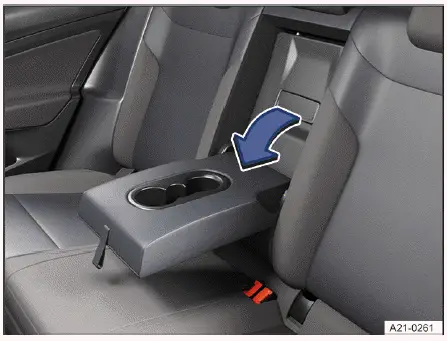
Volkswagen ID.4 load-through hatch in rear seat backrest interior view
Fig. 1 Pass-through in the rear seat backrest.
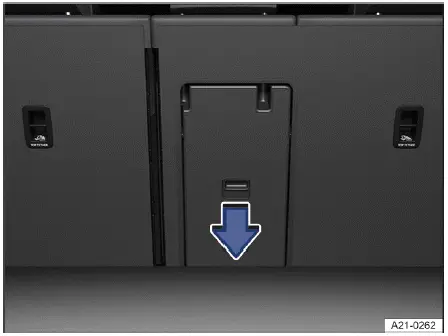
Volkswagen ID.4 load-through hatch from luggage compartment side
Fig. 2 Pass-through in the luggage compartment.

Depending on the equipment version, the Volkswagen ID.4 may feature a practical load-through hatch located behind the center armrest in the rear seat backrest. This function allows you to transport long items such as skis, boards, or narrow cargo safely inside the vehicle without compromising passenger comfort.

Opening the pass-through from the vehicle interior

1. Fold the center armrest forward (→ Center armrest).

2. Pull the release lever in the direction of the arrow → fig. 1 and fold the load-through hatch cover completely forward → Volkswagen ID.4 release lever for load-through hatch.

3. Open the trunk lid of the Volkswagen ID.4.

Opening the pass-through from the luggage compartment

1. Press the release lever downward in the direction of the arrow → fig. 2 and fold the cover forward.

2. Insert long objects from the luggage compartment and carefully slide them through the load-through hatch toward the interior.

3. If necessary, secure the transported items using a seat belt for additional stability.

4. Close the trunk lid securely.

Closing the load-through hatch

1. Fold the hatch cover back until it audibly clicks into place.

A red indicator may be visible from the luggage compartment side. This marking must not be visible when the hatch is properly closed → Volkswagen ID.4 load-through hatch locking indicator red mark.

2. Close the trunk lid.

3. Return the center armrest to its original position if required.

WARNING

Objects placed in the deployment zone of the center airbag in the Volkswagen ID.4 can interfere with proper airbag operation and may result in serious injury or fatal consequences.

  • Never push objects into the center airbag deployment area (→ Center airbag).

WARNING

Improper handling of the load-through hatch in the Volkswagen ID.4 may lead to serious injury or damage.

  • Do not operate the load-through hatch while driving.
  • Ensure that seat belts are not trapped or damaged when closing the hatch.
  • Keep hands, fingers, and other body parts clear of moving components during operation.
  • Always confirm that the hatch is securely locked and that the red indicator is not visible.
  • If the hatch is open or not locked, do not allow passengers, especially children, to sit in that seat.

Introduction

If equipped accordingly, the Volkswagen ID.4 can be used for towing a trailer, expanding its versatility for transportation needs.

Driving with a trailer increases the total load and requires heightened driver attention and awareness.

Additional towing weight affects vehicle performance, energy consumption, and component wear, and may result in shorter service intervals for the Volkswagen ID.4.

When operating under heavy load conditions, certain vehicle systems such as air conditioning may reduce output or temporarily deactivate to maintain system stability and prevent overheating.

The towing capacity of the Volkswagen ID.4 may decrease under the following conditions:

  • Driving on steep inclines.
  • Operating at high altitudes.
  • Driving in high ambient temperatures.
  • Carrying a fully loaded vehicle with passengers and luggage.
  • Driving at higher speeds.

Trailer with function check for the lighting

Trailers that require active monitoring of tail lights or brake lights for approval may not be compatible with the Volkswagen ID.4. Always consult the trailer manufacturer to confirm compatibility and legal requirements.

Unused ball mount

If no trailer, bicycle rack, or similar equipment is attached, the ball mount should be folded away or removed. This is particularly important if it obstructs the license plate or lighting of the Volkswagen ID.4. Always follow country-specific regulations regarding towing equipment → Volkswagen ID.4 tow ball mount removal illustration.

The Volkswagen ID.4 combines practical cargo solutions like the load-through hatch with advanced towing capabilities, making it a versatile choice for both everyday use and extended travel.

Special conditions

Before towing a trailer with the Volkswagen ID.4, be aware that certain driver assistance and parking systems may operate with reduced functionality or may be temporarily limited due to the additional load and altered vehicle dynamics. This is a normal behavior designed to ensure safety and system reliability.

DANGER

Transporting passengers in a trailer is extremely dangerous, may lead to life-threatening injuries, and is prohibited by law in many countries.

  • Never allow any person to ride in a trailer attached to the Volkswagen ID.4.

WARNING

Incorrect use of the trailer hitch on the Volkswagen ID.4 may lead to loss of vehicle control, accidents, and serious or fatal injuries.

  • Always install and operate the trailer according to the manufacturer’s instructions.
  • Only use a ball mount that is in perfect condition and properly secured.
  • Do not modify, repair, or tamper with the ball mount.

WARNING

If the ball mount of the Volkswagen ID.4 remains extended when not in use, it increases the risk of injury to pedestrians and cyclists, as well as the severity of damage in rear-end collisions.

  • Always retract or remove the ball mount when it is not required.

WARNING

The Volkswagen ID.4 is not designed for use with weight-distributing or load-equalizing trailer hitches. Using such systems may cause malfunction or detachment of the trailer, resulting in serious accidents.

  • Never install or use weight-distributing or load-equalizing trailer hitch systems.

WARNING

Towing a trailer or carrying heavy and bulky loads with the Volkswagen ID.4 significantly affects handling characteristics, increases braking distance, and may lead to dangerous situations if not managed properly.

  • Always secure all cargo using suitable and undamaged straps, belts, or fastening systems.
  • Be aware that trailers with a higher center of gravity are more prone to tipping.
  • Adjust your speed and driving style according to road, traffic, and weather conditions.
  • Drive proactively and anticipate potential hazards.
  • Accelerate smoothly and cautiously.
  • Avoid sudden braking or sharp steering maneuvers.
  • Do not exceed 80 km/h, or 100 km/h, when towing with the Volkswagen ID.4.

    This recommendation also applies in regions where higher towing speeds may be legally permitted.

  • Reduce speed when driving downhill or on steep inclines.
  • Always follow local speed limits for vehicles towing trailers, which are often lower than standard limits.
  • Exercise extreme caution when overtaking and reduce speed immediately if any trailer sway is detected.
  • Never attempt to stabilize a swaying trailer by accelerating.
  • Pay attention to warning messages and indicator lights in the Volkswagen Digital Cockpit, as towing places additional strain on the vehicle.

Volkswagen ID.4 towing regulations and N1 certificate informationAlways follow all safety instructions and legal requirements for vehicles with an N1 classification (→ N1 certificate).

Volkswagen ID.4 trailer anti-theft alarm system activationIf a trailer is integrated into the anti-theft alarm system of the Volkswagen ID.4, disconnecting the trailer may trigger the alarm system (→ Anti-theft alarm system).

Volkswagen ID.4 tow hitch blocking towing eye warningSome aftermarket or retrofitted trailer hitches may obstruct access to the towing eye. In such cases, the Volkswagen ID.4 cannot be used to tow another vehicle. For this reason, always store the removable ball mount safely inside the vehicle when it is not in use.

The Volkswagen ID.4 combines modern electric mobility with practical towing capabilities, but safe operation requires careful attention to load distribution, equipment compatibility, and driving behavior under towing conditions.