Tire labeling and tire classifications
In this manual: Tire labeling and tire classifications
View from the front — 1Rear view — 1Driver door — 1Driver side — 1Center console — 1Passenger's side — 1Symbols in the instrument cluster — 1Warning and information texts — 1Introduction to the instrument cluster — 1Operating the Volkswagen Digital Cockpit — 1Volkswagen Digital Cockpit information displays — 1Charge status and range in the digital instrument cluster — 1Power display — 1Head-up display (HUD) — 1ID. Light — 1Service menu — 1Service display — 1Vehicle settings menu — 1Limits of the Driver Alert System — 1Operating the Driver Alert System — 1Limits of the Dynamic Road Sign Display — 1Operating the Dynamic Road Sign Display — 1Correct seating position — 1Fasten seat belts reminder — 1Fastening and unfastening the safety belts — 1Safety belt positioning — 1Safety belt height adjuster — 1Automatic safety belt retractor, safety belt pretensioner, safety belt load limiter — 1Safety belt pretensioner servicing and disposal — 1Functions of the proactive passenger protection system — 1Limitations of the proactive passenger protection system — 1Indicator light — 1Installation Locations and Deployment Zones — 1Front airbags — 1How to Recognize that the Front Passenger's Front Airbag is Switched Off — 1Side airbags — 1Types of child restraints — 1Installing and using child restraints — 1Securing systems — 1Attaching a child restraint with ISOFIX or i-Size — 1Securing the child restraint with the upper strap (top tether) — 1Securing a child restraint with a safety belt — 1Securing yourself and the vehicle — 1What to do in the event of an accident or fire — 1Emergency equipment — 1Information Call, Roadside Assistance Call and Emergency Call Service — 1Legally required eCall Emergency System — 1Vehicle key functions — 1Replacing the button cell battery — 1Synchronizing a vehicle key — 1Setting up primary users for the vehicle — 1Using a mobile key — 1Unlocking or locking using Keyless Access — 1Opening the doors — 1Control for central locking — 1Opening and closing the driver's door in an emergency — 1Locking the front passenger door and rear doors in an emergency — 1Electrical childproof lock — 1SAFELOCK — 1Anti-theft alarm system — 1Interior monitoring and towing protection — 1Opening and closing the trunk lid — 1Power opening and closing the trunk lid — 1Trunk lid with Easy Open motion sensor — 1Automatic trunk lid closing Easy Close — 1Opening and closing the windows — 1Power window pinch protection — 1Adjusting the steering wheel position — 1Manually adjusting front seats — 1Adjusting power front seats — 1Folding the rear bench seat backrest forward or backward — 1Adjusting the head restraints — 1Removing and installing the head restraints — 1Center armrest — 1Memory function — 1Massage feature — 1Switching the turn signals on and off — 1Switching the lights on and off — 1Switching the high beam headlights on and off — 1High Beam Control (Light Assist) — 1Advanced high beam control (Dynamic Light Assist) — 1Switching the poor weather lights on and off — 1Parking lights — 1Entry and exit lighting (orientation lighting) — 1Headlight range control — 1Adjusting headlights (travel mode) — 1Interior/reading lights, ambient lighting — 1Operating the windshield wiper lever — 1Rain/light sensor — 1General safety precautions — 1Interior rearview mirror — 1Outside mirrors — 1Sun visors — 1Sunshade in the sunroof — 1Overview of the Climatronic — 1Air conditioner menu in the Infotainment system — 1Temperature regulation — 1Air distribution and blower speed — 1Air recirculation — 1Seat heating — 1Steering wheel heating — 1Windshield defroster — 1Operating the stationary air conditioning — 1Programming the stationary air conditioning — 1Functions of the electric drivetrain — 1Steering information — 1Information on the pedals — 1Information on the brakes — 1Switching the ignition on and off — 1Activating the vehicle's drive system — 1Exiting a vehicle while the vehicle's drive system is active — 1Deactivating the vehicle's drive system — 1Driving mode selector — 1Brake energy recuperation — 1General driver information — 1Eco tips — 1Driving a loaded vehicle — 1Driving with an open trunk lid — 1Driving through water on roads — 1Operating the vehicle in different countries and continents — 1Selecting the driving mode — 1Standard behavior of the driving mode and the vehicle systems — 1Limits of the sensor system — 1Operating the cruise control system — 1Operating the speed limiter — 1System Limitations of the Predictive Control — 1Driving with predictive control — 1Eco assist — 1Special driving situations — 1System Limitations of ACC — 1Switching ACC on and off — 1Adjusting the ACC settings — 1System Limitations of Predictive Cruise Control — 1Driving with predictive cruise control — 1Warning levels and braking support — 1System Limitations of Front Assist — 1Using Front Assist — 1Lane Assist system limitations — 1Driving with Lane Assist — 1Operating Travel Assist — 1Using assisted lane changing — 1Driving with Emergency Assist — 1Side Assist system limitations — 1Driving with Side Assist — 1Parking — 1Electronic parking brake — 1Auto Hold — 1Automatic braking intervention — 1Switching Park Distance Control (PDC) on and off — 1Parking (Rear View Camera system with parking mode selection) — 1Changing the camera perspective — 1Searching for parking spaces — 1Driving into parking spaces — 1Exiting a parking space — 1Calibrating the parking process — 1Displaying and editing parking spaces — 1Driving into or out of a parking space — 1Rear Traffic Alert — 1Information about braking assistance systems — 1Switching ASR Sport and ESC Sport on and off — 1Sockets in the vehicle — 1Charging Options for Mobile Devices — 1Cyber security — 1Download and software installation — 1V2X limitations — 1Traffic hazard alert — 1USB port — 1Bluetooth interface — 1Establishing a data connection — 1Setting up and deactivating a Wi-Fi hotspot — 1Setting up a Wi-Fi client — 1Quick connection — 1Apps — 1Apple CarPlay — 1Android Auto — 1MirrorLink — 1Introduction to online services — 1Data processing — 1Prerequisites for Using Services — 1Situations that can affect system functions — 1Services That Do Not Require Activation — 1Ordering Services and Activation in the Vehicle — 1Setting, Changing and Resetting the S-PIN — 1Carrying Out Volkswagen Ident — 1Manage services — 1Managing Users — 1Changing and Deleting User Data — 1Status display — 1Impact on online vehicle functions — 1Customizable vehicle settings — 1Viewing and enabling functions — 1Safety instructions — 1User information — 1Overview and controls of the 12" version — 1Overview and controls of the 10" version — 1Operating the Infotainment system — 1Personalizing the Infotainment system — 1System and sound settings — 1Cleaning the screen — 1Brands, licenses, copyright — 1Functions and radio symbols — 1Special functions in radio mode — 1Online functions in radio mode — 1Functions and media symbols — 1Selecting and playing a media source — 1Entertainment playback via the Infotainment system — 1Function descriptions — 1Functions and symbols of the navigation system — 1Inputting destinations and starting route guidance — 1Setting a 360º range display and Electric Vehicle Route Planner — 1Navigation data — 1Traffic information — 1Functions and symbols of the phone interface — 1Coupling, connecting and managing — 1Calling and sending text messages — 1Phone directory, favorites and speed dial keys — 1Introduction to using voice control — 1Starting and ending voice control — 1Activation word — 1Stowing luggage and cargo — 1Luggage compartment cover — 1Second luggage compartment floor - functions — 1Fitting and removing the screen separator behind the rear bench seat — 1Fitting and removing the screen separator behind the front seats — 1Tie-downs — 1Luggage net — 1Shopping bag hooks — 1Load-through hatch — 1Hitching a trailer — 1Loading a trailer — 1Driving with a trailer — 1Trailer stabilization — 1Swiveling out the ball mount — 1Dimensions and mounting points for retrofitting a trailer hitch — 1Attaching a rear carrier system or bicycle rack to the ball mount — 1Mounting a roof rack — 1Loading the roof rack — 1Warning signs for the high-voltage system — 1Handling the high-voltage battery — 1Charging — 1Charging process indicator — 1Emergency release for the charging connector — 1Overview of the charging settings — 1Battery charge limits — 1Charging locations — 1Departure Times (time-delayed charging) — 1Charging with solar power — 1Bidirectional charging — 1Instructions for the charging cable — 1Charging cable for charging stations with alternating current (AC) — 1Charging cable for mains sockets — 1Vehicle tool kit components — 1Putting the windshield wipers in the service position — 1Cleaning and changing wiper blades — 1Information on bulb replacement — 1Replacing bulbs in LED headlights — 1Fuses in the hood space — 1Fuse table for fuses in the hood space — 1Fuses in the instrument panel — 1Fuse table for fuses in the instrument panel — 1Replacing blown fuses — 1Ground jump-start point — 1Preparing and Performing a Jump-start — 1Instructions for towing — 1Towing — 1Installing the front towing eye — 1Installing the rear towing eye — 1Safety precautions for working in the hood space — 1Preparing the vehicle for work in the hood space — 1Display — 1Operating fluids and operating equipment — 1Washer fluid — 1Engine coolant specifications — 1Checking and filling engine coolant — 1Brake fluid specifications — 1Checking the Brake Fluid — 1Checking the 12 V vehicle battery acid level — 1Handling tires — 1Handling rims — 1Checking the tire pressure — 1Monitoring the tightening torque — 1Replacing tires — 1Monitoring the tread depth — 1Winter tires — 1Snow chains — 1How the Tire Pressure Monitoring System Works — 1Limitations of the Tire Pressure Monitoring System — 1Calibrating the Tire Pressure Monitoring System — 1Troubleshooting the Tire Pressure Monitoring System — 1Preparing Your Vehicle — 1Removing and Fitting Hubcaps — 1Removing and Fitting Wheel Hub Covers — 1Removing and Fitting the Wheel Bolt Caps — 1Loosening wheel bolts — 1Raising the vehicle with the vehicle jack — 1Changing a wheel — 1Preparing Your Vehicle — 1Sealing and pumping up tires — 1Tire labeling and tire classifications — 1Maintenance procedures and digital maintenance schedule — 1Information about operating conditions — 1Scope of service — 1Vehicle care information — 1Washing the vehicle — 1Exterior care and cleaning — 1Care and cleaning of the vehicle interior — 1Accessories and replacement parts — 1Sensors and Cameras — 1Repairs and technical modifications — 1Airbag system repairs and situations that can affect the system function — 1Mobile phone usage in the vehicle — 1Volkswagen dealer warranty — 1Data Storage and Data Protection Information — 1Event data recorder (crash data recorder) — 1Labels and signs — 1Fluids in the air conditioning system — 1Component protection — 1Disposal of old batteries and electronic devices — 1Declaration of conformity — 1Third Party Copyright Information — 1Useful information on vehicles with N1 type approval (light commercial vehicle) — 1Radar Sensors — 1Mapping tables — 1Dimensions — 1
20steps
~120min
4/5difficulty
Done 0 of 20

Volkswagen ID.4 tire labeling diagram international markings explanation tire sidewall codes
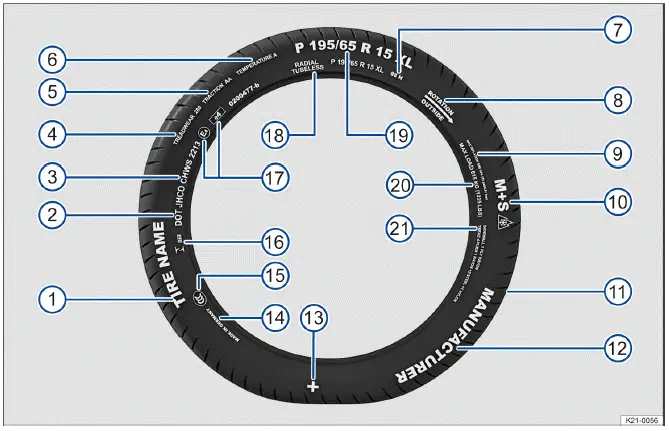
Fig. 1 International tire labeling.

→ fig. 1 Tire labeling (example), meaning for Volkswagen ID.4 tires and general automotive standards

  1. Product name
    • Manufacturer-specific tire designation used to identify the tire model and characteristics for the Volkswagen ID.4.
  2. DOT
    • Indicates compliance with U.S. Department of Transportation safety regulations applicable to tire manufacturing.
  3. JHCO CHWS 2213
    • Tire Identification Number (TIN), which may appear only on the inner side of the tire, along with production date:
      • JHCO CHWS
        Code identifying the production plant and tire specifications.
      • 2213
        Production date: 22nd week of 2013.

Information for consumers regarding comparative tire performance values (based on standardized test procedures):

  1. TREADWEAR 280
    • Indicates relative tread life. A value of 280 means the tire may last approximately 2.8 times longer than a reference tire rated at 100, depending on driving conditions, maintenance, and climate.
  2. TRACTION AA
    • Represents wet braking performance (AA, A, B, or C). Higher ratings indicate better traction under controlled test conditions. This rating does not account for cornering or hydroplaning.
  3. TEMPERATURE A
    • Indicates resistance to heat buildup at high speeds. Ratings A and B exceed legal requirements when tires are properly inflated. Incorrect pressure or excessive speed can lead to overheating and tire damage.
  4. 88 H
    • Load index and speed rating for the Volkswagen ID.4 tire → Tire load and speed rating.
  5. Rotation and arrow
    • Indicates the required rotation direction for unidirectional tires.

Or: Outside

  • Marking for asymmetrical tires indicating correct outer side placement.
  1. MAX INFLATION 350 KPA (51 psi/3.51 bar)
    • Maximum allowable tire pressure according to U.S. standards.
  2. M+S or M/S or Volkswagen ID.4 winter tire marking M+S mud and snow symbol sidewall
    • Indicates suitability for winter conditions (mud and snow tires). Studded tires may include an additional marking.
  3. TWI
    • Location of tread wear indicators used to assess tire wear.
  4. Brand name, logo
    • Tire manufacturer identification.
  5. Volkswagen ID.4 genuine tire approval symbol original equipment marking
    • Symbol indicating Volkswagen-approved original equipment tires.
  6. Made in Germany
    • Country of manufacture.
  7. Volkswagen ID.4 China certification CCC tire marking compliance label
    • China Compulsory Certification (CCC) marking.
  8. Volkswagen ID.4 Brazil tire certification code marking identification 023
    • Country-specific certification code for Brazil.
  9. E4 e4 0200477-b
    • Approval marking under ECE or EU regulations with issuing country code and certification number.
  10. RADIAL TUBELESS
    • Indicates a tubeless radial tire construction used on the Volkswagen ID.4.
  11. P 195 / 65 R 15 XL
    • P Passenger vehicle classification.
    • 195 Tire width in millimeters.
    • 65 Aspect ratio (height to width).
    • R Radial construction.
    • 15 Rim diameter in inches.
    • XL Reinforced ("Extra Load") tire.
  12. MAX LOAD 615 KG (1235 LBS)
    • Maximum load capacity per tire.

SIDEWALL 1 PLY RAYON

  • Construction details of the sidewall, consisting of one layer of rayon.
  1. TREAD 4 PLIES
    • Indicates the multi-layer structure of the tread area.

1 RAYON +
2 STEEL +
1 NYLON

  • Example composition: one rayon layer, two steel belts, and one nylon layer for durability and performance.

The tire labeling on the Volkswagen ID.4 is typically located on both sides of the tire. Some markings, such as the TIN and production date, may appear only on one side.

Additional numbers and symbols may represent manufacturer-specific or regional certifications relevant to the Volkswagen ID.4.

Low-profile tires

Low-profile tires used on the Volkswagen ID.4 provide a wider tread and larger rim diameter with shorter sidewalls. This improves handling, cornering precision, and responsiveness. However, these tires may offer reduced ride comfort on uneven or damaged road surfaces.

Unidirectional tires

Unidirectional tires are marked with arrows indicating the correct rotation direction. For optimal performance and safety on the Volkswagen ID.4, these tires must always be installed according to the specified direction.

If installed incorrectly, handling and traction may be compromised. The tire should be reinstalled or replaced as soon as possible.

Asymmetrical tires

Asymmetrical tires are designed with different inner and outer tread patterns to optimize performance. The sidewalls are labeled accordingly, and correct mounting orientation must be maintained on the Volkswagen ID.4.

Tire load

The tire load index specifies the maximum load capacity per tire for the Volkswagen ID.4.

Examples:

78

425 kg (936 lbs)

81

462 kg (1018 lbs)

83

487 kg (1073 lbs)

85

515 kg (1135 lbs)

87

545 kg (1201 lbs)

88

560 kg (1234 lbs)

91

615 kg (1355 lbs)

92

630 kg (1388 lbs)

93

650 kg (1433 lbs)

95

690 kg (1521 lbs)

97

730 kg (1609 lbs)

99

775 kg (1708 lbs)

100

800 kg (1763 lbs)

101

825 kg (1818 lbs)

102

850 kg (1873 lbs)

103

875 kg (1929 lbs)

104

900 kg (1984 lbs)

Speed rating

The speed rating indicates the maximum permitted speed for a tire fitted to the Volkswagen ID.4:

P

max. 150 km/h

Q

max. 160 km/h

R

max. 170 km/h

S

max. 180 km/h

T

max. 190 km/h

U

max. 200 km/h

H

max. 210 km/h

V

max. 240 km/h

W

max. 270 km/h

Y

max. 300 km/h

Z

above 240 km/h, depending on manufacturer (ZR designation).

Tire load and speed range

Vehicles such as the Volkswagen ID.4 delivered within the EU include a Certificate of Conformity (COC), which specifies approved tire sizes, load capacities, and speed ratings.

The presence of a COC can be identified on the model plate:

  • If the model plate contains the line "Authorization", the Volkswagen ID.4 is equipped with a COC.
  • If not, the vehicle does not have a COC document.

Understanding tire labeling helps ensure optimal safety, performance, and correct tire selection for your Volkswagen ID.4.