Go to the Owner's Manual in the center display
The digital Owner's Manual can be accessed from the center display. Content can be found and sections are designed for easy navigation.
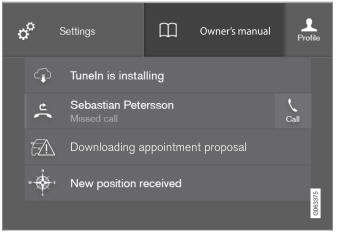
The Owner's Manual is available from the top view.
- To open the Owner's Manual, pull down Top view in the center display and tap Owner's manual.
There are several ways to find information in the Owner's Manual. The options can be accessed from the Owner's Manual start page and from the Top menu.
Opening the menu in the Top menu
Tap  in the upper list in the Owner's Manual.
- A menu opens showing the different search options:
Start page

Tap the symbol to return to the Owner's Manual start page.
Categories
Articles in the Owner's Manual are structured in main categories and subcategories. The same article may appear in several relevant categories to make it easier to find.
- Tap Categories.
- The main categories are listed.
- Tap a main category (
 ).
- A list of sub-categories (
 ) and articles (
 ) will appear.
- A list of sub-categories (
- Tap an article to open it.
To go back, tap the left arrow.
Favorite articles
Tap the symbol to go to a page with links to a selection of useful articles about the vehicle's more commonly used features and functions. The articles can also be accessed via categories, but have been collected here for quicker access. Tap an article to read it in its entirety.
Exterior and interior hotspots
Exterior and interior overview of the car. Hotspots are provided for certain functions, components, etc. Tap a hotspot to go to the corresponding article.
- Press Exterior or Interior.
- Exterior or interior images of the vehicle are shown with hotspots. The hotspots lead to articles about the corresponding function, component, etc. Swipe the screen horizontally to scroll between images.
- Tap a hotspot.
- The title of the corresponding article will be displayed.
- Tap the title to open the article.
To go back, tap the left arrow.
Favorites

Tap the symbol to go to articles saved as favorites. Tap an article to read it in its entirety.
Saving or removing favorite articles
Save an article as a favorite by tapping the at the upper right when the article is open. When an article has been saved as a favorite, the star symbol will be filled in:  .
To remove an article from the favorites list, tap its star again.
Videos
Tap the symbol to go to brief instructive videos for various functions in the vehicle.
Information

Tap the symbol for information about the current version of the Owner's Manual in your vehicle and other useful information.
Using the search function in the Top menu
- Tap
 in the Owner's Manual upper menu. A keyboard will appear at the bottom of the screen.
- Enter a search word, e.g. "seat belt".
- Suggested articles and categories will be displayed as characters are entered.
- Tap an article or category to read it.
Related information
- Owner's Manual in the center display
- Using the center display keyboard
- Using the Owner's Manual
Test yourself
A quick Volvo XC90 quiz: every answer comes with an explanation and a link to the manual page.