Acceda al manual del propietario en la pantalla central
El manual digital del propietario se puede consultar desde la pantalla central. El contenido se puede localizar y las secciones están diseñadas para una navegación sencilla.
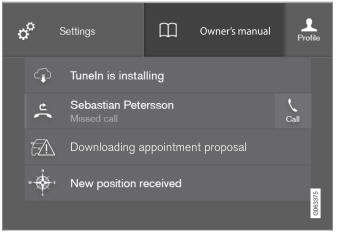
El manual del propietario está disponible desde la vista de la pantalla.
- To open the Owner's Manual, pull down Top view in the center display and tap Owner's manual.
Hay varias formas de encontrar información en el manual del propietario. Las opciones se pueden acceder desde la página de inicio del manual del propietario y desde el menú superior.
Apertura del menú superior
Tap  in the upper list in the Owner's Manual.
- Se abrirá un menú que muestra las distintas opciones de búsqueda de información:
Página de inicio

Pulse el símbolo para volver a la página de inicio del manual del propietario.
Categorías

Los artículos del manual del propietario están estructurados en categorías principales y subcategorías. El mismo artículo puede aparecer en varias categorías relevantes para facilitar su localización.
- Pulse Categorías.
- Se muestran las categorías principales.
- Tap a main category (
 ).
- A list of sub-categories (
 ) and articles (
 ) will appear.
- A list of sub-categories (
- Pulse el artículo para abrirlo.
Para volver, pulse la flecha izquierda.
Artículos favoritos

Tap the symbol to go to a page with links to a selection of useful articles about the vehicle's more commonly used features and functions. The articles can also be accessed via categories, but have been collected here for quicker access. Tap an article to read it in its entirety.
Puntos de acceso exteriores e interiores
Vista exterior e interior del vehículo. Se proporcionan puntos de acceso para determinadas funciones, componentes, etc. Pulse el punto de acceso para acceder al artículo correspondiente.
- Press Exterior or Interior.
- Las imágenes exteriores o interiores del vehículo se muestran con puntos de acceso. Los puntos de acceso conducen a artículos sobre la función, componente, etc. correspondiente. Deslice la pantalla horizontalmente para desplazarse entre las imágenes.
- Tap a hotspot.
- Se mostrará el título del artículo correspondiente.
- Pulse el título para abrir el artículo.
Para volver, pulse la flecha izquierda.
Favoritos

Pulse el símbolo para acceder a los artículos guardados como favoritos. Pulse un artículo para leerlo completo.
Guardado o eliminación de artículos favoritos
Save an article as a favorite by tapping the at the upper right when the article is open. When an article has been saved as a favorite, the star symbol will be filled in:  .
Para eliminar un artículo de la lista de favoritos, pulse de nuevo su estrella.
Vídeos

Tap the symbol to go to brief instructive videos for various functions in the vehicle.
Información

Tap the symbol for information about the current version of the Owner's Manual in your vehicle and other useful information.
Uso de la función de búsqueda en el menú superior
- Tap
 in the Owner's Manual upper menu. A keyboard will appear at the bottom of the screen.
- Enter a search word, e.g. "seat belt".
- Suggested articles and categories will be displayed as characters are entered.
- Pulse el artículo o la categoría para leerlo.
Información relacionada
- Manual del propietario en la pantalla central
- Uso del teclado de la pantalla central
- Uso del manual del propietario
Pon a prueba tus conocimientos
Un test rápido sobre el Volvo XC90: cada respuesta trae una explicación y un enlace a la página del manual.