Öffnen Sie die Betriebsanleitung im Mittelbildschirm.
Die digitale Betriebsanleitung kann über den Mittelbildschirm aufgerufen werden. Die Inhalte lassen sich finden, und die Abschnitte sind für eine einfache Navigation ausgelegt.
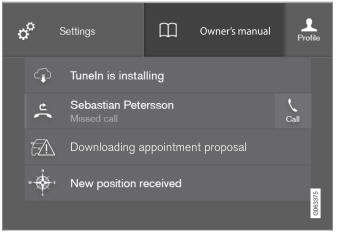
Die Betriebsanleitung ist über den Mittelbildschirm verfügbar.
- To open the Owner's Manual, pull down Top view in the center display and tap Owner's manual.
Es gibt mehrere Möglichkeiten, Informationen in der Betriebsanleitung zu finden. Die Optionen sind über die Startseite der Betriebsanleitung und über das obere Menü zugänglich.
Menü im oberen Bereich öffnen
Tap  in the upper list in the Owner's Manual.
- Das Menü mit den verschiedenen Möglichkeiten zur Informationssuche wird geöffnet:
Startseite

Tippen Sie auf das Symbol, um zur Startseite der Betriebsanleitung zurückzukehren.
Kategorien

Die Artikel in der Betriebsanleitung sind in Hauptkategorien und Unterkategorien gegliedert. Derselbe Artikel kann in mehreren relevanten Kategorien erscheinen, um das Auffinden zu erleichtern.
- Tippen Sie auf Kategorien.
- Die Hauptkategorien werden aufgelistet.
- Tap a main category (
 ).
- A list of sub-categories (
 ) and articles (
 ) will appear.
- A list of sub-categories (
- Tippen Sie auf einen Artikel, um ihn zu öffnen.
Tippen Sie zum Zurückkehren auf den linken Pfeil.
Favoritenartikel
Tap the symbol to go to a page with links to a selection of useful articles about the vehicle's more commonly used features and functions. The articles can also be accessed via categories, but have been collected here for quicker access. Tap an article to read it in its entirety.
Außen- und Innenbereich: Hotspots
Außen- und Innenansicht des Fahrzeugs. Für bestimmte Funktionen, Komponenten usw. sind Hotspots vorhanden. Tippen Sie auf einen Hotspot, um zum entsprechenden Artikel zu gelangen.
- Press Exterior or Interior.
- Außen- oder Innenansichten des Fahrzeugs werden mit Hotspots angezeigt. Die Hotspots führen zu Artikeln über die jeweilige Funktion, Komponente usw. Wischen Sie horizontal über den Bildschirm, um zwischen den Ansichten zu blättern.
- Tap a hotspot.
- Der Titel des entsprechenden Artikels wird angezeigt.
- Tippen Sie auf die Überschrift, um den Artikel zu öffnen.
Tippen Sie zum Zurückkehren auf den linken Pfeil.
Favoriten

Tippen Sie auf das Symbol, um zu den als Favoriten gespeicherten Artikeln zu gelangen. Tippen Sie auf einen Artikel, um ihn vollständig zu lesen.
Favoritenartikel speichern oder entfernen
Save an article as a favorite by tapping the at the upper right when the article is open. When an article has been saved as a favorite, the star symbol will be filled in:  .
Tippen Sie erneut auf den Stern, um einen Artikel aus der Favoritenliste zu entfernen.
Videos
Tap the symbol to go to brief instructive videos for various functions in the vehicle.
Info

Tap the symbol for information about the current version of the Owner's Manual in your vehicle and other useful information.
Suchfunktion im oberen Menü verwenden
- Tap
 in the Owner's Manual upper menu. A keyboard will appear at the bottom of the screen.
- Enter a search word, e.g. "seat belt".
- Suggested articles and categories will be displayed as characters are entered.
- Tippen Sie auf einen Artikel oder eine Kategorie, um ihn bzw. sie zu lesen.
Verwandte Informationen
- Betriebsanleitung im Mittelbildschirm
- Verwendung der Tastatur im Mittelbildschirm
- Verwendung der Betriebsanleitung
Testen Sie sich
Ein kurzes Quiz zum Volvo XC90: Zu jeder Antwort gibt es eine Erklärung und einen Link zur Handbuchseite.