Remote Key Battery Replacement
The battery in the remote key must be replaced when required.

The remote key battery must be replaced if
- The information symbol lights up and the message key battery low is displayed in the instrument panel
- the locks do not respond after several attempts to lock or unlock the vehicle using the remote key within approx. 20 meters (65 feet) of the vehicle.
The battery in the smaller key without buttons1 (the Key Tag) cannot be replaced. A new key can be ordered from an authorized Volvo workshop.
Opening the Key and Replacing the Battery
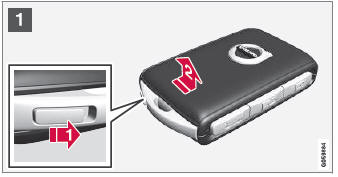

 Hold the remote key with the front side (with the Volvo logo) facing up and move the button on the key ring section to the right. Slide the front cover slightly upward.
The cover will loosen and can be removed from the key.


 Turn the key over, move the button to the side and slide the rear cover slightly upward.
The cover will loosen and can be removed from the key.

 Use a screwdriver or similar object to turn the battery cover counterclockwise so the markers point to OPEN.

 The battery's positive side (+) faces upward. Carefully pry out the battery as shown in the illustration.

 Insert a new battery with the positive side (+) facing upward. Do not touch the contact surfaces of the remote key battery.
 Place the edge of the battery downward into the holder. Slide the battery forward until it locks into place under the two plastic catches.
 Press the battery downward until it locks into place under the upper black plastic catch.
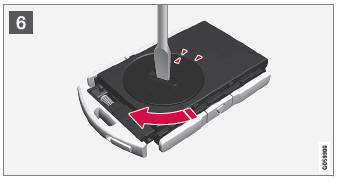
 Replace the battery cover and turn it clockwise until the markers point to CLOSE.
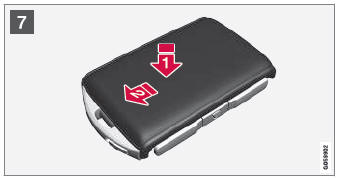

 Put the rear cover back into position and press it down until it clicks into place.
Slide the cover back.
- A second click indicates that the cover is correctly positioned and locked into place.


 Turn the remote key over and press the front cover down until it clicks into place.
 Slide the cover back. An audible click indicates that the cover is correctly in place.
- Keep batteries out of reach of children.
- Do not leave batteries lying out where they could be swallowed by children or pets.
- Never disassemble, short-circuit, or place the battery in an open fire.
- Do not recharge non-rechargeable batteries, as this may cause an explosion.
Check the remote key for damage before use. If any damage is detected, e.g. if the battery cover cannot be closed properly, do not use the product. Keep defective products out of the reach of children.
1 Included in vehicles equipped with keyless locking/unlocking*.
Test yourself
A quick Volvo XC90 quiz: every answer comes with an explanation and a link to the manual page.