Riproduzione di filmati da CD/DVD
Codici regionali DVD
Il cambia-DVD può riprodurre solo dischi con il codice della propria regione, ad esempio Europa = 2. Il codice supportato dal proprio DVD è indicato nelle informazioni del disco.
Assegnazione dei codici regionali:
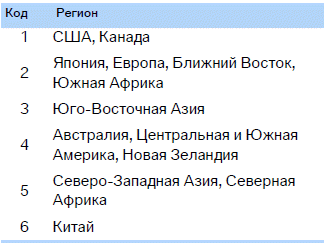
Riproduzione
1. Inserire il CD/DVD con l'etichetta rivolta verso l'alto.
Il disco viene automaticamente trascinato all'interno.
► Di norma la riproduzione inizia automaticamente dopo alcuni secondi.
► Se la riproduzione non parte automaticamente: selezionare „DVD“.
Premere il tasto .
2. Se sullo schermo compare il pannello di controllo o il menu proprio del DVD, selezionare la voce desiderata con i tasti del telecomando.
Oppure:
premere sul lettore CD/DVD il tasto .
La riproduzione può essere controllata con i tasti sul lettore CD/DVD oppure tramite il menu proprio del DVD.
 Video-CD (VCD) e super video-CD (SVCD) senza menu proprio vengono riprodotti come i DVD.◄
Espulsione di CD/DVD
Premere sul lettore CD/DVD il tasto .
Il disco viene espulso dal lettore.
Barra di controllo del DVD
La barra di controllo DVD consente di selezionare tracce e capitoli, aprire il menu DVD, selezionare la lingua, eseguire la ricerca veloce in avanti e indietro, mettere in pausa ecc.
Alcuni dischi possono disattivare la barra di controllo DVD (per un breve periodo o per tutta la durata della riproduzione del disco). In questo caso utilizzare il menu del DVD per il controllo.
1. Durante la riproduzione premere sul telecomando il tasto .
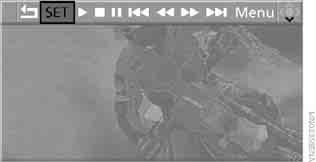
2. Per selezionare la funzione premere il tasto sul telecomando oppure ruotare il regolatore sul lettore.
3. Premere il tasto .
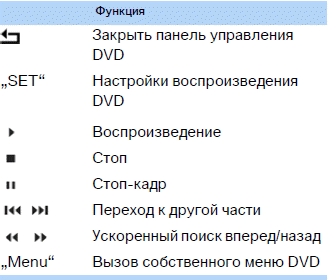
La barra di controllo DVD scompare automaticamente dallo schermo dopo un certo tempo dall'ultima pressione di un tasto.
Oppure:
premere sul telecomando il tasto , per chiudere il pannello di controllo DVD.
Ricerca veloce in avanti/indietro
Ricerca veloce in avanti/indietro tramite la barra di controllo DVD
1. Durante la riproduzione premere sul telecomando il tasto .
2. Select the icon
 .
3. Press the key .
4. To speed up the search, press the key several times.
Il DVD viene riprodotto con distorsioni.
Per disattivare la ricerca veloce in avanti/indietro:
1. Select the icon .
2. Press the key .
Oppure:
premere sul lettore CD/DVD il tasto .
Il disco viene riprodotto dal punto selezionato.
Fast forward/reverse search using the remote control
Premere il tasto and hold it until you find the desired location.
Oppure:
1. During playback, turn the knob on the player.
Viene avviata la ricerca veloce in avanti/indietro.
2. Turn the knob again to speed up the search.
3. Press the key on the CD/DVD player .
The search stops.
Il disco viene riprodotto dal punto selezionato.
Passaggio ad un'altra traccia
Durante la riproduzione è possibile passare alla traccia successiva o precedente.
1. Durante la riproduzione premere sul telecomando il tasto .
2. Select the icon
 .
3. Press the key as many times as necessary to reach the desired section.
Oppure:
premere il tasto con la freccia corrispondente tutte le volte necessarie per trovare il capitolo desiderato.
Freeze frame
1. Durante la riproduzione premere sul telecomando il tasto .
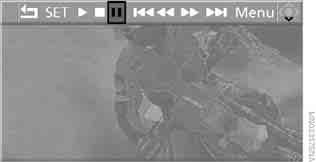
2. Select the icon .
3. Premere il tasto .
Resuming playback:
1. Select the icon oppure
 .
2. Premere il tasto .
Playback can also be stopped and started again using the keys on the CD/DVD player.
Impostazioni DVD
1. During playback, press the key.
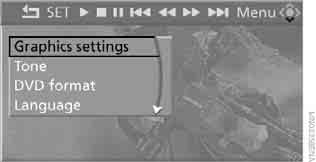
2. Making settings using the remote control:
► "Graphics settings" (Image settings):
► "Brightness", "Colour" and "Contrast" of the image.
► After moving to the upper field, other settings can be made.
"Language": language of the DVD system menu in the rear compartment.
"Display": brightness of the display backlight.
► "Tone" (Sound):
► "Treble / Bass" (High / low) and "Balance" (Left/right balance):
are adjusted separately for the left and right headphones (including infrared).
► "Reset":
standard parameter values are restored.
► "DVD format":
► "Standard"
► "Zoom": image displayed full screen.
► "Language":
audio track recorded on the DVD. Each selection of this menu item switches to the next language.
► "Subtitle": subtitle language.
"00 n/a": no subtitles.
► "Title": selection of individual titles on the DVD.
► "Angle": camera angle.
Di norma, la possibilità di selezionare l'angolo di ripresa è indicata da collegamenti e simboli che compaiono durante la riproduzione del film. Tale possibilità è disponibile, per lo più, solo per un breve tratto.
► "Menu": calls up the DVD's own menu.
► "Return": exits the menu (also when pressing the keys on the remote control).
On many DVDs, dialogue and subtitles are recorded in several languages. The availability of these functions depends on the specific disc.
 Su alcuni DVD la lingua, i sottotitoli e l'angolo di ripresa possono essere selezionati solo tramite il menu proprio del disco (integrato).
Refer to the disc description for the available options.
Menu items shown in gray cannot be selected.◄
Richiamo del menu proprio del DVD
I DVD possono avere funzioni aggiuntive. Ad esempio, lo spettatore può scegliere la linea narrativa del film oppure consultare le informazioni relative ad esso.
1. Durante la riproduzione premere sul telecomando il tasto .
2. Select "Menu".
3. Press the key .
 On some DVDs, another menu opens via the "Menu" and "Title" items.◄
Selection:
1. Use the remote control keys to select the required function in the disc's own menu.
2. Press the key .
 Nel menu proprio del DVD è possibile selezionare anche la lingua, i sottotitoli e l'angolo di ripresa.
Consultare le opzioni di selezione nella descrizione del disco.◄
Compressed video files
Riproduzione
1. Select the directory.
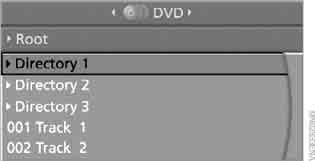
2. Premere il tasto .
3. Select the track.
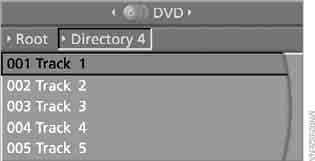
4. Press the key.
5. Select "Play".
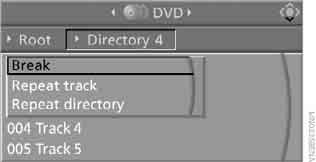
6. Press the key.
To go to another directory:
1. Select the directory.
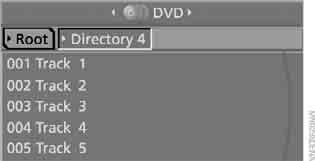
2. Premere il tasto.
Playback functions
1. Select the track.
2. Press the key.
3. Select the following item in the menu:
► "Play": starts playback.
► "Break" (Pause): interrupts and resumes playback.
► "Repeat track": repeats the selected track.
► "Repeat directory": repeats the tracks of the current directory.
4. Press the key.
Mettiti alla prova
Un breve quiz sulla BMW X3: ogni risposta ha una spiegazione e un link alla pagina del manuale.