Playing video films from CDs/DVDs
DVD region codes
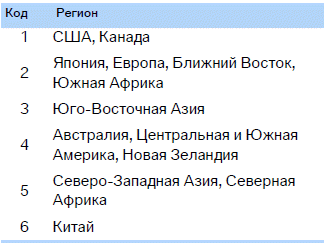
The DVD changer can only play discs with the code for your region, for example Europe = 2. The code supported by your DVD can be found in the disc information.
Regional code assignment:
Playback
1. Insert the CD/DVD label side up.
The disc is drawn in automatically.
► Playback usually starts automatically after a few seconds.
► Playback does not start automatically: select "DVD".
Press the button .
2. If the control panel or the DVD's own menu appears on the screen, select the desired item using the buttons on the remote control.
Or:
press the button on the CD/DVD player .
Playback can be controlled with the buttons on the CD/DVD player or via the DVD's own menu.
 Video CDs (VCD) and Super Video CDs (SVCD) without their own menu are played in the same way as DVDs.◄
Ejecting CDs/DVDs
Press the button on the CD/DVD player. .
The disc is ejected from the disc drive.
DVD control panel
The DVD control panel allows you to select tracks and chapters, open the DVD menu, select the language, perform fast forward and reverse, pause, etc.
Some discs may cause the DVD control panel to be disabled (temporarily or for the entire playback of the disc). In this case, use the disc menu to operate the DVD.
1. During playback, press the button on the remote control .
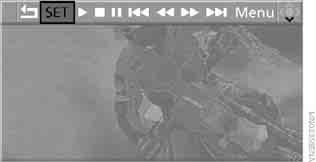
2. To select a function, press the button on the remote control or turn the controller on the player.
3. Press the button .
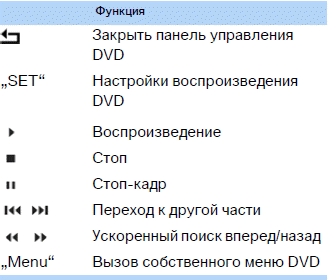
The DVD control panel disappears from the screen automatically some time after the last key press.
Or:
press the button on the remote control to close the DVD control panel.
Fast forward/reverse
Fast forward/reverse via the DVD control panel
1. During playback, press the button on the remote control .
2. Select the symbol
 .
3. Press the button .
4. To speed up the search, press the button several times.
The DVD plays with distortion.
To turn off fast forward/reverse:
1. Select the symbol .
2. Press the button .
Or:
press the button on the CD/DVD player .
The disc plays from the selected point.
Fast forward/reverse search via the remote control
Press the button and hold it until the required position is found.
Or:
1. During playback, turn the controller on the player.
Fast forward/reverse starts.
2. Turn the controller again to speed up the search.
3. Press the button on the CD/DVD player .
The search stops.
The disc plays from the selected point.
Skipping to another chapter
During playback, you can skip to the next or previous chapter.
1. During playback, press the button on the remote control .
2. Select the symbol
 .
3. Press the button as many times as required to move to the required section.
Or:
press the key with the corresponding arrow as many times as needed to find the desired chapter.
Freeze frame
1. During playback, press the button on the remote control .
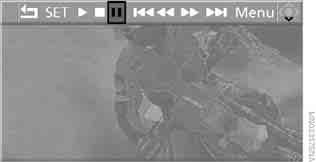
2. Select the symbol .
3. Press the button .
Resuming playback:
1. Select the symbol or
 .
2. Press the key .
Playback can also be stopped and restarted using the buttons and on the CD/DVD player.
DVD settings
1. During playback, press the button.
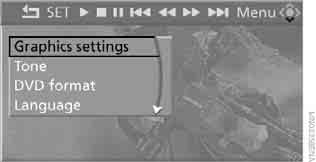
2. Making settings using the remote control:
► "Graphics settings":
► "Brightness", "Colour" and "Contrast" of the picture.
► After moving to the upper field, other settings can be made.
"Language": language of the DVD system menu in the rear seat area.
"Display": backlight brightness of the display.
► "Tone":
► "Treble / Bass" and "Balance" (left/right):
adjusted separately for the left and right headphones (including infrared).
► "Reset":
standard parameter values are restored.
► "DVD format":
► "Standard"
► "Zoom": picture full screen.
► "Language":
audio track recorded on the DVD. Each time this menu item is selected, the display switches to the next language.
► "Subtitle": subtitle language.
"00 n/a": no subtitles.
► "Title": selecting individual titles on the DVD.
► "Angle": camera angle.
As a rule, the option to select a camera angle is indicated by links and symbols that appear during playback of the film. This option is usually available only for a short section.
► "Menu": calls up the DVD's own menu.
► "Return": exits the menu (also when pressing the buttons on the remote control).
On many DVDs, dialogue and subtitles are recorded in several languages. The availability of these functions depends on the specific disc.
 On some DVDs, the language, subtitles and camera angle can only be selected through the disc's own (built-in) menu.
Refer to the disc description for available options.
Items shown in grey cannot be selected.◄
Calling up the DVD menu
DVDs may have additional functions. For example, the viewer can select a storyline of the film or view information about it.
1. During playback, press the button on the remote control .
2. Select "Menu".
3. Press the button .
 On some DVDs, another menu opens via the "Menu" and "Title" items.◄
Selection:
1. Using the remote control buttons, select the required function in the disc's own menu.
2. Press the button .
 The DVD menu also allows you to select the language, subtitles and camera angle.
Check the selection options in the disc description.◄
Compressed audio files
Playback
1. Select the directory.
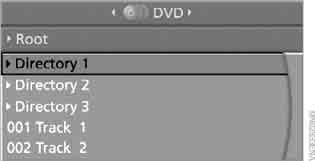
2. Press the key .
3. Select the track.
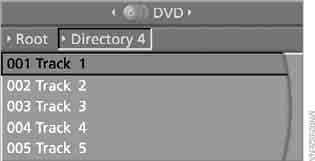
4. Press the button.
5. Select "Play".
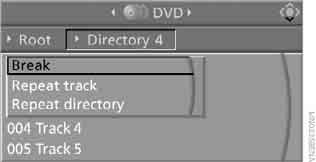
6. Press the button.
To go to another directory:
1. Select the directory.
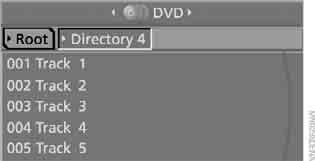
2. Press the key.
Playback functions
1. Select the track.
2. Press the button.
3. Select the following item in the menu:
► "Play": starts playback.
► "Break": interrupts and resumes playback.
► "Repeat track": repeats the selected track.
► "Repeat directory": repeats the tracks in the current directory.
4. Press the button.
Test yourself
A quick BMW X3 quiz: every answer comes with an explanation and a link to the manual page.