Playing audio tracks from CD/DVD
Riproduzione
Insert the CD/DVD label side up.
Il disco viene automaticamente trascinato all'interno.
► Playback starts automatically after a few seconds.
► Playback does not start automatically: select "CD".
Premere il tasto .
Reading the contents of a CD/DVD with compressed audio files may take several minutes, depending on the file structure.
Starting playback with a disc already inserted:
1. Open the source menu using the remote control.
2. Select "CD".

Playback can also be started using the keys on the CD/DVD player.
Ejecting the CD/DVD: press the key on the CD/DVD player .
Selezione del brano
Using the keys on the CD/DVD player
Premere il tasto
 con la freccia corrispondente, finché non si trova il brano desiderato.
Playback starts from the beginning of the track.
Using the remote control
Premere il tasto with the corresponding arrow, or turn the knob until you find the desired track.
Playback starts from the beginning of the track.
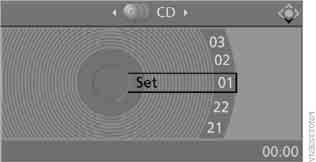
Settings and playback functions for audio CD/DVD
1. Select "SET" (Settings).
2. Premere il tasto .

3. Making settings using the remote control:
► "Tone" (Sound):
► „Treble / Bass“ (Acuti / Bassi) e „Balance“ (Bilanciamento destra / sinistra): regolazione separata per le cuffie sinistra e destra (inclusi gli apparecchi a infrarossi).
► „Reset“ (Ripristino): ripristino dei valori standard dei parametri.
► "Break" (Pause): interrupts and resumes playback.
► „Random“ (Riproduzione casuale): le tracce del CD/DVD vengono riprodotte in ordine casuale.
► „Scan“ (Scansione): vengono riprodotti automaticamente, uno dopo l'altro, brevi frammenti di tutte le tracce del CD/DVD.
► „Repeat“ (Ripeti): ripetizione della traccia corrente. Per interrompere la ripetizione, selezionare di nuovo la voce.
Ricerca veloce in avanti/indietro
Tasti sul lettore CD/DVD: premere e tenere premuto il tasto
 della direzione corrispondente.
Telecomando:
premere il tasto and hold it until you find the desired location.
File audio compressi
La riproduzione di alcuni CD/DVD può iniziare automaticamente dalla prima traccia.
Riproduzione
1. Select the directory.
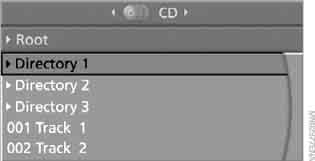
2. Premere il tasto .
3. Selezionare la traccia.
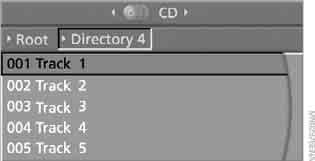
4. Press the key.
To go to another directory:
1. Select the directory.

2. Premere il tasto.
Impostazioni e funzioni di riproduzione per i file audio compressi
1. Select the track.
2. Press the key.
3. Eseguire le impostazioni con il telecomando:
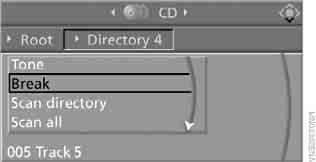
► "Tone" (Sound):
► „Treble / Bass“ (Acuti / Bassi) e „Balance“ (Bilanciamento destra / sinistra): regolazione separata per le cuffie sinistra e destra (inclusi gli apparecchi a infrarossi).
► „Reset“ (Ripristino): ripristino dei valori standard dei parametri.
► „Break“ (Pausa): interrompe o riprende la riproduzione.
► „Scan directory“ (Scansione cartella): riproduzione di brevi frammenti delle tracce della cartella corrente.
► „Scan all“ (Scansione di tutto): riproduzione di brevi frammenti di tutte le tracce.
► „Random directory“ (Riproduzione casuale della cartella): le tracce della cartella selezionata vengono riprodotte in ordine casuale.
► „Random all“ (Riproduzione casuale di tutto): tutte le tracce vengono riprodotte in ordine casuale.
► "Repeat track": repeats the selected track.
► "Repeat directory": repeats the tracks of the current directory.
► „Details“ (Dettagli): vengono visualizzate le informazioni disponibili sulla traccia/file corrente.
Mettiti alla prova
Un breve quiz sulla BMW X3: ogni risposta ha una spiegazione e un link alla pagina del manuale.