Playing audio tracks from CD/DVD
Playback
Insert the CD/DVD label side up.
The disc is drawn in automatically.
► Playback starts automatically after a few seconds.
► Playback does not start automatically: select "CD".
Press the button .
Reading the contents of a CD/DVD with compressed audio files may take several minutes, depending on the file structure.
To start playback when a disc is already inserted:
1. Open the source menu using the remote control.
2. Select "CD".

Playback can also be started using the buttons on the CD/DVD player.
Ejecting a CD/DVD: press the button on the CD/DVD player .
Selecting a track
Using the buttons on the CD/DVD player
Press the button
 with the corresponding arrow until the required track is found.
Playback starts from the beginning of the track.
Using the remote control
Press the button with the corresponding arrow, or turn the knob until the required track is found.
Playback starts from the beginning of the track.
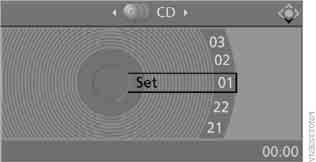
Settings and playback functions for audio CD/DVD
1. Select "SET".
2. Press the key .

3. Making settings using the remote control:
► "Tone":
► "Treble / Bass" and "Balance" (left/right): adjusted separately for the left and right headphones (including infrared).
► "Reset": standard parameter values are restored.
► "Break": interrupts and resumes playback.
► "Random": CD/DVD tracks are played in random order.
► "Scan": short excerpts of all CD/DVD tracks are played one after another automatically.
► "Repeat": repeats the current track. To cancel repeat, select the item again.
Fast forward/reverse
CD/DVD player buttons: press and hold the button
 in the appropriate direction.
Remote control:
press the button and hold it until the required position is found.
Compressed audio files
Some CD/DVDs may start playing automatically from the first track.
Playback
1. Select the directory.
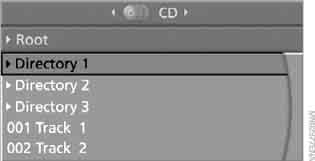
2. Press the key .
3. Select the track.
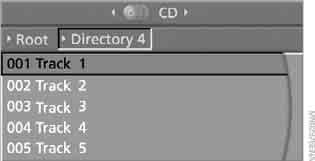
4. Press the button.
To go to another directory:
1. Select the directory.

2. Press the key.
Settings and playback functions for compressed audio files
1. Select the track.
2. Press the button.
3. Make settings using the remote control:
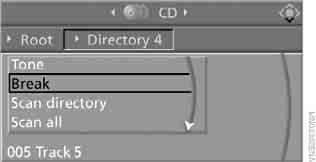
► "Tone":
► "Treble / Bass" and "Balance" (left/right): adjusted separately for the left and right headphones (including infrared).
► "Reset": standard parameter values are restored.
► "Break": interrupts or resumes playback.
► "Scan directory": plays short excerpts of the tracks in the current directory.
► "Scan all": plays short excerpts of all tracks.
► "Random directory" (Random directory): tracks in the selected directory are played in random order.
► "Random all" (Random all): all tracks are played in random order.
► "Repeat track": repeats the selected track.
► "Repeat directory": repeats the tracks in the current directory.
► "Details" (Details): displays the available information for the current track/file.
Test yourself
A quick BMW X3 quiz: every answer comes with an explanation and a link to the manual page.