Media Player
Handling phone calls
In this manual: Media Player
15steps
~90min
4/5difficulty
Done 0 of 15
Handle phone calls in the vehicle for a cell phone connected via Bluetooth.
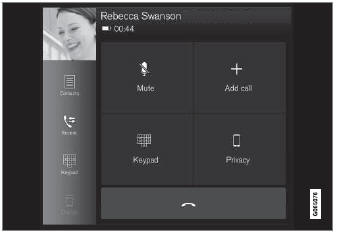
General illustration.
Ringing
- Open the phone tile.
- Initiate a call by selecting the phone number from the recent calls list, entering the number on the keypad or selecting a number from the phone book (list of contacts). You can search or scroll to find a contact in the phone book. Tap
 in the phone book to add a contact to Favorites.
- Tap
 to make a call.
- Tap
 to end the call.
Calls can also be made from the list of recent calls using the app menu, which can be opened using the  button on the right-side steering wheel keypad.
Making multiple calls
While a call is in progress:
- Tap Add call.
- Select from the list of recent calls, favorites or contacts.
- Tap an item/row in the list of recent calls or
 for the contact in the phone book.
- Tap Swap calls to switch between calls.
- Tap
 to end the current call.
Group (conference) calls
While multiple calls are in progress:
- Tap Join calls to merge ongoing calls.
- Tap
 to end the call.
Incoming calls
Incoming phone calls will be shown on the instrument panel and in the center display. Manage the calls using the right-side steering wheel keypad or the center display.
- Tap Answer/Decline.
- Tap
 to end the call.
Incoming calls while another call is in progress
- Tap Answer/Decline.
- Tap
 to end the call.
Privacy
- While a call is in progress, tap Privacy and select a setting:
- Switch to mobile phone - the hands-free function will be disabled and the call will continue on the mobile phone.
- Driver focus - the microphone in the overhead console on the passenger side will be muted and the call will continue using the vehicle's hands-free function.
Test yourself
A quick Volvo XC90 quiz: every answer comes with an explanation and a link to the manual page.
Was this page helpful?