Lecteur multimédia
Gestion des appels téléphoniques
Dans ce manuel : Lecteur multimédia
15étapes
~90min
4/5difficulté
Fait 0 sur 15
Gérer les appels téléphoniques dans le véhicule pour le téléphone portable connecté via Bluetooth.
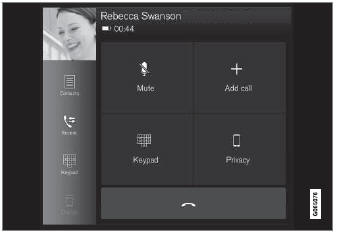
Illustration générale.
Appel entrant
- Ouvrez la tuile téléphone.
- Initiate a call by selecting the phone number from the recent calls list, entering the number on the keypad or selecting a number from the phone book (list of contacts). You can search or scroll to find a contact in the phone book. Tap
 dans le répertoire pour ajouter un contact aux Favoris.
- Tap
 to make a call.
- Tap
 to end the call.
Calls can also be made from the list of recent calls using the app menu, which can be opened using the  button on the right-side steering wheel keypad.
Passer plusieurs appels
Pendant un appel en cours :
- Appuyez sur Ajouter un appel.
- Sélectionnez dans la liste des appels récents, des favoris ou des contacts.
- Tap an item/row in the list of recent calls or
 for the contact in the phone book.
- Appuyez sur Alterner les appels pour basculer d'un appel à l'autre.
- Tap
 to end the current call.
Appels en groupe (conférence)
Pendant que plusieurs appels sont en cours :
- Appuyez sur Joindre les appels pour fusionner les appels en cours.
- Tap
 to end the call.
Appels entrants
Incoming phone calls will be shown on the instrument panel and in the center display. Manage the calls using the right-side steering wheel keypad or the center display.
- Appuyez sur Répondre/Refuser.
- Tap
 to end the call.
Appels entrants pendant qu'un autre appel est en cours
- Appuyez sur Répondre/Refuser.
- Tap
 to end the call.
Confidentialité
- Pendant un appel, appuyez sur Confidentialité et sélectionnez le réglage :
- Basculer sur le téléphone mobile - la fonction mains libres est désactivée et l'appel se poursuit sur le téléphone portable.
- Conducteur concentré - le microphone du pavillon côté passager est coupé et l'appel se poursuit via la fonction mains libres du véhicule.
Testez-vous
Un quiz rapide sur Volvo XC90 : chaque réponse est expliquée, avec un lien vers la page du manuel.
Cette page vous a-t-elle été utile ?