SiriusXM® Satellitenradio
The SiriusXM® Satellite system broadcasts from of a number of high elevation satellites in geosynchronous orbit.
Satellitenradio hören
The digital signals from the satellites are lineof- sight, which means that physical obstructions such as bridges, tunnels, etc, may temporarily interfere with signal reception.
Avoid any obstructions, such as metallic objects transported on roof racks or in a ski box, or other antennas that may impede signals from the SiriusXM® satellites.
Auswahl eines SiriusXM® Satellitenradiosenders
- From the center display's Home view, swipe from right to left to come to App view.

- Tippen Sie auf das Symbol für SiriusXM® Satellitenradio.
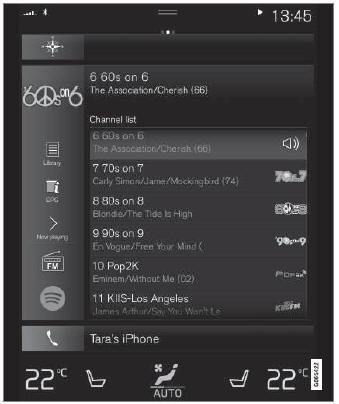
Startansicht mit aktiviertem SiriusXM® Satellitenradio
If there is no subscription activated, tap channel 1, where you will be prompted on the screen to phone SiriusXM®.
If a cell phone is paired and connected to the vehicle, you can also subscribe by:
- Ziehen Sie in der Startansicht das Einstellungsmenü herunter.
- Öffnen Sie das Menü „Einstellungen“ für SiriusXM® Satellitenradio.
- Tippen Sie auf Nicht abonnierte Dienste.
- Um SiriusXM® anzurufen, geben Sie die Telefonnummer ein. Sie aktivieren das gewählte Abonnement. Dies kann einige Minuten dauern.
- When the subscription has been activated, tap the SiriusXM® Satellite radio icon to start the function and display the channel list included in your subscription.
Testen Sie sich
Ein kurzes Quiz zum Volvo XC90: Zu jeder Antwort gibt es eine Erklärung und einen Link zur Handbuchseite.