Radio por satélite SiriusXM®
The SiriusXM® Satellite system broadcasts from of a number of high elevation satellites in geosynchronous orbit.
Escuchar la radio por satélite
The digital signals from the satellites are lineof- sight, which means that physical obstructions such as bridges, tunnels, etc, may temporarily interfere with signal reception.
Avoid any obstructions, such as metallic objects transported on roof racks or in a ski box, or other antennas that may impede signals from the SiriusXM® satellites.
Selección de la radio por satélite SiriusXM®
- From the center display's Home view, swipe from right to left to come to App view.

- Toque el icono de la radio por satélite SiriusXM®.
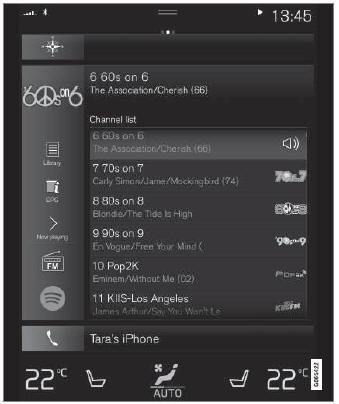
Vista de inicio con la radio por satélite SiriusXM® activada
If there is no subscription activated, tap channel 1, where you will be prompted on the screen to phone SiriusXM®.
If a cell phone is paired and connected to the vehicle, you can also subscribe by:
- Desde la vista de inicio, deslice hacia abajo el menú de ajustes.
- Abra el menú «Ajustes» de la radio por satélite SiriusXM®.
- Toque Servicios no suscritos.
- Para llamar a SiriusXM®, marque el número de teléfono. Ellos activarán la suscripción de su elección. Esto puede tardar unos minutos.
- When the subscription has been activated, tap the SiriusXM® Satellite radio icon to start the function and display the channel list included in your subscription.
Pon a prueba tus conocimientos
Un test rápido sobre el Volvo XC90: cada respuesta trae una explicación y un enlace a la página del manual.