Audio, médias et Internet
Radio satellite SiriusXM®
Dans ce manuel : Audio, médias et Internet
7étapes
~42min
2/5difficulté
Fait 0 sur 7
The SiriusXM® Satellite system broadcasts from of a number of high elevation satellites in geosynchronous orbit.
Écoute de la radio satellite
The digital signals from the satellites are lineof- sight, which means that physical obstructions such as bridges, tunnels, etc, may temporarily interfere with signal reception.
Avoid any obstructions, such as metallic objects transported on roof racks or in a ski box, or other antennas that may impede signals from the SiriusXM® satellites.
Sélection de la radio satellite SiriusXM®
- From the center display's Home view, swipe from right to left to come to App view.

- Appuyez sur l'icône de la radio satellite SiriusXM®.
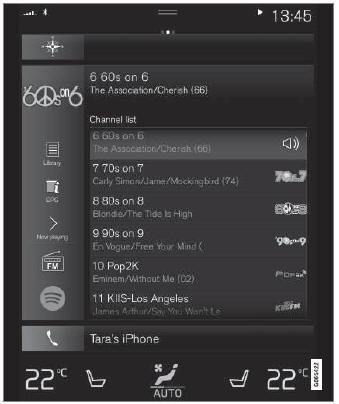
Écran d'accueil avec la radio satellite SiriusXM® activée
If there is no subscription activated, tap channel 1, where you will be prompted on the screen to phone SiriusXM®.
If a cell phone is paired and connected to the vehicle, you can also subscribe by:
- Depuis l'écran d'accueil, ouvrez le menu des réglages.
- Ouvrez le menu « Réglages » de la radio satellite SiriusXM®.
- Appuyez sur Services non souscrits.
- Pour appeler SiriusXM®, composez le numéro de téléphone. Ils activeront l'abonnement de votre choix. Cette opération peut prendre quelques minutes.
- When the subscription has been activated, tap the SiriusXM® Satellite radio icon to start the function and display the channel list included in your subscription.
Testez-vous
Un quiz rapide sur Volvo XC90 : chaque réponse est expliquée, avec un lien vers la page du manuel.
Cette page vous a-t-elle été utile ?