Audio, media e Internet
Radio satellitare SiriusXM®
In questo manuale: Audio, media e Internet
7passaggi
~42min
2/5difficoltà
Completati 0 di 7
The SiriusXM® Satellite system broadcasts from of a number of high elevation satellites in geosynchronous orbit.
Ascolto della radio satellitare
The digital signals from the satellites are lineof- sight, which means that physical obstructions such as bridges, tunnels, etc, may temporarily interfere with signal reception.
Avoid any obstructions, such as metallic objects transported on roof racks or in a ski box, or other antennas that may impede signals from the SiriusXM® satellites.
Selezione della radio satellitare SiriusXM®
- From the center display's Home view, swipe from right to left to come to App view.

- Toccare l'icona della radio satellitare SiriusXM®.
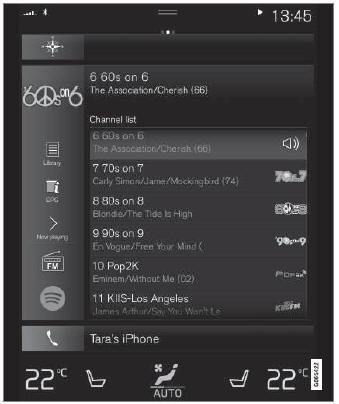
Schermata Home con radio satellitare SiriusXM® attivata
If there is no subscription activated, tap channel 1, where you will be prompted on the screen to phone SiriusXM®.
If a cell phone is paired and connected to the vehicle, you can also subscribe by:
- Dalla schermata Home, trascinare verso il basso il menu delle impostazioni.
- Aprire il menu "Impostazioni" per la radio satellitare SiriusXM®.
- Toccare Servizi non sottoscritti.
- Per chiamare SiriusXM®, digitare il numero di telefono. Attiveranno l'abbonamento di vostra scelta. L'operazione può richiedere alcuni minuti.
- When the subscription has been activated, tap the SiriusXM® Satellite radio icon to start the function and display the channel list included in your subscription.
Mettiti alla prova
Un breve quiz sulla Volvo XC90: ogni risposta ha una spiegazione e un link alla pagina del manuale.
Questa pagina ti è stata utile?