ECO PRO. Displays on the Control Display. Coasting. ECO PRO driving style analysis
In the 7th generation BMW 5 Series, the Control Display shows precise information on ECO PRO functions such as coasting, Start-Stop or energy recovery. The driving style analysis evaluates individual behavior and provides tips for greater efficiency. The Predictive Assistant recognizes speed limits or turns and helps save fuel by lifting off the accelerator early. The displays are intuitive and encourage conscious driving. Ideal for anyone who wants to optimize their driving style based on data.
Displays on the Control Display
Show EfficientDynamics information
The current effect of the ECO PRO functions can be shown on the Control Display.
Via iDrive:
- "My Vehicle"
- "Experience Technology"
- "EfficientDynamics"
 Select the symbol.
The following functions are displayed:
- Auto Start/Stop function.
- Energy recovery.
- Coasting.
Display consumption history
The average consumption, the distance covered while coasting and the duration for which the Auto Start/Stop function has switched off the engine can be shown on the Control Display.
The average consumption and the duration for which the Auto Start/Stop function has switched off the engine can be shown on the Control Display.
Via iDrive:
- "My Vehicle"
- "Experience Technology"
- "EfficientDynamics"
 Select the symbol.
Vertical bars show consumption over the selected route.
Select route length
Via iDrive:
 Press the button.
- Select the desired route length or scale.
Reset consumption history
Via iDrive:
 Press the button.
- "Reset consumption history"
Predictive Assistant
Principle
The function helps save fuel and supports anticipatory driving.
Based on navigation data, certain upcoming road sections can be recognized early and indicated.
General
The recognized road sections, such as
upcoming towns or turns, require a reduction in speed.
The indication is given even if the upcoming road section cannot yet be seen while driving.
The indication remains displayed until the road section is reached.
When an indication is given, lift off the accelerator and coast to reduce speed in a fuel-efficient way until the road section is reached.
Depending on the situation, the system also uses engine braking independently by interrupting coasting.
Prerequisites for operation
The function is available in ECO PRO driving mode.
The function depends on the currency and quality of the navigation data.
The navigation data can be updated.
Display
Display in the instrument cluster
 The indication of an upcoming road section is a recommendation to let the vehicle coast.
An additional symbol shows the recognized road section:
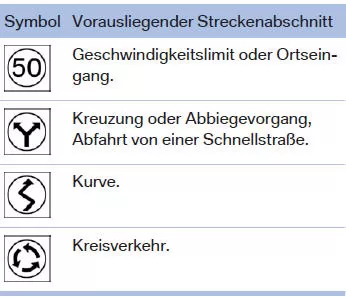
Display in head-up display
The predictive indication can also be shown in the Head-Up Display.
Displays on the Control Display

On the Control Display, a message is shown in the driving style analysis display when a corresponding road section lies ahead.
Call up the driving style analysis display via iDrive:
- "My Vehicle"
- "Experience Technology"
- "Driving style analysis"
Using the Predictive Assistant
An upcoming road section is displayed:
- Lift off the accelerator.
- Let the vehicle coast until the displayed road section is reached.
- If necessary, adjust speed by braking.
System limitations
The function is not available in the following situations:
- Speed is below 50 km/h.
- With temporary and variable speed limits, e.g. in construction zones.
- If the quality of the navigation data is insufficient.
- With active cruise control.
- When towing a trailer.
Coasting
Principle
The function helps save fuel.
Under certain conditions, the engine is automatically decoupled from the transmission in selector lever position D. The vehicle then rolls on in neutral to reduce fuel consumption.
Selector lever position D remains engaged.
This driving state is called coasting.
As soon as the brake or accelerator pedal is pressed, the engine is automatically reconnected.
General
Coasting is part of the ECO PRO driving mode.
Selecting the ECO PRO driving mode via the Driving Experience control automatically activates coasting.
Anticipatory driving helps you use the function frequently and supports the fuel-saving effect of coasting.
Prerequisites for operation
In ECO PRO driving mode, the function is available in the speed range of approx. 50 km/h to 160 km/h when the following conditions are met:
- The accelerator pedal and brake pedal are not pressed.
- Selector lever is in position D.
- Engine and transmission are at operating temperature.
Operation using shift paddles
Principle
The coasting driving state can be influenced using the shift paddles.
Activating and deactivating coasting using the shift paddles
- Pull the right shift paddle to shift into the highest gear.
- Press the right shift paddle again to enter the coasting driving state.
Display
Instrument cluster without extended scope
 The marker in the efficiency display below the tachometer is at the zero point and illuminated blue.
The tachometer shows approximately idle speed.
Instrument cluster with extended scope
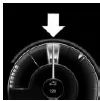 The marker in the efficiency display is at the zero point and illuminated blue.
 In the coasting driving state, the distance covered is displayed.
Displays on the Control Display
In EfficientDynamics, the coasting driving state is displayed while driving.
The distance covered in the coasting driving state is shown in the consumption history.
The counter is reset every time the vehicle is refueled.
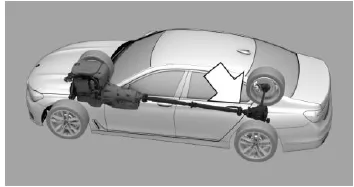
Blue coloring: coasting driving state.
Show EfficientDynamics information
Via iDrive:
- "My Vehicle"
- "Experience Technology"
- "EfficientDynamics"
System limitations
The function is not available if one of the following conditions is met:
- DSC OFF or TRACTION is activated.
- Driving in the dynamic limit range, as well as on steep uphill or downhill gradients.
- Battery state of charge temporarily too low, or excessive power demand on the vehicle electrical system.
- Towing a trailer.
ECO PRO driving style analysis
Principle
This function helps you develop a particularly efficient driving style and save fuel.
For this purpose, your driving style is analyzed. The evaluation is made in different categories and shown on the Control Display.
This display helps you adapt your individual driving style to save fuel.
General
The current trip is evaluated.
To support efficient driving, ECO PRO tips are displayed while driving.
By adapting your driving style, the vehicle's range can be increased.
This range gain is shown as bonus range in the instrument cluster and on the Control Display.
Function requirements
The function is available in ECO PRO driving mode.
Opening the ECO PRO driving style analysis
Via iDrive:
- "My Vehicle"
- "Experience Technology"
- "Driving style analysis"
Display on the Control Display
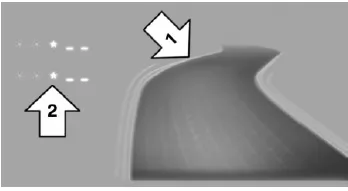
The ECO PRO driving style analysis display consists of a symbolic road profile and a value table.
The road symbolizes the efficiency of your driving.
The more efficient your driving, the flatter the road profile shown, arrow 1.
The value table contains stars. The more efficient your driving, the more stars are shown in the table, arrow 2, and the faster the bonus range increases.
With inefficient driving, however, a wavier road and a reduced number of stars are shown.
The ECO PRO driving style analysis displays in the BMW 5 G30/G31 help you consciously reflect on your driving behavior and improve it further. The graphic representation on the Control Display makes the link between driving style and efficiency immediately visible and encourages resource-conserving use of the vehicle.
The additional hints from the predictive assistant are particularly useful. It alerts you to upcoming road sections and helps you avoid unnecessary acceleration and braking. The combination of analysis and practical tips makes ECO PRO a valuable everyday companion.
FAQQuestion 1: Is the bonus range reset every time the vehicle is refueled?
Answer: Yes, after refueling, the bonus range count starts again to evaluate the new driving style.
Question 2: Does the predictive assistant work in all driving situations?
Answer: No. For example, at speeds below 50 km/h or when towing a trailer, the function is not active.
Test yourself
A quick BMW 5 quiz: every answer comes with an explanation and a link to the manual page.