ECO PRO. Principle. General. Configuring ECO PRO INDIVIDUAL. Display in the instrument cluster
ECO PRO is the core of economical driving in the BMW 5 Series G30. This chapter describes in detail how functions such as "Coasting", the Predictive Assistant or the individual configuration of comfort functions help to improve range and efficiency. The bonus range motivates a sustainable driving style. The consumption displays are also designed for maximum transparency. An intelligent technology for everyone who wants to drive consciously.
Principle
ECO PRO supports fuel-saving driving. For this purpose, the engine control and comfort functions, such as the climate control output, are adjusted.
Steptronic transmission: Under certain conditions, the engine is decoupled from the transmission in selector lever position D. The vehicle coasts in neutral in a consumption-optimized manner.
The selector lever remains in position D.
In addition, situation-dependent hints, ECO PRO tips, can be displayed to help drive in a consumption-optimized way.
In the instrument cluster, the range extension achieved in this way can be displayed as bonus range.
General
The system includes the following EfficientDynamics functions and EfficientDynamics displays:
- ECO PRO bonus range.
- ECO PRO climate control.
- ECO PRO Predictive Assistant driving hint.
- ECO PRO Coasting driving state.
- ECO PRO driving style analysis.
Overview
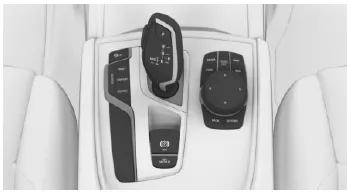
 Button
Activate ECO PRO
Press the button. ECO PRO is shown in the instrument cluster.
Configure ECO PRO INDIVIDUAL
Access via Driving Experience control
- Activate ECO PRO.
- "Configure ECO PRO INDIVIDUAL"
Access via iDrive
- "My Vehicle"
- "Vehicle settings"
- "Driving Experience control"
- "Configure ECO PRO INDIVIDUAL"
- Select the desired setting.
Activate/deactivate ECO PRO functions
The following ECO PRO functions can be activated/deactivated:
- "ECO PRO Limit"
- "Coasting"
- "ECO PRO Seat climate"
- "ECO PRO Climate control"
- "ECO PRO Lights and vision"
- "Predictive Assistant"
The settings are saved for the driver profile currently in use.
ECO PRO Limit
- Activate ECO PRO Limit: "ECO PRO Limit" On. An ECO PRO tip is displayed when the speed of the set ECO PRO limit is exceeded.
- Set ECO PRO Limit speed: "Notify at:" Select the desired speed.
Coasting
When coasting, the engine can be operated in neutral in a fuel-efficient manner.
This function is only available in ECO PRO driving mode.
To use the engine braking effect on downhill gradients, deactivate the function.
ECO PRO Seat climate
The output of the seat heating and, if fitted, the seat ventilation is reduced when ECO PRO is activated.
ECO PRO Climate control
Climate control is adjusted in a fuel-efficient manner.
A slight deviation from the set temperature, i.e. slower heating or cooling of the interior, is therefore possible in favor of fuel economy.
Mirror heating is made available at low outside temperatures.
ECO PRO Lights and vision
The output of the exterior mirror and rear window defroster is reduced. Depending on equipment, the Dynamic ECO Light function, see page 144, is also activated.
Predictive Assistant
The Predictive Assistant detects upcoming road sections and gives a notice about them.
Reset settings
Reset ECO PRO INDIVIDUAL to the standard setting: "Reset to ECO PRO STANDARD"
Display in the instrument cluster
Display
When the ECO PRO driving mode is activated, the display switches to a special layout.
Some displays may differ from the display in the instrument cluster.
ECO PRO bonus range
 An adapted driving style can extend the range.
This can be shown as bonus range in the instrument cluster.
The bonus range is included in the range display.
Depending on equipment, blue bar segments show the range gained in steps.
If the bonus range is shown in grey, the current driving style is inefficient.
The display turns blue as soon as all conditions for consumption-optimized driving are met.
After refueling, the bonus range is reset automatically.
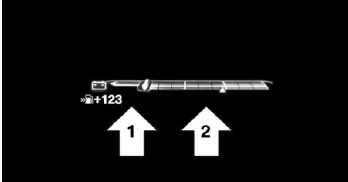
Fuel consumption display
Instrument cluster without extended equipment:
Instrument cluster with extended scope
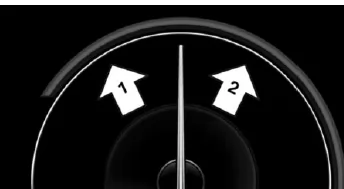
A pointer in the consumption display shows the current driving style:
- The current consumption is shown in relation to the average consumption.
- Pointer in area arrow 1: display for energy recovery by coasting or when braking.
- Pointer in area arrow 2: display when accelerating.
With inefficient acceleration, the area between average consumption and current consumption turns red.
In addition, the following information is shown depending on the situation:
- Depending on equipment: the distance covered while coasting.
- The total time with the engine switched off during automatic engine stop phases.
- A shift point indicator, recommending a more fuel-efficient gear.
The ECO PRO driving mode in the BMW 5 Series G30/G31 combines intelligent technology and practical tips to promote consumption-optimized driving. By adjusting engine control, climate control and other functions, driving becomes noticeably more efficient.
The configurable ECO PRO settings are particularly innovative, allowing the mode to be adapted individually to your own driving style. The bonus range provides direct feedback that further motivates you to drive ahead-of-time and fuel-efficiently.
With these features, the BMW 5 Series G30/G31 shows how modern driving comfort and sustainability can be combined in harmony.
Test yourself
A quick BMW 5 quiz: every answer comes with an explanation and a link to the manual page.