Operating Elements
This chapter explains the main operating elements of the BMW 5 Series (VII generation / G30 & G31), in particular the Control Display and the controller with touchpad. It shows how to navigate efficiently through menus and make settings. It also covers the importance of correct handling and care. It is a clear guide for anyone who wants to use the infotainment system safely and effectively.
Overview
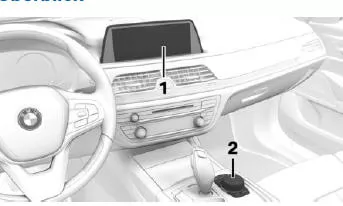
- Control Display with touchscreen
- Controller with touchpad
Control Display
General
When cleaning the Control Display, observe the care instructions.
If the Control Display is exposed to very high temperatures, e.g. due to intense sunlight, its brightness may be reduced or it may switch off completely. When the temperature drops, e.g.
due to shade or the air conditioning, normal functions are restored.
Safety information
NOTICE Objects in the area in front of the Control Display can slip and damage the Control Display. There is a risk of property damage. Do not place objects in the area in front of the Control Display.
Switching on
- Switch on standby mode.
- Press the controller.
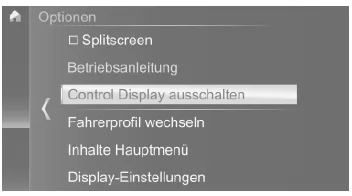
Switching off
 Press the button.
- "Switch off Control Display"
Controller
General
The buttons can be used to open menus directly. The controller is used to select menu items and make settings.
Some iDrive functions can be operated using the touchpad on the controller.
Operation
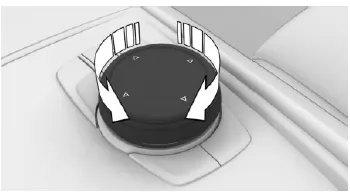
- Turn.
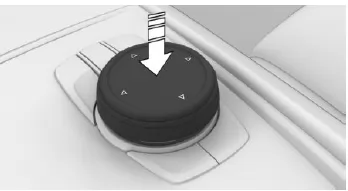
- Press.
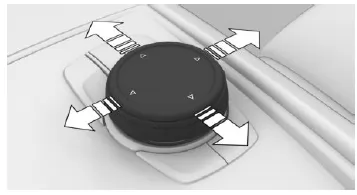
- Tilt in four directions.
Buttons on the controller
| Button | Function |
 |
Press once: Open main menu. |
Press twice: Display all menu items of the main menu.


The operating elements of the BMW 5 Series G30/G31 are optimally positioned to provide maximum ergonomics and comfort. The Control Display with touch function and the controller with touchpad complement each other perfectly and allow precise control of vehicle functions.
A clearly structured menu layout is particularly important, as it allows functions to be found quickly. This keeps operation of the BMW 5 intuitive and safe, a real advantage in modern road traffic.
Test yourself
A quick BMW 5 quiz: every answer comes with an explanation and a link to the manual page.