Audio playback
In vehicles with a single disc drive, the DVD audio track is played even if video playback is not possible.
1. Press the button .
The main menu opens.
2. Push the controller back to open the "Entertainment" menu.
3. Move to the upper field. Select "DVD" and press the controller.
4. Move to the second field from the top, select DVD and press the controller.
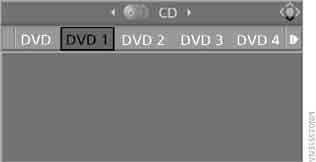
Playing DVD audio content
DVDs are usually divided into titles, and titles into chapters. Playback starts with the title that contains the most chapters. This prevents playback from starting, for example, with the disc introduction.
All DVD chapters are numbered, but the numbering differs from the disc numbering. The disc numbering is shown in the status line.
Example:

Chapter 06 in the selection menu is Chapter 4 of Title 2 on the disc.
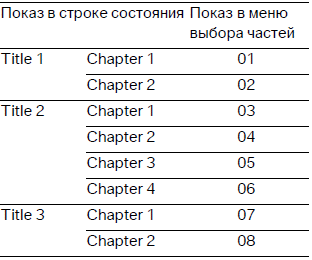
Since playback does not necessarily start from the first track, the chapter selection menu may not start at 01.
 The behavior of the disc during playback depends on the disc itself.
DVDs may not play or playback may end prematurely. In this case, the DVD changer switches to the next disc.◄
Selecting a chapter
Select a chapter by turning the controller.

If playback stops at the end of a track, use the controller to select the next chapter.
A maximum of 99 DVD chapters can be played.
Adjusting sound settings
For a DVD with multi-channel sound, for optimal playback select the multi-channel audio track, see Selecting the language, and set the sound parameters to surround sound, see HiFi Professional sound system.
Language Selection
For a multilingual disc you can select the language.
1. Select “Set” and press the controller.
The following menu items appear on the screen.
2. Select "Language / Audio format" and press the controller.
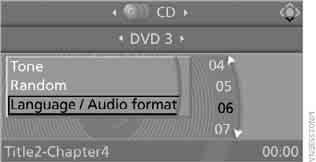
The languages available on the disc appear on the screen.
3. Select a language and press the controller.
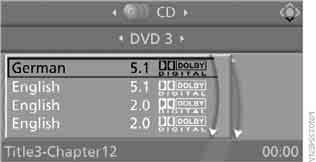
The number of channels is usually indicated next to the language or audio track. The figures 5.1 indicate multi-channel sound.
Test yourself
A quick BMW X3 quiz: every answer comes with an explanation and a link to the manual page.