Remote control
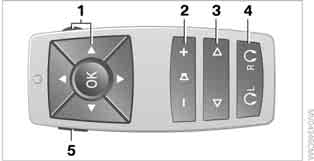
1 Menu navigation
2 Headphone volume for plug-in headphones
3 Skip to another track or chapter during CD or DVD playback, fast forward/reverse, select another TV channel
4 Switch between right and left headphones
5 Call up the DVD system home menu
Menu navigation
Menu navigation is possible with controller 1 and buttons 1. See also iDrive operating principles.
► Turn controller 1: select a menu item.
► Press buttons 1: move to another field.
► Press the button : confirm the menu item.
Replacing the Batteries
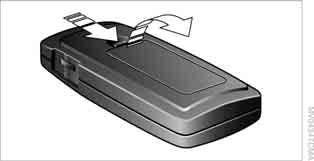
1. Press the latch and remove the cover.
2. Replace the batteries. The battery type and installation position are indicated on the bottom of the compartment.
3. Close the cover.
 Dispose of used batteries at a collection point or at a BMW service center.◄
Test yourself
A quick BMW X3 quiz: every answer comes with an explanation and a link to the manual page.