10-inch touch screen
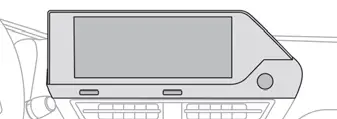
This system gives access to the following elements:
- Permanent display of the time and outside temperature (a blue warning lamp appears if there is a risk of ice).
- Heating/air conditioning system controls (depending on version).
- Vehicle functions and equipment setting menus.
- Audio system and telephone controls and display of related information.
- Display of visual manoeuvring aid functions (visual parking sensor information, etc.).
- Internet services and display of related information.
- Navigation system controls and display of related information (depending on version).
For safety reasons, always stop the vehicle before performing operations that require sustained attention.
Some functions are not accessible while driving.
Recommendations
This screen uses capacitive sensing technology.
- Do not use pointed objects on the touch screen.
- Do not touch the touch screen with wet hands.
- Use a soft, clean cloth to clean the touch screen.
- With MyCitroën Play
- With MyCitroën Drive Plus
With MyCitroën Play
Principles
 Use this button to access the menus, then press the buttons that appear on the touch screen.
 Use this button for direct access to the Driving menu.
Some menus may display across two pages: press the "OPTIONS" button to access the second page.
After a few moments with no action on the second page, the first page is displayed automatically.
To deactivate/activate a function, select "OFF" or "ON".
 Configuring a function
 Access to additional information on the function
 Confirm
 Return to the previous page or confirm
 Audio system on/off Volume adjustment/mute
Menus
Press the touch screen with three fingers to show all of the menu buttons.
For more information about the menus, refer to the sections describing the audio and telematics systems.
 Radio/Media
 Climate
Settings for temperature, air flow, etc.
For more information on Manual air conditioning and Dual-zone automatic air conditioning, refer to the corresponding sections.
 Navigation (Depending on equipment)
 Driving or Vehicle (Depending on equipment)
Activation, deactivation and settings for certain functions.
The functions are organised in 2 tabs: "Driving functions" and "Vehicle settings".
 Telephone
 Applications
Access to certain configurable equipment.
 Settings
Main settings for the audio system, touch screen and digital instrument panel.
Energy menu (Electric)
 It can be accessed directly by pressing the button located on the centre console.
The pages available vary depending on the audio equipment.
Flow
The page displays a real-time representation of the electric drive train's operation.

- Active driving mode
- Electric motor
- Estimated traction battery charge level
- Energy flows
The energy flows have a specific colour for each type of driving:
- Blue: energy consumption
- Green: energy recovery
Statistics
This page shows electrical energy consumption statistics.
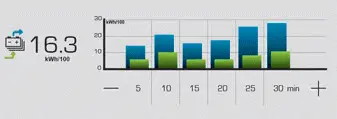
- Blue bar chart: directly consumed energy supplied by the traction battery.
- Green bar chart: energy recovered during deceleration and braking, used to recharge the battery.
The average result for the current trip is stated in kWh/100 km.
► You can change the displayed time scale by pressing the - or + buttons.
A current trip is any trip of more than 20 minutes without switching off the ignition.
Charging
This page allows you to programme deferred charging.
For more information on Charging the traction battery, refer to the corresponding section.
With MyCitroën Drive Plus
Main controls
 Access to one of the home pages Return to the first home page
 Direct access to the Shortcuts for driving aids
► Swipe down from the upper edge of the touch screen to access a list of quick settings (e.g. Brightness, Diagnostics).
► Depending on the pages displayed on the screen, with or without the context menu, scroll the text by swiping with your finger, as with a smartphone.
From any page, press the touch screen with three fingers to display the applications wall.
 Show/Hide context menu
 Return to the previous page
► To change the status of a function, press the description for the corresponding line (change confirmed by the slider moving to the right/left: function activated/deactivated).
 Access additional information on the function
 Access to function parameters
 Adding/Removing shortcuts
 Short press, ignition off: system on/off.
Short press, ignition on: mute/restore sound.
Long press, ignition on: start standby mode (mute sound, screens and clock display off).
Rotation: volume adjustment.
Applications
 Press this button to access the applications wall.
To obtain information about the other applications not listed here, refer to the sections describing the audio and telematic systems.
 ADAS
Activation/Deactivation and configuration of the driving aid functions.
 Climate
Settings for temperature, air flow, etc.
For more information on Dual-zone automatic air conditioning, refer to the corresponding section.
 Settings
Main settings for the audio system, touch screen and digital instrument panel.
Activation/Deactivation and configuration of the exterior lighting, vehicle access and safety functions.
 Energy
Access to the charging system features (energy flow, consumption statistics, deferred charging).
Energy application
Energy Flow
The page displays a real-time representation of the electric drive train's operation.
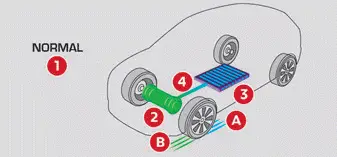
- Active driving mode
- Electric motor
- Estimated traction battery charge level
- Energy flows
The energy flows have a specific colour for each type of driving:
- Blue: energy consumption
- Green: energy recovery
Statistics
This page shows electrical energy consumption statistics.
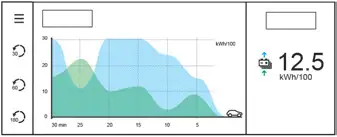
- Blue graph: energy consumed directly from the traction battery.
- Green graph: energy regenerated during deceleration and braking phases used to recharge the traction battery.
The average result for the current trip is stated in kWh/100 km.
It is possible to view data for the last 30, 60 or 180 minutes by clicking on the corresponding value on the left of the graph.
Charging
This page allows you to programme deferred charging.
For more information on Charging the traction battery, refer to the corresponding section.