Top Rear Vision - 360 Vision
- With MyCitroën Play
- Top Rear Vision
- 360 Vision
- With MyCitroën Drive Plus
With MyCitroën Play
For more information, refer to the General recommendations on the use of driving and manoeuvring aids.
With the engine running, these systems allow views of your vehicle's close surroundings to be displayed on the touch screen using one camera for Top Rear Vision and two cameras for 360 Vision.

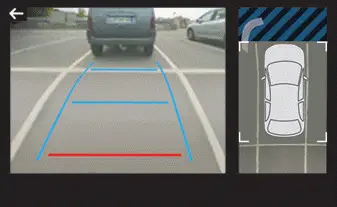
The screen is divided into two parts with a contextual view and a view from above the vehicle in its close surroundings.
The parking sensors supplement the information on the view from above the vehicle.
Various contextual views may be displayed:
- Standard view.
- 180º view.
- Zoom view.
AUTO mode is activated by default.
In this mode, the system chooses the best view to display (standard or zoom).
You can change the type of view at any time during a manoeuvre.
► Press the button in the bottom left-hand corner of the touch screen.
► Select the type of view:
- "Standard view".
- "180º view".
- "Zoom view".
- "AUTO view".
The display is immediately updated with the type of view selected.
The system status is not saved when the ignition is switched off.
Operating principle

Using one or two cameras, the close surroundings of the vehicle are recorded whilst manoeuvring at low speed.
An image from above your vehicle in its close surroundings is reconstructed (represented between the brackets) in real time and as the manoeuvre progresses.
It facilitates the alignment of your vehicle when parking and allows obstacles close to the vehicle to be seen. It is automatically deleted if the vehicle remains stationary for too long.
With 360 Vision, the image is created using both cameras, when going forward and when reversing.
When the function is activated, it is possible that the view from above is not displayed. If the system is activated when the vehicle has already moved, the view from above can be fully displayed.
Top Rear Vision
Rear view
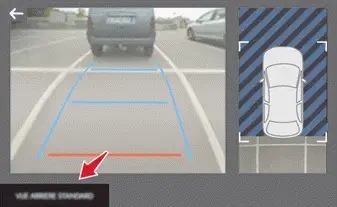
To activate the camera located near the number plate lamps, engage reverse gear and do not exceed a speed of 10 km/h.
The system is deactivated:
- Automatically, at speeds above approximately 20 km/h,
- Automatically, if the boot is opened.
- When changing out of reverse gear.
- By pressing the white arrow in the upper-left corner of the touch screen.
AUTO mode
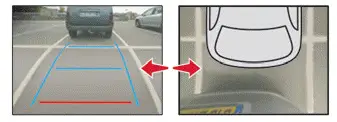
This mode is activated by default.
Using sensors in the rear bumper, the automatic view changes from the rear view (standard) to the view from above (zoom) as an obstacle is approached at the level of the red line (less than 30 cm) during a manoeuvre.
Standard view
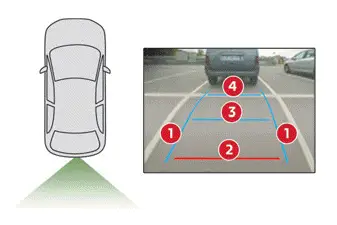
The area behind the vehicle is displayed on the screen.
The blue lines 1 represent the width of your vehicle, with the mirrors unfolded; their direction changes according to the position of the steering wheel.
The red line 2 represents a distance of 30 cm from the rear bumper; the two blue lines 3 and 4 represent 1 m and 2 m, respectively.
This view is available with AUTO mode or in the view selection menu.
Zoom view
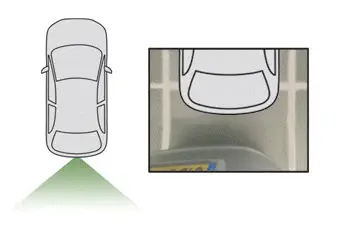
The camera records the vehicle's surroundings during the manoeuvre in order to create a view from above the rear of the vehicle in its near surroundings, allowing the vehicle to be manoeuvred around nearby obstacles.
This view is available with AUTO mode or in the view selection menu.
Obstacles may appear further away than they actually are.
It is important to monitor the sides of the vehicle during the manoeuvre, using the mirrors.
Parking sensors also provide additional information about the area around the vehicle.
180º view
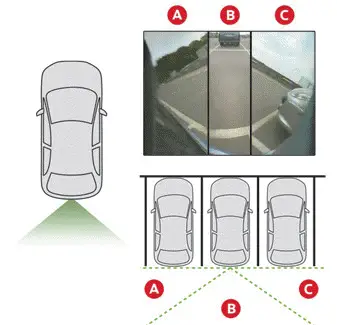
The 180º view facilitates reversing out of a parking space, making it possible to see the approach of vehicles, pedestrians and cyclists.
This view is not recommended for carrying out a complete manoeuvre.
It features 3 areas: left A, centre B and right C.
This view is only available via the view selection menu.
360 Vision
The vehicle has a camera at the front, fitted in the grille, and a camera at the rear, located close to the number plate lamps.
Using these cameras, the system displays the vehicle's near surroundings on the touch screen, offering views from the rear of the vehicle (rear vision) when reverse gear is engaged and views from the front of the vehicle (front vision) when the gearbox is in neutral or a gear is engaged.
Rear vision

The system activates automatically when reverse gear is engaged.
The system is deactivated:
- Automatically, at speeds above approximately 20 km/h.
- When shifting out of reverse (the front vision image replaces the rear vision image for 7 seconds).
- By pressing the white arrow in the upper-left corner of the touch screen.
If a trailer or a bicycle carrier is fitted to the towball, the area behind the vehicle on the view from above goes dark.
The surroundings are reconstructed by the front camera only.
The rear vision views are similar to those for the Top Rear Vision function.
For more information on the Top Rear Vision function, refer to the corresponding section.
Front and rear vision
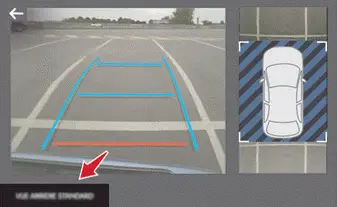
 With the engine running and the speed below 20 km/h, the system is activated via the Driving/Vehicle touch screen menu:
► Select "Visual parking assistance".
AUTO mode is displayed by default, with front vision, if the gearbox is in neutral or with a gear engaged, or with rear vision, if reverse is engaged.
The system is deactivated:
- Automatically above about 30 km/h (the image disappears temporarily from 20 km/h ).
- By pressing the white arrow in the upper-left corner of the touch screen.
AUTO mode

This mode is activated by default.
Using sensors in the front bumper, the automatic view changes from the front view (standard) to the view from above (zoom) as an obstacle is approached during a manoeuvre.
Standard view
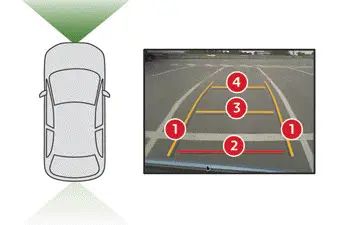
The area in front of your vehicle is displayed on the screen.
The orange lines 1 represent the width of your vehicle, with the mirrors unfolded; their direction changes according to the position of the steering wheel.
The red line 2 represents a distance of 30 cm from the front bumper; the two orange lines 3 and 4 represent 1 m and 2 m, respectively.
This view is available with AUTO mode or by selecting it in the view change menu.
Zoom view
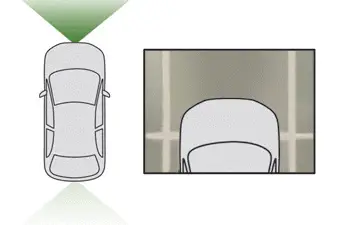
The camera records the vehicle's surroundings during the manoeuvre in order to create a view from above the front of the vehicle in its near surroundings, allowing the vehicle to be manoeuvred around obstacles nearby.
This view is available with AUTO mode or in the view selection menu.
Obstacles may appear further away than they actually are.
It is important to check the sides of the vehicle during the manoeuvre, using the mirrors.
The parking sensors also supplement the information on the vehicle's surroundings.
180º view
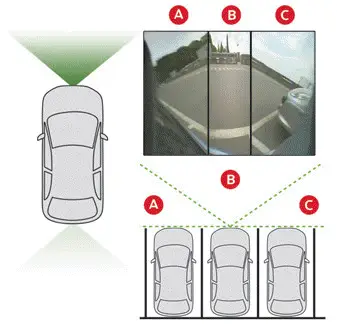
The 180º view assists with exiting from a parking space in forward gear, making it possible to see the approach of vehicles, pedestrians and cyclists.
This view is not recommended for carrying out a complete manoeuvre.
It consists of 3 areas: left A, centre B and right C.
This view is available only from the view selection menu.
With MyCitroën Drive Plus
Top Rear Vision
For more information, refer to the General recommendations on the use of driving and manoeuvring aids.
When reverse gear is engaged, with the engine running, this system displays views of the vehicle's close surroundings on the touch screen using a camera located at the rear of the vehicle.
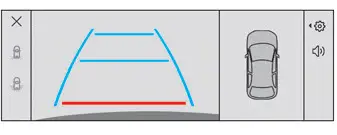
The screen is divided into 4 parts with two side menus, a contextual view and a view from above the vehicle in its close surroundings.
The parking sensors supplement the information in the view from above the vehicle.
Different contextual views are available:
- Automatic zoom view.
- Standard view.
- Panoramic view.
Depending on the context, the system chooses the best view to display (standard or automatic zoom).
The view type can be changed at any time during the manoeuvre.
The system status is not saved when the ignition is switched off.
Operating principle
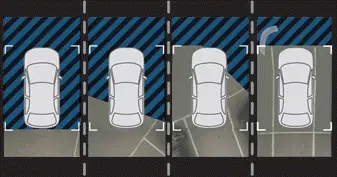
Using the camera, the vehicle's close surroundings are recorded during low speed manoeuvres.
An image from above the vehicle in its close surroundings is created in real time (on the side of the screen), as the vehicle progresses.
This view makes it easier to align the vehicle when parking and to perceive nearby obstacles.
It is automatically deleted if the vehicle remains stationary for too long.
Settings
In the side menu:
 This window allows to carry out the following operations:
- adjust the volume of the audible signal.
- trigger the camera washing (depending on equipment).
 This button allows to mute/unmute the audible signal.
Activation/Deactivation
To activate the camera, engage reverse gear.
The system is deactivated:
- when changing out of reverse gear and speed greater than 10 km/h in forward gear.
- by pressing the cross in the top left-hand corner of the touch screen.
Automatic zoom view

The rear camera records the vehicle's surroundings during the manoeuvre in order to create a view from above the rear of the vehicle in its close surroundings, allowing the vehicle to be manoeuvred around nearby obstacles.
Using the sensors located on the rear bumper, the automatic zoom view is displayed when approaching an obstacle at the red line (less than 30 cm) during the manoeuvre.
This view is only available automatically.
Obstacles may appear further away than they actually are.
It is important to monitor the sides of the vehicle during the manoeuvre, using the mirrors.
Parking sensors also provide additional information about the area around the vehicle.
Standard view
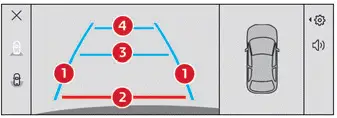
The area behind the vehicle is displayed on the screen.
The blue lines 1 represent the width of your vehicle, with the mirrors unfolded; their direction changes according to the position of the steering wheel.
The red line 2 represents a distance of 30 cm from the rear bumper; the two blue lines 3 and 4 represent 1 m and 2 m, respectively.
This view is available automatically or by selection in the side menu.
Panoramic view
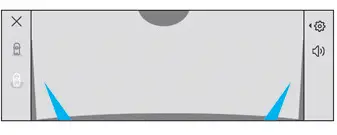
The panoramic view allows you to leave, in reverse, a parking space by anticipating the arrival of vehicles, pedestrians or cyclists.
This view is not recommended for carrying out a complete manoeuvre.
This view is only available by selection in the side menu.
360 Vision
For more information, refer to the General recommendations on the use of driving and manoeuvring aids.
This system allows you to view your vehicle's close surroundings on the touch screen using cameras, located at the front and rear of the vehicle.
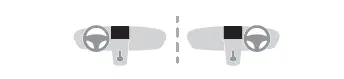
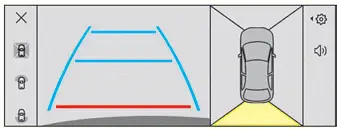
The screen is divided into 4 parts with two side menus, a contextual view and a view from above the vehicle in its close surroundings.
The parking sensors supplement the information in the view from above the vehicle.
Depending on the view angle chosen in the left-hand side menu, the system provides specific visual assistance in particular driving conditions, such as entering a blind intersection or manoeuvring in areas with reduced visibility.
Different contextual views are available for the rear or for the front:
- Automatic zoom view.
- Standard view.
- Panoramic view.
Depending on the context, the system chooses the best view to display (standard or automatic zoom).
The view type can be changed at any time during the manoeuvre.
The system status is not saved when the ignition is switched off.
Operating principle
Reconstructed view
The cameras are activated and a reconstruction of a view from above your vehicle in its close surroundings is displayed on the touch screen.
Live view
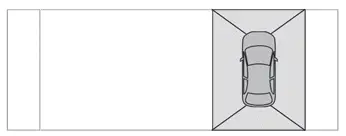
The front and rear views automatically appear in the view from above the vehicle.
It is also possible to display any live view by selecting the corresponding zone.
The front view can be selected in forward gear up to 16 km/h.
Installing the very cold climate screen can alter the image transmitted by the front camera.
Settings
In the side menu:
 This window allows to carry out the following operations:
- adjust the volume of the audible signal.
- trigger the camera washing (depending on equipment).
 This button allows to mute/unmute the audible signal.
Activation/Deactivation
Automatic
With the rear camera, engine running and vehicle stationary, rear vision is displayed automatically if reverse gear is engaged.
With the front camera, engine running and speed below 16 km/h, rear vision is displayed automatically if a reverse gear is engaged.
Manual
 ► In the ADAS touch screen application, select Functions>Panoramic Camera The system is deactivated:
- automatically for the rear, when changing out of reverse gear.
- automatically for the front, above approximately 16 km/h.
- by pressing the cross in the top left-hand corner of the touch screen.
Automatic zoom view

The front or rear camera records the surroundings during the manoeuvre to create a front or rear view from above the vehicle in its close surroundings, making it possible to manoeuvre the vehicle around the surrounding obstacles.
Using the sensors located on the front or rear bumper, the automatic zoom view is displayed when approaching an obstacle at the red line (less than 30 cm) during the manoeuvre.
This view is only available automatically.
Depending on version, it can be activated/ deactivated in the ADAS touch screen application.
► Select Functions>Panoramic Camera, and then its setting menu.
Obstacles may appear further away than they actually are.
It is important to monitor the sides of the vehicle during the manoeuvre, using the mirrors.
Parking sensors also provide additional information about the area around the vehicle.
Standard view
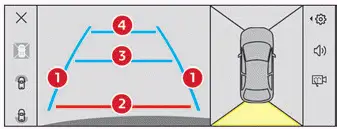
Depending on the context, the area behind or in front of your vehicle is displayed on the screen.
The blue lines (at the rear)/orange lines (at the front) 1 represent the width of your vehicle, with the mirrors unfolded; their direction changes according to the position of the steering wheel.
The red line 2 represents a distance of 30 cm from the rear or front bumper; the two blue lines (at the rear)/orange lines (at the front) 3 and 4 represent 1 m and 2 m respectively.
This view is available automatically or by selection in the left-hand side menu.
Panoramic view
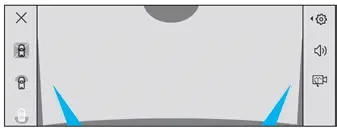
The rear or front panoramic view allows you to leave a parking space by anticipating the arrival of vehicles, pedestrians or cyclists.
This view is not recommended for carrying out a complete manoeuvre.
This view is only available by selection in the left-hand side menu.