Electronic key with remote control function and built-in key
- Remote control function
- Unlocking the vehicle
Remote control function
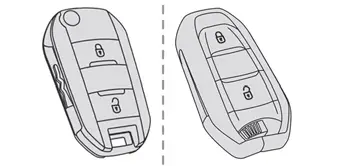
The remote control can be used to perform the following remote functions (depending on version):
- Unlocking/Locking/Deadlocking the vehicle.
- Unlocking and partial opening of the boot.
- Remote operation of lighting.
- Folding/Unfolding the door mirrors.
- Activating/Deactivating the alarm.
- Locating the vehicle.
- Opening/Closing the windows.
- Closing the sunroof.
- Activating the vehicle's electronic immobiliser.
Back-up procedures allow the vehicle to be locked/unlocked in the event of a failure of the remote control, the central locking, the battery, etc. For more information on the Back-up procedures, refer to the corresponding section.
Built-in key
Using the remote control built-in key, you can perform the following operations (depending on version):
- Unlocking/Locking the vehicle.
- Activation/Deactivation of the manual child lock.
- Activation/Deactivation of the front passenger airbag.
- Back-up Unlocking/Locking of the doors.
- Switching on the ignition and starting/ switching off the engine.
Without Keyless Entry and Start
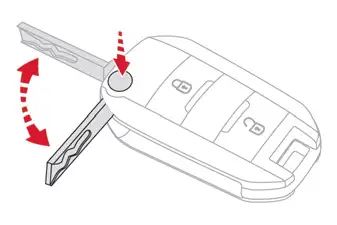
► To unfold or fold the key, press the button.
With Keyless Entry and Start

► To eject the key or put it back in place, pull and hold the button.
Once the built-in key is ejected, always keep it with you to be able to carry out the corresponding back-up procedures.
Unlocking the vehicle

With Touch screen BLUETOOTH audio system or MyCitroën Play
 Selective unlocking is configured in the Driving touch screen menu.
With MyCitroën Drive Plus
 Selective unlocking is configured in the Settings > Vehicle touch screen application.
Complete unlocking
► If the selective unlocking is deactivated, press the unlocking button.
Selective unlocking
Driver's door
► Press the unlocking button.
The driver's door and the fuel filler flap are unlocked (Petrol, Diesel or Hybrid).
The driver's door and the charging flap are unlocked (Electric).
► Press it again to unlock the other doors and the boot.
The charging nozzle can be unplugged on the second press.
Complete or selective unlocking, and alarm deactivation (depending on version), is confirmed by the flashing of the direction indicators.
Depending on version, the door mirrors unfold.
Unlocking and partial opening of the boot
 ► Press this button for more than one second to unlock the boot. The boot opens slightly.
This action unlocks the vehicle first.
Locking the vehicle

Normal locking
► Ignition off, press the locking button.
The locking, and the activation of the alarm depending on version, is confirmed by the lighting of the direction indicators.
Depending on version, the door mirrors fold.
An access (door or boot) that is not properly closed prevents locking of the vehicle. However, if the vehicle is fitted with an alarm, it will be activated after 45 seconds.
If the vehicle is unlocked but the doors or boot are not subsequently opened, the vehicle will automatically lock itself again after about 30 seconds. If the vehicle is fitted with an alarm, it will be reactivated automatically.
Deadlocking
Deadlocking renders the interior door controls inoperative. It also disables the central locking button.
The horn remains operational.
Never leave anyone inside the vehicle when it is deadlocked.
► Ignition off, press the locking button.
► Press the locking button again within 3 seconds to deadlock the vehicle (confirmed by the temporary lighting of the direction indicators).
For the vehicles equipped with the Proximity Keyless Entry and Start system, a double audible signal indicates that the vehicle is not deadlocked.
 With MyCitroën Drive Plus, depending on version, the activation/deactivation of the lock audible signal is configured in the Settings > Vehicle touch screen application.
Opening / Closing the windows
Opening the windows
 ► Press the unlocking button for more than 3 seconds.
Depending on version, the windows stop when the button is released or by pressing the button a second time.
Closing the windows and sunroof (depending on version)
 ► Press the locking button for more than 3 seconds.
Depending on version, the windows and the sunroof stop when the button is released or by pressing the button a second time.
Ensure that no person or object could prevent the correct closing of the windows and sunroof.
If, on versions with alarm, you want to leave the windows and/or sunroof partially open, you must first deactivate the interior volumetric alarm protection.
For more information on the Alarm, refer to the corresponding section.
Remote lighting of the lamps
(Depending on version)
 ► Press this button. The sidelamps, dipped beam headlamps, number plate lamps and door mirror spotlamps come on for 30 seconds.
Pressing again before the end of the timed period switches off the lamps immediately.
Advice
Remote control
The remote control is a sensitive, high-frequency device; avoid handling it in your pocket, due to the risk of unintentionally unlocking the vehicle.
Avoid pressing the remote control buttons while out of range of the vehicle, due to the risk of rendering the remote control inoperative. It would then be necessary to reset it.
The remote control does not work when the key is in the ignition switch, even when the ignition is switched off.
Anti-theft protection
Do not modify the electronic vehicle immobiliser, as this might result in malfunctions.
For vehicles with a key ignition switch, remember to remove the key and turn the steering wheel to engage the steering lock.
Locking the vehicle
Driving with the doors locked could make it more difficult for the emergency services to enter the passenger compartment in an emergency.
As a safety precaution, remove the key from the ignition or take the electronic key with you when leaving the vehicle, even for a short time.
Purchasing a second-hand vehicle
Have the key codes memorised by a CITROËN dealer, to ensure that the keys in your possession are the only ones able to start the vehicle.