Digital instrument panel
Driver information
Instrument panel
The instrument panel displays all the information the driver needs about the status of the vehicle's various systems.
This information appears in the form of warning and indicator lamps and messages.
The instrument panel is in the form of a fully digital screen.
The digital instrument panel can be personalised.
Depending on the display page selected, certain information is hidden or presented differently.
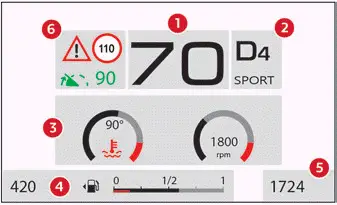
Petrol / Diesel
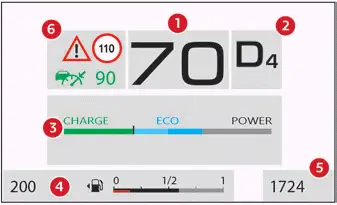
Hybrid
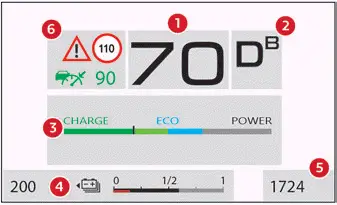
Electric
- Digital speedometer (mph or km/h)
- Selector position and gear on automatic gearbox (Petrol, Hybrid or Diesel)
Drive selector position (Electric)
Gear change indicator (Petrol, Hybrid or Diesel)
Driving mode selected - Customizable area
Different pages can be displayed. - Fuel gauge (Petrol, Hybrid or Diesel)
Charge level indicator (Electric)
Remaining range (miles or km) - Total distance recorder (miles or km)
- Cruise control or speed limiter settings
Display of recognised signs
Indication of danger zones (with connected navigation)
Information displayed on the instrument panel
The information displayed on the instrument panel (e.g. warning lamps, indicators) may have a fixed or variable location depending on the page or the driving aid activated.
For the functions that have indicator lamps for both operation and deactivation, there is only one dedicated location.
Display language and units
These depend on the touch screen settings.
When travelling abroad, the speed must be shown in the official units of the country you are driving in (mph, miles or km/h, km).
Choice of the displayed page
By default, pages are memorised in the instrument panel.
The page change between the instrument panel and the head-up display is synchronised.
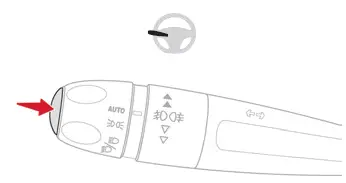
► Press the button located at the end of the lighting control stalk to scroll through the different pages.
The new page is applied immediately.
When a message is displayed in a temporary window, pressing this button will cause this window to disappear immediately.
With MyCitroën Play
It is possible to choose between the following pages:
- "Minimum": digital speedometer, selector position, driving range, distance recorder and:
- Fuel gauge (Petrol, Hybrid or Diesel).
- Battery charge indicator (Electric).
- Power indicator (Electric).
- "Dials" (Petrol, Hybrid or Diesel): digital speedometer, selector position, driving range, distance recorder, fuel gauge, rev counter and engine coolant temperature indicator.
- "Trip computer" (Petrol, Hybrid or Diesel): digital speedometer, selector position, driving range, distance recorder, fuel gauge, current information and selected trip (1 or 2).
- "Driving": digital speedometer, selector position, driving range, distance recorder, information about current driving aids and:
- Fuel gauge (Petrol, Hybrid or Diesel).
- Battery charge indicator (Electric).
- "Navigation": digital speedometer, selector position, driving range, distance recorder, information about current navigation (map and settings) and:
- Fuel gauge (Petrol, Hybrid or Diesel).
- Battery charge indicator (Electric).
- "Personal 1"/"Personal 2" (Electric): digital speedometer, selector position, driving range, distance recorder, battery charge indicator and information selected by the driver.
With MyCitroën Drive Plus
The available settings operations are: addition, deletion and layout of pages and widgets.
It is possible to memorise up to 5 pages.
Each page may contain 1 or 2 widgets:
- With 1 widget, large display in central position.
- With 2 widgets, reduced display in side position.
The colour for each driving mode may be personalised. A default setting is suggested.
The setting also matches the interior ambient lighting (depending on availability).
 The settings are changed via the Settings > Customization touch screen application.
For further information on Personalisation - Instrument Panel, refer to the corresponding section in the audio equipment and telematics systems.