Trip computer

In this manual: Trip computer
Presentation — 1Hybrid system — 1Electric drive system — 1Labels — 1Eco-driving — 1Vehicle data recording and privacy — 1Digital instrument panel — 1Head-up display — 1Warning and indicator lamps — 1Indicators — 1Manual test — 1Lighting dimmer — 1Trip computer — 15-inch touch screen — 110-inch touch screen — 1My shortcuts — 1Electronic key with remote control function and built-in key — 1Proximity Keyless Entry and Start — 1Central locking — 1Back-up procedures — 1Doors — 1Alarm — 1Electric windows — 1Sunroof — 1Correct driving position — 1Front head restraints — 1Front seats — 1Steering wheel adjustment — 1Mirrors — 1Rear bench seat — 1Heating and Ventilation — 1Manual air conditioning — 1Dual-zone automatic air conditioning - With MyCitroën Play — 1Dual-zone automatic air conditioning - With MyCitroën Drive Plus — 1Interior air recirculation — 1Heated windscreen — 1Temperature preconditioning (Electric) — 1Interior fittings — 1Courtesy lamps — 1Boot fittings — 1Exterior lighting control stalk — 1Direction indicators — 1Automatic illumination of lamps — 1Guide-me-home and welcome lighting — 1Automatic lighting systems - General recommendations — 1Automatic headlamp dipping — 1Cornering lighting — 1Wiper control stalk — 1General safety recommendations — 1Hazard warning lamps — 1Emergency or assistance call — 1Event Data Recording system — 1Electronic stability control (ESC) — 1Seat belts — 1Airbags — 1Child seats — 1Manual child lock — 1Driving recommendations — 1Starting / Switching off the engine with the key — 1Starting/Switching off the engine with Keyless Entry and Start — 1Starting/Switching off the electric motor — 1Electric parking brake — 16-speed manual gearbox — 1Automatic gearbox — 1Automatic gearbox (Hybrid) — 1Drive selector (Electric) — 1Driving modes — 1Hill start assist — 1Gear shift indicator — 1Stop & Start (Petrol or Diesel) — 1e-Auto mode (Hybrid) — 1Tyre under-inflation detection — 1Driving and manoeuvring aids - General recommendations — 1Shortcuts for driving aids — 1Road signs recognition — 1Speed limiter — 1Cruise control - Specific recommendations — 1Cruise control — 1Highway Driver Assist — 1Adaptive cruise control — 1Lane positioning assist — 1Lane keeping assist — 1Blind spot monitoring — 1Active Safety Brake with Collision Risk Alert and Intelligent emergency braking assistance — 1Distraction detection — 1Parking sensors — 1Reversing camera — 1Top Rear Vision - 360 Vision — 1Compatibility of fuels — 1Refuelling — 1Electrified vehicles - General recommendations — 1Hybrid system — 1Charging system (Electric) — 1Charging the traction battery (Electric) — 1Towing device — 1Towing device with quickly detachable towball — 1Roof bars — 1Snow chains — 1Energy economy mode — 1Bonnet — 1Engine compartment — 1Checking levels — 1Checks — 1AdBlue (BlueHDi) — 1Free-wheeling — 1Advice on care and maintenance — 1Warning triangle — 1Tool kit — 1Temporary puncture repair kit — 1Spare wheel — 1Changing a bulb — 112 V battery / Accessory battery — 1Towing the vehicle — 1Engine technical data and towed loads — 1Identification markings — 1Menus — 1Radio — 1DAB (Digital Audio Broadcasting) radio — 1Media — 1Telephone — 1Settings — 1Frequently asked questions — 1First steps — 1Steering-mounted controls — 1Menus — 1Radio — 1DAB (Digital Audio Broadcasting) radio — 1Media — 1Telephone — 1Applications — 1Settings — 1Frequently asked questions — 1First steps — 1Personalisation — 1Steering-mounted controls — 1Applications — 1Voice commands — 1Navigation — 1Connectivity — 1Mirror Screen — 1Media — 1Phone — 1Settings — 1Help — 1General Information — 1
~2min read

Displays information related to the current trip (e.g. range, average consumption, average speed, distance travelled).

Data displayed on the instrument panel
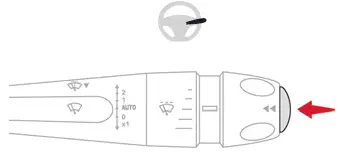
Citroen C4. Trip computer

► Pressing the button located on the end of the wiper control stalk displays the following tabs in turn:

- Current information:

  • Driving range (Petrol or Diesel).
  • Current consumption.
  • Stop & Start time counter (Petrol or Diesel).
  • Percentage of the current journey travelled in all-electric driving mode (Hybrid).

- Trips "1" then "2":

  • Average speed.
  • Average fuel consumption.
  • Distance travelled.

End of trip page

(Depending on version)

When the ignition is switched off, the instrument panel automatically displays an additional page of the trip computer that recapitulates information about the last trip.

The end of trip page contains the following information:

- Range.

- Trip time.

- Distance travelled.

- Percentage of the current journey travelled in all-electric driving mode (Hybrid).

- Average consumption.

Trip reset

► When the desired trip is displayed, press the button on the end of the wiper control stalk for more than 2 seconds.

Trips "1" and "2" are independent and are used in the same way.

Definitions

Range

(miles or km)

(Traction battery charge level percentage)

(Electric)

Distance that can still be travelled with the fuel remaining in the tank (based on the average fuel consumption over the last few miles (kilometres) travelled).

This value may vary following a change in driving style or terrain, leading to a significant change in current fuel consumption.

When the range falls below 19 miles (30 km), dashes are displayed.

After filling with at least 5 litres of fuel, the range is recalculated and is displayed if it exceeds 62 miles (100 km).

Dashes appearing permanently in place of numbers while driving indicates a malfunction.

Consult a CITROËN dealer or a qualified workshop.

Current consumption

(mpg or l/100 km or km/l)

(miles/kWh or kWh/100 km or km/kWh)

(Electric)

Calculated during the last few seconds.

This function is only displayed at speeds above 30 km/h (Petrol or Diesel).

Average consumption

(mpg or l/100 km or km/l)

(miles/kWh or kWh/100 km or km/kWh)

(Electric)

Calculated since the last trip computer reset.

Average speed

(mph or km/h)

Calculated since the last trip computer reset.

Distance travelled

(miles or km)

Calculated since the last trip computer reset.

Stop & Start time counter

(minutes/seconds or hours/minutes)

If your vehicle is fitted with the Stop & Start function, a time counter calculates the time spent in STOP mode during a journey.

The time counter is reset each time the ignition is switched on.