Traffic information
SETTING TMC MESSAGE FILTERING AND DISPLAY
TMC (Traffic Message Channel) messages are traffic and weather condition information, received in real time and passed on to the driver as voice announcements and visual information on the navigation map.
The guidance system may then suggest a diversion route.
1.  Press the TRAFFIC key.

 The list of TMC messages appears below the "Traffic" menu, sorted by proximity.
2.  Press the TRAFFIC button again or select the "Traffic" menu function and press the dial to confirm.


3.  Select the filter of your choice:
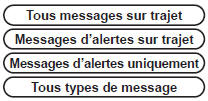
Messages appear on the map and in the list.
To exit, press ESC.

4.  Select the "Geographic filter" function and press the dial to confirm.


5.  Then select the filter radius (in km) required for your route and press the dial to confirm.
When all messages on the route are selected, it is recommended to add a geographic filter (within a radius of 5 km, for example) in order to reduce the number of messages displayed on the map. The geographic filter follows the movement of the vehicle.

! The filters are independent and their results are cumulative.
We recommend a filter on the route and a filter around the vehicle of:
- 3 km or 5 km for an area with dense traffic,
- 10 km for an area with normal traffic,
- 50 km for long journeys (motorway).
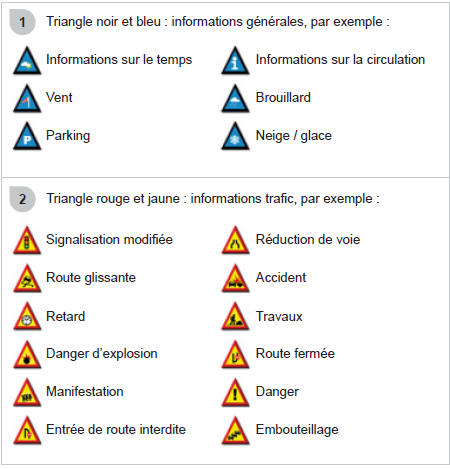
MAIN TMC SYMBOLS
LISTENING TO TA MESSAGES
!  the station broadcasts TA announcements.
 the station does not broadcast TA announcements.
 TA message broadcasting is not activated.
The TA (Traffic Announcement) function gives priority to TA alert messages. To be active, this function requires correct reception of a radio station broadcasting this type of message. As soon as a traffic message is broadcast, the current source (Radio, CD, ...) is automatically interrupted to play the TA message. Normal playback of the source resumes at the end of the message.
1.  When the media being played is displayed on screen, press the wheel.

2. The shortcut menu for the source appears and provides access to:

3.  Select Traffic information (TA) and press the wheel to confirm and access the corresponding settings.

Test yourself
A quick Citroen C5 Aircross quiz: every answer comes with an explanation and a link to the manual page.