USB port
USING THE USB PORT. Supported devices are available from the CITROËN network.
The list of compatible devices and compression rates
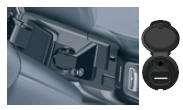
1. This box consists of a USB port and a Jack * socket. Audio files are transmitted from a portable device such as a digital player or a USB key to your car radio, to be played through the vehicle's speakers.

2. USB key (1.1, 1.2 and 2.0) or iPod ® 5th generation or later:
- USB keys must be formatted in FAT or FAT 32 (NTFS not supported),
- the iPod ® cable is essential,
- browsing the file database is done using the steering wheel controls,
- the iPod software must be updated regularly for a better connection.

3. Other iPod ® models from earlier generations and players using the MTP * protocol:
- playback only via Jack-Jack cable (not supplied),
- browsing the file database is done from the portable device.

CONNECTING A USB KEY
1.  Connect the key to the port, directly
or using a cable. If the car radio is on, the USB source is detected as soon as it is connected. Playback starts automatically after a time that depends on the capacity of the USB key.
Recognised file formats are .mp3 (MPEG1 layer 3 only), .wma (standard 9 only, 128 kbit/s compression), .wav and .ogg.
Accepted playlists are of type m3u, .pls, .wpl.
! The system creates playback lists (temporary memory), the creation time of which depends on the capacity of the USB device.
Other sources remain accessible during this time.
Playback lists are updated each time the ignition is switched off or a USB key is connected.
When connecting for the first time, the default sorting is by folder. When reconnecting, the previously selected sorting system is kept.* Depending on vehicle.
USING THE USB PORT2. Press and hold LIST to display the different sort modes.
Select by Folder / Artist / Genre / Playlist, press OK to select the chosen sorting, then press OK again to confirm.


- by Folder: all folders containing recognised audio files on the device, sorted alphabetically regardless of the folder tree structure.
- by Artist: all artist names defined in the ID3 tags, sorted alphabetically.
- by Genre: all genres defined in the ID3 tags.
- by Playlist: playlists saved on the USB device.

3.  Briefly press
LIST to display the previously selected sorting.
Browse the list using the left/right and up/down buttons.
Confirm the selection by pressing OK.

4.  Press one of these buttons
to go to the previous / next track in the list of the current sorting being played.
Press and hold one of the buttons for fast forward or rewind.

5.  Press one of these buttons
to go to the previous / next Genre, Folder, Artist or Playlist in the list of the current sorting being played.

CONNECTING AN iPOD ® VIA THE USB PORT
1. The available lists are Artist, Genre and Playlist (as defined in the iPod ®).
Selection and Browsing are described in steps 1 to 5 above.
! Do not connect a hard disk or USB devices other than audio equipment to the USB port. This may damage your system. USING THE AUXILIARY (AUX) JACK OR USB INPUT (depending on vehicle) The auxiliary input, JACK or
USB, allows connection of a portable device (MP3 player...). ! Do not connect the same device via the JACK and USB ports at the same time.
1. Connect the portable device (MP3 player...) to the JACK or USB port, using a suitable cable (not supplied).
2.  Press the SOURCE button repeatedly
and select AUX.

ADJUSTING THE AUXILIARY SOURCE VOLUME
1. First adjust the volume of your portable device.

2.  Then adjust the volume of your
car radio.

 The display and control of functions are done via the portable device.

Test yourself
A quick Citroen C5 quiz: every answer comes with an explanation and a link to the manual page.