Getting Started
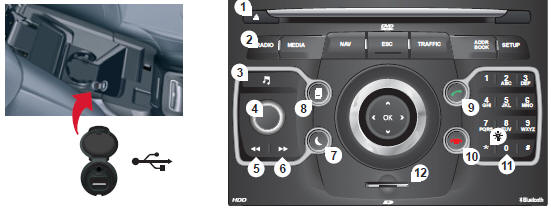
NaviDrive 3D front panel
 Short press: deletes the last
character.
 Long press: activates
voice recognition.
- Ejects the CD.
- RADIO: opens the "Radio" menu.
Displays the list of stations in alphabetical order (FM band) or by frequency (AM band).
MEDIA: opens the "Media" menu (audio CD, Jukebox, Auxiliary input).
Displays the list of tracks. Changes source.
NAV: opens the "Navigation" menu and displays the latest destinations.
ESC: cancels the current operation.
Long press: returns to the main display.
TRAFFIC: opens the "Traffic" menu (function described in sections 02 and 10).
ADDR BOOK: opens the "Address book" menu (function described in section 10).
SETUP: opens the "SETUP" (configuration) menu (function described in sections 02 and 10).
Long press: GPS coverage.
- Audio settings (Balance / Fader, Bass / Treble, Sound ambience...).
- Volume adjustment (each source is independent, including navigation messages and alerts). Long press: resets the system.
Short press: mutes the sound.
- Automatic radio search for a lower frequency.
Selects the previous CD or MP3 track.
- Automatic radio search for a higher frequency.
Selects the next CD or MP3 track.
- Normal display or blank screen.
- Cycles through the displays "MAP" / "NAV" (if navigation is in progress) / "PHONE" (if a call is in progress) / "RADIO" or "MEDIA" (while playing).
- ANSWER: opens the "Phone" menu.
Bluetooth connection, accepts an incoming call.
- HANG UP: opens the "Phone" menu.
Ends the current call or rejects an incoming call. Bluetooth connection.
- Enters numbers or letters on the alphanumeric keypad, presets 10 radio frequencies.
- SD card reader.
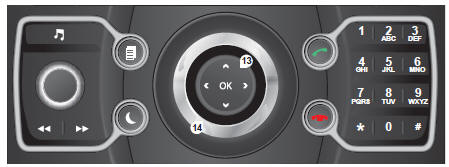
NaviDrive 3D selector
- OK: confirms the item highlighted on the screen.
- 4-way selector: press left / right.
With the "RADIO" display: selects the previous / next frequency.
With the "MEDIA" display: selects the previous / next track.
With the "MAP" or "NAV" display: moves the map horizontally.
- 4-way selector: press up / down.
With the "RADIO" display: selects the previous / next radio station in the list.
With the "MEDIA" display: selects the MP3 folder.
With the "MAP" or "NAV" display: moves the map vertically.
Goes to the next or previous page of a menu.
Moves around the on-screen virtual keyboard.
- Turning the ring:
With the "RADIO" display: selects the previous / next radio station in the list.
With the "MEDIA" display: selects the previous / next CD or MP3 track.
With the "MAP" or "NAV" display: zooms the map in / out.
Moves the menu selection cursor.
Test yourself
A quick Citroen C5 quiz: every answer comes with an explanation and a link to the manual page.