The external environment (hill, building, tunnel, car park, underground...) may disrupt reception, including in RDS tracking mode. This phenomenon is normal in the propagation of radio waves and in no way indicates a fault with the car radio.SELECTING A STATION
1. Press the RADIO key to display the list of locally received stations, sorted in alphabetical order. Select the desired station by turning the rotary control and press to confirm.
In radio mode, press the keys and for automatic search of the lower and higher frequency. When the “RADIO” screen is displayed, turn the rotary control or use the 4-direction selector to select the previous or next station in the list.
Press and hold one of the numeric keypad keys for more than 2 seconds to store the station being listened to. A beep confirms the storage.
Press the numeric keypad key to recall the stored radio station. RDS - REGIONAL MODE
1.
2. The shortcut menu for the radio source appears and provides access to the following shortcuts:
!Select the desired function and press OK to confirm in order to access the corresponding settings. ! If displayed, RDS allows you to keep listening to the same station thanks to frequency tracking. However, under certain conditions, tracking of this RDS station is not guaranteed across the whole country, as radio stations do not cover 100% of the territory. This explains the loss of reception of the station during a journey.
?
Test yourself
A quick Citroen C5 quiz: every answer comes with an explanation and a link to the manual page.
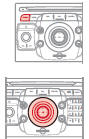
 In radio mode, press the
 and
 for automatic search of the lower and higher frequency.

 When the “RADIO” screen is


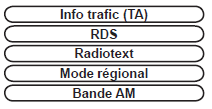
 Select the desired function

 Press the RADIO key to display the list of locally received stations, sorted in alphabetical order. Select the desired station by turning the rotary control and press to confirm.
 Press and hold one of the numeric keypad keys for more than 2 seconds to store the station being listened to. A beep confirms the storage.
