Making a call
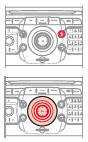
1.  To activate the Bluetooth phone
or the internal phone, press the PICK UP PHONE button.

2.  Select the "Telephone" menu,
then "Select phone", then choose between "None", "Bluetooth phone" or "Internal phone".
Press OK at each step to confirm.

! The system can only be connected to one Bluetooth phone and one SIM card (internal phone) at the same time.
In this case, the phone book is synchronised with the Bluetooth phone. CONNECTING A BLUETOOTH PHONE* Available phone services depend on the network, the SIM card and the compatibility of the Bluetooth devices used.
Check your phone's manual and with your operator for the services you have access to. A list of mobile phones offering the best deal is available from the network.
! For safety reasons, and because they require the driver's sustained attention, pairing the Bluetooth mobile phone with the NaviDrive 3D hands-free kit must be carried out with the vehicle stationary and the ignition on.1. Activate the Bluetooth function on the phone.
The last connected phone reconnects automatically.

2.  Press the TEL key.

3.  When no phone is connected,
the system offers "Connect a phone".
Select "Yes" and press OK to confirm.

 The list of previously
connected phones (4 maximum) is displayed on the multifunction screen. Select the chosen phone then select "Connect a phone" for a new connection. Select "Delete phone" to cancel the connection to the phone.
4.  For a first connection, select
"Search for a phone" and press OK to confirm. Then select the phone name.


5.  Enter the authentication code
on the phone. The code to enter is shown on the screen.

! Once the phone is connected, the NaviDrive 3D can synchronise the address book and call log. This synchronisation may take a few minutes *.

 To change the connected phone,
press the TEL key, then select the "Telephone" menu, then "Select phone", then "Connect Bluetooth phone", then select the desired phone or "Search for a phone".
Press OK at each step to confirm.
USING THE INTERNAL PHONE WITH A SIM CARD If you have declined to use the internal phone for personal calls, you can still connect a Bluetooth phone to receive your calls through the vehicle's audio system.
1.  Remove the tray by pressing
the eject button.

2. 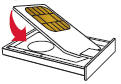
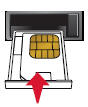
Install the SIM card in the tray, then insert the tray into the slot.
3. To remove the SIM card, follow step 1.
! For safety reasons, and because they require the driver's sustained attention, SIM card installation must be carried out with the vehicle stationary.4.  Enter the PIN code on the keypad,
then select OK and confirm.


 When entering your PIN
code, tick the "PIN code memo" tab to access the phone without having to enter this code at your next use.
5.  The system asks "Use the internal phone
for voice calls?". Select "Yes" if you want to use your SIM card for personal calls.
Otherwise, only emergency calls and services will use the SIM card.

 Once the SIM card is installed,
the system can synchronise the phonebook and call log.
1. An incoming call is announced by a ring tone and an overlay message on the screen.
2.  Select the
"Yes" tab to accept or "No" to reject, then confirm by pressing OK.


 The ANSWER TEL key accepts,
the END TEL key rejects the incoming call.
3.  To end the call, press
the END TEL key, or press OK, select "End call" and confirm by pressing OK.


 Press the TEL key on the steering
wheel controls to accept the call or end the current call.
MAKING A CALL
4.  Press the ANSWER
TEL key.

 The list of the last 20 calls
made and received from the vehicle appears below the "Telephone" menu. You can select a number and press OK to start the call.
5.  Select the
"Telephone" menu function and press OK to confirm.


6.  Select "Dial", then
enter the phone number using the virtual keypad.


 A number can also be chosen from
the address book. You can select "Call from address book". The NaviDrive 3D can store up to 4096 entries.
Test yourself
A quick Citroen C5 quiz: every answer comes with an explanation and a link to the manual page.