Speed limiter function
The speed limiter is a function that helps the driver not to exceed a selected driving speed called the limited speed.
Controls
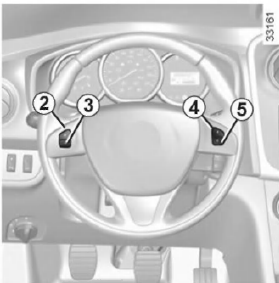
- Main switch: On/Off.
- Activating the function, storing the limited speed in memory and increasing the limited speed (+).
- Decreasing the limited speed
- Activating the function and recalling the limited speed stored in memory (R).
- Switching the function to standby mode (with the limited speed stored in memory) (O).
Activating the function
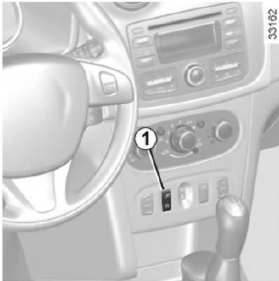
Press switch 1 on the side .
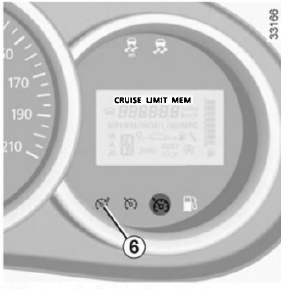
Warning lamp 6 lights up orange and the "LIMIT" message appears on the instrument panel with dashes, indicating that the speed limiter function is active and the system is waiting for the limited speed to be stored.
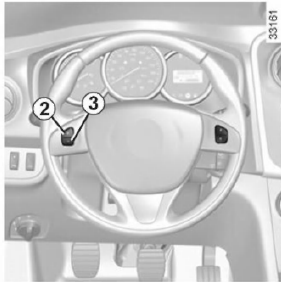
To store the current speed, press switch 2 (+): the dashes are replaced by the limited speed value.
The minimum speed that can be stored is 30 km/h.
Driving the vehicle
When a limited speed is stored in memory, the vehicle is driven in the same way as a vehicle without a speed limiter until the stored speed is reached.
Once the vehicle reaches the stored speed, pressing the accelerator pedal will not allow the programmed speed to be exceeded, except in special situations (see the section "Exceeding the limited speed").
Changing the stored limited speed
The limited speed can be changed by repeatedly pressing:
- switch 2 (+) to increase the speed;
- switch 3 (-) to decrease the speed.
Exceeding the limited speed
The limited speed can be exceeded at any time. To do so, press the accelerator pedal firmly and fully past the detent point (kickdown point).
Throughout the time the speed is exceeded, the set speed value flashes on the instrument panel.
Then release the accelerator pedal: the speed limiter function becomes active again when the vehicle starts to travel below the stored speed value.
Unable to maintain the selected speed limit
When descending a long steep hill, the system cannot maintain the speed limit at the set level: the stored speed information flashes on the instrument panel to alert the driver.
Switching the function to standby
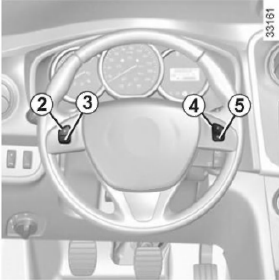
Operation of the speed limiter function is suspended when switch 5 (O) is pressed. In this case, the speed limit is stored in memory and the message "MEM" and the stored speed value appear on the instrument panel.
Recalling the speed limit
Once the speed has been stored in memory, it can be recalled by pressing switch 4 (R).
When the limiter is in standby mode, pressing switch 2 (+) reactivates the function without taking into account the speed stored in memory: in this case, the set speed is the speed at which the vehicle is currently travelling.Switching off the function
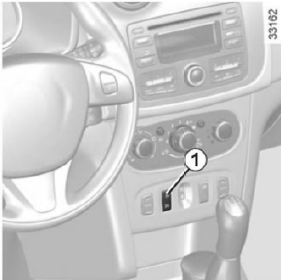
The speed limiter function is cancelled when switch 1 is pressed, which clears the stored speed. The orange indicator lamp (o) on the instrument panel going out confirms that the function is switched off.
Test yourself
A quick Dacia Sandero / Logan quiz: every answer comes with an explanation and a link to the manual page.