Cruise control function

Cruise control is a function that helps the driver maintain driving speed at a constant selected value, called the set speed.
The set speed can be adjusted continuously, starting from 30 km/h.
The cruise control function has no effect on the braking system. This function is an additional driving aid. It does not replace the driver. It must therefore never be used to exceed speed limits, reduce the driver's alertness (who must always be ready to brake in any circumstances), or relieve the driver of responsibility. The cruise control function should not be used in heavy traffic, on winding or slippery roads (black ice, aquaplaning, gravel), or in adverse weather conditions (fog, precipitation, crosswind...). Risk of accident.Controls
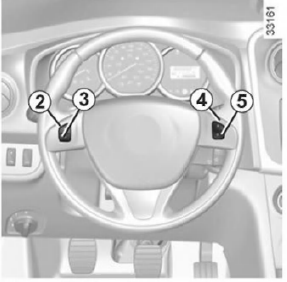
- Main switch: On/Off.
- Switching on the function, storing the speed in memory and increasing the set speed (+).
- Decreasing the set speed (-).
- Switching on the function and recalling the stored set speed (R).
- Switching the function to standby (storing the set speed in memory) (O).
Activating the function

Press switch 1 on the side .
Indicator lamp 6 lights up green and the message "CRUISE" appears on the instrument panel with dashes, showing that the cruise control function is operating and that the system is waiting for the set speed to be registered
Setting the speed

At a steady speed (above approximately 30 km/h), press button 2 (+): the function is switched on and the current speed is stored in memory.
The set speed value replaces the dashes, and the regulation is confirmed by the message "CRUISE" appearing and indicator lamp 6 lighting up
green, in addition to lamp 7 .
Driving the vehicle
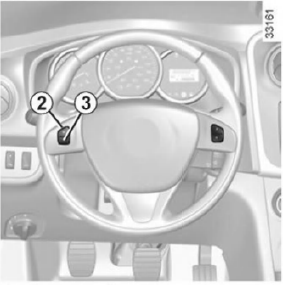
Once the set speed is stored and the cruise control function is operating, you can take your foot off the accelerator pedal.
Note: however, we recommend keeping your feet near the pedals so that you can press them in the event of a sudden situation.Changing the set speed
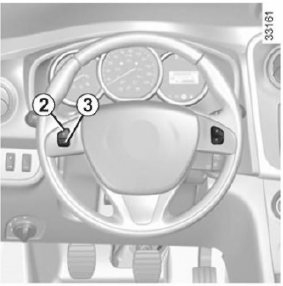
The set speed can be changed by repeatedly pressing:
- switch 2 (+) to increase the speed,
- switch 3 (-) to decrease the speed.
Exceeding the set speed
It is possible to exceed the set speed at any time by pressing the accelerator pedal. Throughout the time the speed is exceeded, the set value flashes on the instrument panel.
Then release the accelerator pedal: after a few seconds, the vehicle automatically returns to the original set speed.
Unable to maintain the set speed
When descending a long steep hill, the system cannot maintain the set speed at the selected level: the stored speed information flashes on the instrument panel to alert the driver.
Switching the function to standby
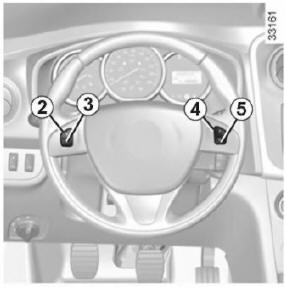
Operation of the function is suspended when you press:
- switch 5 (O);
- the brake pedal;
- the clutch pedal.
In these three cases, the set speed remains stored in memory and the message "MEM" appears on the instrument panel.
The switch to standby is confirmed when indicator lamp goes out .
Recalling the set speed
Once the speed has been stored in memory, it can be recalled after making sure it is suitable for the traffic conditions (traffic density, road surface, weather conditions, etc.).
Press switch 4 (R) if the vehicle speed is above 30 km/h.
When recalling the stored speed, activation of the cruise control is confirmed by the indicator lamp lighting up .
Note: if the previously stored speed is much higher than the current speed, the vehicle will accelerate strongly until the set speed is reached.
When cruise control is in standby mode, pressing switch 2 (+) reactivates the function without regard to the speed stored in memory: in this case, the set speed is the speed at which the vehicle is currently travelling.Switching off the function
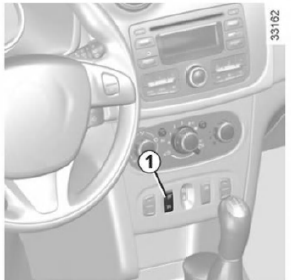
The cruise control function is switched off when switch 1 is pressed, which clears the stored speed.
Green indicator lamps go out and
 on the instrument panel confirms
that the function is switched off.
Test yourself
A quick Dacia Sandero / Logan quiz: every answer comes with an explanation and a link to the manual page.