Starting the Gasoline Engine
When the engine starts, the idle speed increases. This helps warm up the engine. If the engine idle speed does not decrease automatically, have your vehicle checked by an authorized dealer.
Before starting the vehicle, check the following:
- Make sure all passengers have fastened their seat belts.
- Make sure the headlamps and electrical accessories are off.
- Make sure the parking brake is applied.
- Make sure the transmission is in Park (P).
Starting Your Vehicle
- Fully depress the brake pedal.
- Press the ignition switch.
Unable to Start
The system does not operate if:
- The key frequencies are congested.
- The key battery is discharged.
If you cannot start the vehicle, do the following:
- Remove the flat key from the transmitter.
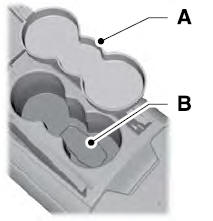
- Remove the rubber cover (A) from the cup holder. With the buttons facing up and the unlock button facing the front of the vehicle, insert the first Intelligent Access key into the backup slot (B).
- Press the ignition switch.
If you cannot start the engine after three attempts, wait 10 seconds and follow this procedure:
- Apply the parking brake.
- Fully depress the brake pedal.
- Shift into Park (P).
- Fully press the accelerator pedal.
- Briefly press the engine start/stop button.
Quick Restart
The quick restart feature allows you to restart the vehicle within 20 seconds of switching it off, even if it does not detect a valid passive key.
Within 20 seconds of switching the engine off, press the brake pedal and press the ignition button. After 20 seconds, you can no longer start the vehicle if it does not detect a valid passive key.
Once your vehicle is started, it keeps running until you press the ignition switch, even if your vehicle does not detect a valid Intelligent Access key. If you open and close a door while the vehicle is moving, the system searches for a valid Intelligent Access key. After 20 seconds, the vehicle cannot be restarted if it does not detect a valid Intelligent Access key.
Automatic Engine Shutdown
This feature automatically shuts off your vehicle if it has been idling for an extended period. The ignition is also turned off to conserve battery charge. Before your vehicle shuts off, a message appears in the information display with a countdown timer. If you do not intervene within 30 seconds, your vehicle shuts down. Another message appears in the information display to tell you that your vehicle has been stopped to conserve fuel. Start your vehicle normally.
Automatic Engine Shutdown Override
You can stop the shutdown or reset the timer at any time before the 30-second countdown expires by doing any of the following:
- Interacting with your vehicle, for example, pressing the brake or accelerator pedal.
- You can temporarily disable Auto-Off each time the ignition is turned on using the information display.
During the countdown to shutdown, you will be prompted to press OK or RESET (depending on your information display type) to temporarily disable this feature (for the current ignition cycle only).
Stopping the Engine When the Vehicle Is Stationary
- Apply the parking brake.
- Shift into Park (P).
- Briefly press the engine start/stop button.
Stopping the Engine While the Vehicle Is Moving
- Shift into Neutral and use the brakes to bring the vehicle to a safe stop.
- When your vehicle has stopped, shift to Park (P).
- Apply the parking brake.
- Press and hold the ignition switch or press it three times within two seconds.
Exhaust Gas Protection
Important Ventilation Information
If you stop your vehicle and then leave the engine idling for an extended period, we recommend you do one of the following:
- Open the windows at least 1 inch (3 cm).
- Set the climate control to outside air.
Test yourself
A quick Ford Fusion quiz: every answer comes with an explanation and a link to the manual page.