Playing a multi-session disc
When the first track of the first session is CD audio data only, the CD audio data of the first session is played. Non-audio CD data and MP3 or WMA file information (such as track number and time) are displayed without sound.
When the first track of the first session is not CD audio data:- If the disc contains MP3 or WMA files, the system skips these files and other types of data. CD audio data is not recognized.
- If the disc does not contain MP3 or WMA files, nothing is played. CD audio data is not recognized.
The playback order of folders and files is as follows.
Note: The system skips any folder that does not contain an MP3 or WMA file.To set the desired playback order, put a number (for example, 01 or 02) before the folder or file name, then burn the contents to a disc. The order differs depending on the writing software.
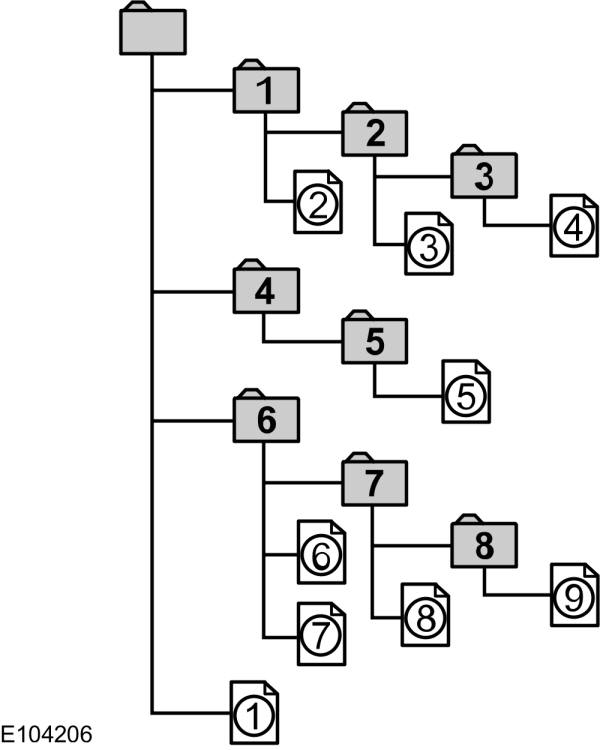
The following occurs when playing an MP3 or WMA file that contains a tag:
- When part of the tag (at the beginning of the track) is skipped, no sound is output. The skip time varies depending on the tag size. Example: at 64 kbytes, it is about 2 seconds (with RealJukebox).
- The elapsed playing time shown when part of the tag is skipped is inaccurate. For MP3 files with a bit rate other than 128 kbps, the time is not displayed accurately during playback.
- When an MP3 file is created with specific conversion software (such as RealJukebox, a registered trademark of RealNetworks Inc.), the tag is generated automatically.
MP3 tracks can be recorded on a CD in several ways. They can be placed in the root directory like any audio CD, or in folders representing categories, such as album, artist or genre.
The normal playback sequence for CDs with multiple folders is:- First, the tracks in the root folder (top level) are played.
- Next, the tracks in the subfolders of the root folder are played.
- Finally, the system moves on to the second folder, and so on.
- Press the up or down arrow keys to access the track list.
- Navigate the folder structure using the arrow keys to select another folder or track (file).
- Press OK to select the highlighted track.
When an MP3 or WMA disc is playing, some encoded information may appear for each track. This information normally includes:
- File name.
- Folder name.
- ID3 information, which may be the album or artist name.
Note: If the selected ID3 information is not available, NO MP3 or NO WMA TAG appears on the display.
CD text display optionsWhen an audio CD with CD text is playing, limited information encoded on each track may be displayed. This information typically includes:
- Disc name.
- Artist name.
- Track name.
Compact Disc playback interruption
To restore radio reception, press RADIO.Note: CD not ejected. The disc pauses at the point where radio reception was restored.
To resume CD playback, press CD again.Test yourself
A quick Ford Ka quiz: every answer comes with an explanation and a link to the manual page.