Reversing camera
WARNINGS
- The rear view camera is an additional reversing aid; the driver must use it together with the interior and exterior mirrors to benefit from the maximum field of view.
- Objects located near the corners of the bumper or below the bumper may not be visible on the screen due to the limited field of view of the camera.
- Reverse as slowly as possible: high speed may limit your reaction time if you need to stop the vehicle.
- Exercise caution when using the rear view camera with the luggage compartment door open. If the luggage compartment door is open, the camera is not correctly positioned and the image may be distorted. All guidelines disappear when the luggage compartment door is open.
- Exercise caution when switching the camera functions on or off.
The rear view camera provides a video image of the area behind the vehicle.
During use, lines showing the vehicle's path and the distance to objects behind the vehicle are displayed on the screen.
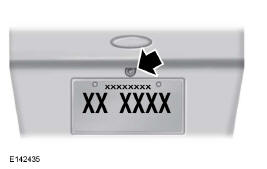
The camera is located in the luggage compartment door.
Using the rear view camera
The rear view camera system displays what is behind the vehicle when you select reverse (R).
Note: The reverse detection system does not operate when the speed is above 5 km/h and may not detect certain moving obstacles or obstacles located in the corners.
The system uses three types of guidelines to help you see what is behind the vehicle:
- Active guidelines: show the predicted path of the vehicle when reversing.
- Fixed guidelines: show the actual path of the vehicle when reversing in a straight line. This feature is useful when reversing into a parking space or aligning the vehicle with another object behind you.
- Centre line: helps you align the centre of the vehicle with an object (for example, a trailer).
Note: if reverse (R) is selected and the luggage compartment door or tailgate is open, none of the rear view camera features are displayed. Note: if your vehicle is towing a trailer, the camera can only film what you are towing. The camera's field of view may therefore be limited compared with normal operation, and some objects may not be detected. On some vehicles, the guidelines may disappear when you connect the trailer connector.
Correct operation of the camera may be compromised in the following cases:
- In complete darkness or in dark areas if one or both reversing lights are not working.
- When mud, water or debris obstructs the camera's field of view. Clean the lens with a soft, lint-free cloth and a non-abrasive cleaning product.
- The rear of the vehicle has been subject to an impact or damage and the camera alignment is incorrect.
Camera guidelines
Note: active guidelines are only available when reverse (R) is selected.
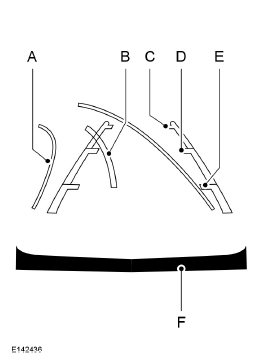
- Active guidelines
- Centre line
- Fixed guidelines: green zone
- Fixed guidelines: yellow zone
- Fixed guidelines: red zone
- Rear bumper
Active guidelines are only displayed together with the fixed guidelines. To use the active guidelines, turn the steering wheel to steer the guidelines towards the desired path. If you change the steering wheel position while reversing, the vehicle may deviate from the originally intended path.
Fixed and active guidelines appear and disappear depending on the steering wheel position. Active guidelines are not displayed when the steering wheel is straight.
Always reverse with caution. Obstacles in the red zone are closest to the vehicle, and those in the green zone are furthest away.
When obstacles move from the green zone into the yellow or red zone, it means they are getting closer to the vehicle. Use the exterior mirrors and the interior mirror to get a better view of what is at the sides and rear of your vehicle.
Manual zoom
WARNING
When manual zoom is activated, the screen may not show the entire area behind the vehicle.
Be aware of the surroundings of the vehicle when using manual zoom.
Note: Manual zoom is only available when reverse (R) is selected. Note: when you activate manual zoom, only the centre line is displayed on the screen.
Two settings are available for this feature: Zoom in (+) and Zoom out (-). Press the corresponding symbol on the camera screen to change the view. Zoom is deactivated by default.
This feature gives you a more detailed view of an obstacle behind the vehicle. For reference, the bumper is visible in the close-up view. The zoom is active only when reverse (R) is engaged.
Rear View Camera System Settings
To access the rear view camera settings, select the following on the multifunction display when reverse (R) is not engaged:
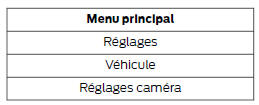
Enhanced Park Aid or Park Pilot
This feature can be turned on or off (ON and OFF settings).
When one of the detection systems detects an object, a red, yellow or green alert appears superimposed on the video.
Rear View Camera Delay
This feature can be turned on or off (ON and OFF settings).
The rear view camera delay is turned off by default.
When you leave reverse (R) and select a gear other than park (P), the camera image remains on the screen until:
- the vehicle speed is sufficient;
- the gear selector is in park (P);
- a time of 10 seconds has elapsed.
Test yourself
A quick Ford Mondeo quiz: every answer comes with an explanation and a link to the manual page.