Active Park Assist
Parallel parking, perpendicular parking and parking exit assist
WARNINGS
- You must remain in the vehicle when the system is activated. You are responsible for controlling your vehicle and managing the system at all times, and must intervene when necessary. Failure to follow these instructions may result in loss of control of your vehicle and serious or fatal injury.
- The sensors may not detect objects in heavy rain or in other conditions that may produce disruptive reflections.
The system scans the adjacent area on both sides of the vehicle to locate a suitable parking space.
The system informs you when it has located a suitable parking space.
When you stop your vehicle, the system takes control of the steering to guide the vehicle into the parking space.
Parking exit assist automatically steers your vehicle out of a parallel parking space (hands-free) while you control acceleration, gear changes and braking. The system gives visual and audible instructions to help you merge into traffic.
The system may not operate correctly in the following conditions:
- You are using a spare wheel, or a tyre is more worn than the other tyres.
- You are using a tyre of a size not recommended by Ford.
- You are attempting to park at a tight bend.
- The edge of a nearby parked vehicle is well above ground (for example, a bus, a tow truck or a flatbed truck).
- Weather conditions are unfavourable (heavy rain, snow, fog, etc.).
Note: the sensors, located on the bumper or the trim, must be free of snow, ice and heavy dust build-up. If the sensors are covered, the accuracy of the system may be affected. Do not clean the sensors with sharp objects.
Do not use the system if:
- you have attached a foreign object (a bicycle carrier or a trailer) to the front or rear of your vehicle, or near the sensors;
- you have attached an object that extends above the roof (a surfboard);
- a foreign object damages or obstructs the front or rear bumper, or the side sensors;
- you are not using a tyre size appropriate for your vehicle (for example, using a small spare wheel).
Using Active Park Assist - Parallel parking
 Press once on
the button located on the centre console near the gear selector lever.
If your vehicle's speed is below 30 km/h, the system automatically scans both sides of your vehicle to detect an available parking space. The system displays a message and a corresponding graphic to indicate that it is searching for a parking space.
Use the turn signals to select either the left or the right side of your vehicle.
Note: If you make no selection, the system defaults to parking assist on the passenger side of the vehicle.
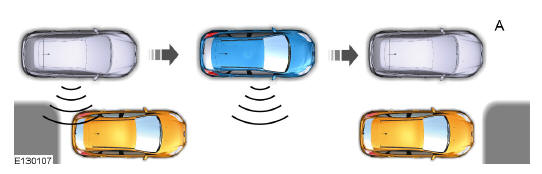
When the system finds a suitable space, it displays a message and an audible signal sounds. Stop your vehicle and follow the instructions shown on the screen. If your vehicle is moving very slowly, you may need to move forward slightly before the system is ready to park.
Note: You must make sure that the selected space remains clear at all times during the entire maneuver. Note: Active parking assist may not detect street furniture and other objects. Make sure that the selected space is suitable for parking your vehicle. Note: When searching for a parking space, drive your vehicle as parallel as possible to the other vehicles. Note: The system always offers the last parking space detected (for example, if your vehicle detects several spaces, the system offers the last space found). Note: If the vehicle speed is above approximately 35 km/h, the system displays a message asking you to slow down.
Automatic steering into the parking space
Note: If the vehicle speed is above 9 km/h, or if an object interrupts a maneuver, the automatic steering function is deactivated and you must take back control of your vehicle.
When you place the transmission in reverse (R) and your hands are not on the steering wheel (and nothing is obstructing movement), your vehicle steers itself into the parking space. The system displays instructions to help you position your vehicle correctly in the parking space.
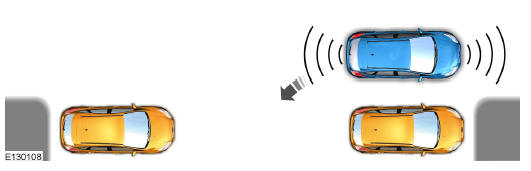
As soon as you judge that your vehicle is correctly parked, or when the parking assist system emits a continuous audible signal (in addition to the display of a message and an audible signal), bring your vehicle to a complete stop.
Once automatic steering is complete, the system displays a message and an audible signal sounds to indicate that the active parking assist process has finished. It is your responsibility to check the parking position of your vehicle and make any necessary adjustments before leaving the vehicle.
Using active parking assist - Perpendicular parking
 Press twice
the button located on the center console near the gear selector lever.
The system displays a message and a corresponding graphic to indicate that it is searching for a parking space. Use the turn signals to select either the left or the right side of your vehicle.
Note: If you make no selection, the system defaults to parking assist on the passenger side of the vehicle.
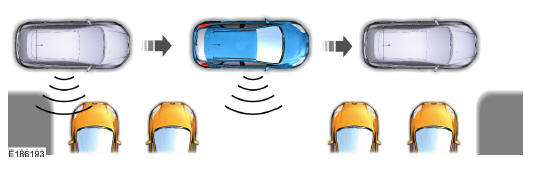
When the system finds a suitable space, it displays a message and an audible signal sounds. Stop your vehicle and follow the instructions shown on the screen. If your vehicle is moving very slowly, you may need to move forward slightly before the system is ready to park.
Note: You must make sure that the selected space remains clear at all times during the entire maneuver. Note: When searching for a parking space, drive your vehicle as perpendicular as possible to the other vehicles. Note: The system always offers the last parking space detected (for example, if your vehicle detects several spaces, the system offers the last space found). Note: If the vehicle speed is above approximately 30 km/h, the system displays a message asking you to slow down.
Automatic steering into the parking space
Note: If the vehicle speed is above 9 km/h, or if an object interrupts a maneuver, the automatic steering function is deactivated and you must take back control of your vehicle.
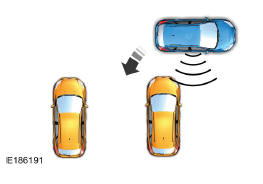
When you place the transmission in reverse (R) and your hands are not on the steering wheel (and nothing is obstructing movement), your vehicle steers itself into the parking space. The system displays instructions to help you position your vehicle correctly in the parking space.
As soon as you judge that your vehicle is correctly parked, or when the parking assist system emits a continuous audible signal (in addition to the display of a message and an audible signal), bring your vehicle to a complete stop.
Once automatic steering is complete, the system displays a message and an audible signal sounds to indicate that the active parking assist process has finished. It is your responsibility to check the parking position of your vehicle and make any necessary adjustments before leaving the vehicle.
Using active parking assist - Parking exit assist
 When your
vehicle is stopped in a parallel parking space, press the active parking assist button.
The system displays a message asking you to indicate a direction.
Use the turn signal to indicate which side of your vehicle you want to exit the parking space from.
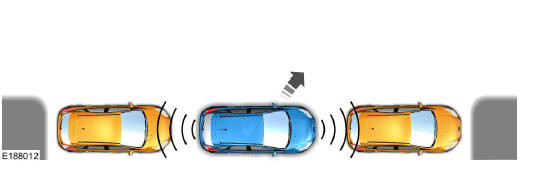
The system determines the available space in front of and behind your vehicle and automatically steers your vehicle out of the parallel parking space (hands-free) while you control acceleration, gear changes and braking. The system gives you visual and audible instructions to help you merge into traffic.
Once your vehicle has passed the nearby vehicle or object, the system helps you take back steering control to finish leaving the parking space.
Note: If the space in front of your vehicle allows an easy exit, parking exit assist may not be available.
Deactivating active parking assist
You can deactivate the system manually by:
- pressing the active parking assist button twice;
- placing your hands on the steering wheel during the maneuver and taking control;
- driving faster than approximately 35 km/h for 30 seconds during an active parking search;
- driving faster than 9 km/h during automatic steering.
- Deactivating the traction control system.
The system may also be deactivated when:
- The traction control system is activated.
- The anti-lock braking system is activated or faulty.
If there is a problem with the system, a warning message is displayed and a warning tone sounds. Under normal conditions, messages relating to the system may occasionally appear. If the system repeatedly or frequently generates errors, contact an authorized dealer to have your vehicle serviced.
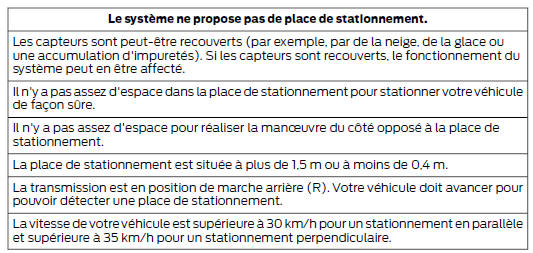
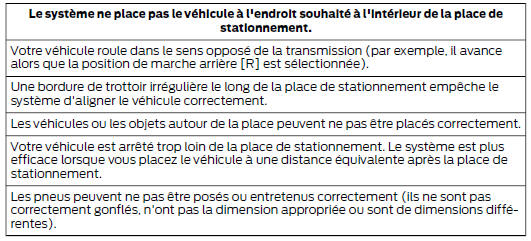
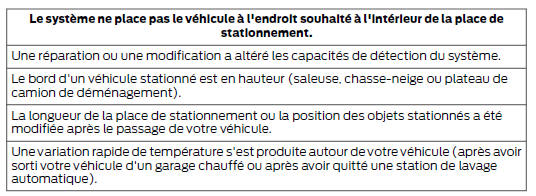
System diagnosis

Test yourself
A quick Ford Mondeo quiz: every answer comes with an explanation and a link to the manual page.