Second generation (2007-2026)
Deleting a Paired Phone
In this manual: Second generation (2007-2026)
~1min read
 PHONE button
► Phone Setup ► Add/Select a phone
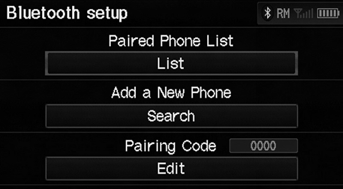
1. Select List under Paired Phone List. 2. Select a phone to delete.
► The Bluetooth® icon indicates the currently linked phone.
When you transfer the vehicle to a third party, delete all paired phones.
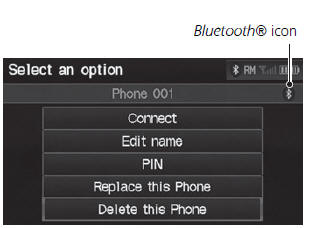
3. Select Delete this Phone.
4. Select Yes.
Test yourself
A quick Honda Fit quiz: every answer comes with an explanation and a link to the manual page.
Was this page helpful?